
Affiliate Disclosure: Some links on this page are affiliate links. As an Amazon Associate, we earn from qualifying purchases — at no extra cost to you. We do not buy, install, or physically handle the cameras we cover; our rankings come from aggregated owner reviews, ratings and expert consensus. Commissions never change our verdicts. We're reader-supported: commissions fund hosting, research and updates, so if a guide helped, buying through our links keeps it going. How we rank · full disclosure.
Short version: an NVR system is the answer for anyone who wants a continuous, searchable history of their property rather than a handful of cloud clips, and who would rather own their footage than rent access to it. You buy a recorder with a hard drive, wire cameras to it, and pay nothing per month for as long as you own it. The cost is up-front money and a real installation.
How we work: we do not buy, install or physically handle these systems. Rankings come from aggregated owner reviews, star ratings weighted by review volume, and the complaints that repeat at scale. Full method on how we rank. For specific kits, start with best security camera systems, or the best PoE security camera systems for most homes if camera coverage rather than the recorder is what you are shopping for.
In Plain English
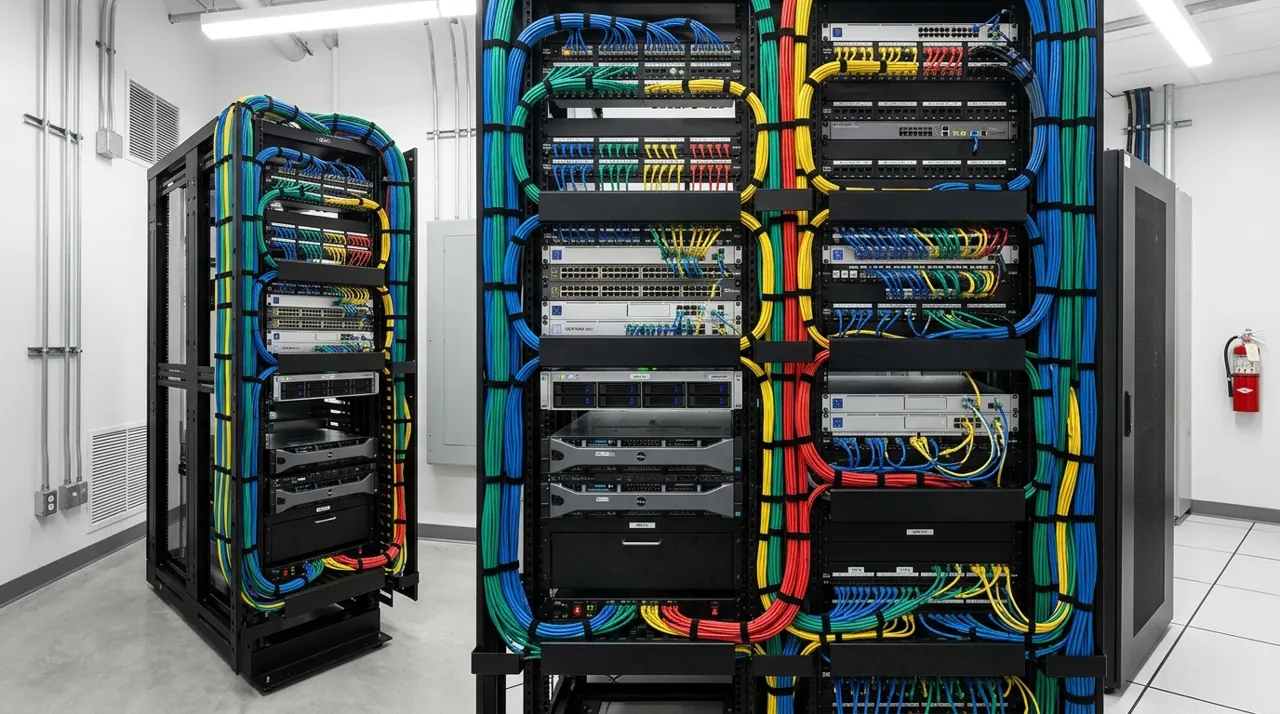
An NVR (network video recorder) is a box that sits somewhere in your house with a hard drive inside, a bit like a video recorder for your security cameras. Each camera connects to it with one network cable. That single cable carries both power and video, a trick called PoE (Power over Ethernet), so nothing needs charging and nothing depends on WiFi.
The box records everything, all day, and lets you scroll back through one timeline for every camera. When the drive fills up, it quietly records over the oldest footage.
Why it matters: you own your footage and pay nothing per month, and the storage subscription you avoid would usually add up to more than the system cost over five years. The trade-off is effort up front, because running a cable to each camera is real work.
The one thing to look for: a recorder with more channels (camera slots) than the cameras you are buying today. Almost everyone adds a camera later, and spare channels make that cheap.
Best NVR Camera System for Home: Our Recommended Pick

The REOLINK RLK8-410B4 carries the largest review base of any complete NVR system tracked on this site, pairing four 5MP (2K+) bullet cameras, per Reolink’s current spec sheet, with an 8-channel PoE NVR and a 2TB HDD for 24/7 local recording. Person and vehicle detection cuts false alerts. There is no subscription at any point. Owners consistently cite it as the honest starting point for a first NVR system.
Why You Should Get This
If you want a complete, well-evidenced NVR system with real headroom to expand, this is the starting point.
| Camera resolution | 4MP Super HD (2560x1440), 4 bullet cameras |
| NVR | 8-channel PoE NVR |
| Storage | 2TB HDD pre-installed, 24/7 recording |
| Connectivity | PoE, single cable per camera |
| Detection | Person and vehicle detection |
| Night vision | Infrared, up to 30m range |
Benefits
- Largest review base of any complete NVR system tracked on this site.
- 2TB HDD pre-installed, 24/7 continuous recording.
- No subscription at any point.
Pros and Cons
- Deep, trustworthy review base.
- True 24/7 recording, not event clips only.
- Expandable, 8 channels for 4 cameras.
- 5MP rather than 4K resolution.
- Real installation project running cable.
- Higher upfront cost than a single camera.
Features
- 5MP (2K+) bullet cameras.
- 8-channel PoE NVR.
- 2TB HDD pre-installed.
What an NVR Actually Does
The direct answer: it records everything, all the time, to a hard drive inside your house, and gives you one timeline to search across every camera. That is the whole proposition, and it is a fundamentally different product from a cloud camera that saves thirty-second clips when something moves.
The practical difference shows up when you actually need footage. With clip-based cloud recording you get what the detection algorithm decided was worth keeping. With continuous NVR recording you get the four minutes before the event, which is frequently where the useful information is — the car that circled the block twice, the person who walked past three times first. Owners who have used both describe this as the thing they did not expect to care about and then cared about a great deal.
A modern NVR also powers the cameras. Most home kits are an NVR PoE camera system built around the recorder, so one Ethernet cable per camera carries both electricity and video back to the box. Nothing needs charging, nothing uses WiFi, and the recorder sits safely indoors where a stolen camera does not take the footage with it.
Types of NVR Camera System: Bundled Kit, Camera Kit and Build-Your-Own
There are three ways to buy into a network video recorder setup, and the right one depends on how much of the decision you want made for you.
- A bundled PoE NVR kit. Recorder, drive, cameras and cable in one box. Reolink, Amcrest, Annke, Lorex and Swann all sell these, and they are what most owners should buy — everything is guaranteed to talk to everything else, and the storage capacity is stated on the box.
- A camera kit added to a recorder you already own. Cheaper per angle, and the normal way to expand from four cameras to six, provided the cameras are from the same manufacturer.
- A build-your-own system. A standalone recorder, a PoE switch and individually chosen cameras. More control over resolution and lens choice per angle, more research required, and the ONVIF compatibility claims on the box are not always complete.
Channels: Buy More Than You Need
Channel count is the number of cameras a recorder can accept, and it is the specification buyers most often get wrong. Almost nobody stops at their original camera count. The fifth camera should cost an entry-level amount, not a system-replacement amount.
The practical mapping: most houses need four cameras — front door, driveway, back door, and whichever side has a gate or low fence. Six is the point at which owners stop finding new blind spots. So an 8-channel recorder is the sensible default for a house, leaving two to four spare channels for the additions you have not thought of yet. A property with outbuildings, a shop or a long driveway wants a 16-channel recorder, which is the only configuration that still has room after the property changes.
One caveat worth repeating because it disappoints people regularly: these ecosystems are largely closed. A recorder from one manufacturer generally will not reliably accept another manufacturer’s cameras — ONVIF support helps at the margins, but compatibility is not guaranteed — and no consumer WiFi camera from the big cloud brands will ever appear on it. Pick the ecosystem before you buy into either half of it.
Hard Drive Math, Done Honestly
This is the single most common surprise in the category. Buyers see "2TB included" and imagine months of history. The real figure is roughly a week to ten days of continuous recording from four cameras. At a typical default of about 6 Mbps per camera, each camera writes around 66GB a day, so four cameras fill 2TB in about seven to eight days — in line with Reolink’s own estimate of roughly eight days for a four-camera kit at default settings. Cameras set to higher bitrates, as 4K models often are, shorten that further, and eight cameras halve it again.
Nothing breaks when the drive fills — the recorder overwrites the oldest footage and keeps going, so what you have is a rolling window rather than an archive. The question is only how wide you want that window. Three levers control it:
- Drive size. Doubling to 4TB roughly doubles retention. Check the recorder’s maximum supported drive size before buying one, and use a surveillance-rated drive designed for continuous writing rather than a desktop drive.
- Encoding. H.265 roughly halves the storage load compared with H.264 — half the bit rate was the ITU’s stated goal for the standard. Every current system supports it; not every system ships with it enabled.
- Selective recording. What experienced owners actually do — leave the front door and driveway recording continuously, and set the fence-line channels to motion-triggered. This often triples effective retention on the channels that matter.
Resolution is part of the same decision. 5MP is a strong middle ground and is what our highest-rated kits use. Reserve 4K for the one or two angles where identifying a face or a plate is the actual goal, and accept the storage cost there rather than everywhere.
Continuous Recording, Motion Recording and Playback
Every recorder offers both modes per channel, and mixing them is what experienced owners do. Continuous recording writes 24/7 and gives you the minutes either side of an event. Motion recording only writes when something moves, which stretches a drive a long way but leaves gaps you cannot go back and fill.
Playback is where the difference becomes obvious. A good recorder gives you a scrubbable timeline with coloured bars for motion events across all channels at once, so finding 3:40am on the driveway takes seconds. Clip-based cloud apps make you open thirty separate videos to do the same job. Check before buying that the desktop or phone app supports timeline playback and clip export in a normal video format — a few budget recorders will only export in a proprietary player, which is a genuine problem the day you need to hand footage to someone.
Local Recording vs Cloud: The Five-Year Comparison
The financial case is straightforward. A four-camera cloud setup on a moderate monthly plan adds up to a substantial sum across five years on top of the hardware. A four-camera NVR system with a 2TB drive costs a mid-range system price once, and then nothing. That gap is why this category exists and why owner reviews are so consistently positive about the absence of a monthly fee.
The risk case is more balanced and worth stating fairly. Local storage means nobody else holds your video, there is no account to be locked out of, and no company decision can retroactively paywall your history. It also means a fire or a well-targeted burglary that takes the recorder takes the footage. Cloud storage survives the destruction of the hardware but depends on an account, a subscription and a vendor that keeps operating.
Owners who care about both usually solve it by placement: put the recorder somewhere non-obvious, not in the hall cupboard by the front door. Some systems also allow a parallel cloud or network backup of key channels, which is the belt-and-braces answer if the footage genuinely matters.
What Installation Actually Involves
Mounting the cameras is easy. Getting Ethernet from the recorder to four or eight exterior mounting points, through an attic or a crawl space and down wall cavities, is the part reviews warn about most, and it is a full weekend for a first-timer.
Two decisions remove most of the pain. Buy pre-terminated outdoor-rated cable in fixed lengths rather than learning to crimp RJ45 ends, because bad terminations are the most common cause of a channel that will not hold a link. And plan the physical route before ordering, since standard PoE runs to roughly 328 feet of cable — a camera that looks close can exceed that once the real path around corners and through an attic is measured. The wired PoE cameras hub covers cabling in detail.
Placement follows the same rules as any outdoor camera: eight to ten feet up, angled across approach paths rather than along them, out of the direct line of street lights and sunlit white walls, with at least one camera framed tightly on the main entry at head height rather than sweeping the whole driveway.
Detection and Alert Tuning on a Multi-Camera System
Smart detection stops being a nice feature and becomes a requirement once you pass four cameras. Six or eight cameras firing raw motion alerts produce a notification stream nobody reads by the end of the first week, and a system whose alerts are muted is a recording device rather than a security system.
Enable person and vehicle filtering on every channel from day one, and set per-channel activity zones that exclude the street and the sidewalk. Expect two or three weeks of tuning after installation. The most consistent nuisance in reviews is not a software problem at all: infrared illuminators attract insects, insects attract spiders, and a web across a housing triggers motion all night. Mounting under an eave helps; periodic cleaning is the only real fix.
What to Look For in a Multi-Camera System: The Short Buying Guide
Five specifications decide whether a multi-camera system ages well, and none of them is the headline resolution number.
- Spare channels. At least two more than the cameras you are buying today.
- Storage capacity and drive headroom. The included drive matters less than the largest drive the recorder will accept later.
- Per-channel recording control. The ability to set some channels continuous and others motion-triggered.
- Person and vehicle filtering on the recorder, not just in the app, so filtering still works when the internet is down.
- No monthly fee for local recording or remote viewing. Every system in this category should charge nothing; some brands still upsell a cloud tier on top, which is optional and rarely worth it.
Anything past that list is preference. The frequently asked questions at the foot of this page cover the ones owners raise most often.
Who Should Buy an NVR System
Buy one if you own the property, want continuous history rather than clips, object to paying monthly for access to your own footage, and can either run cable or hire someone to. Under those conditions the owner-satisfaction data in this category is emphatic, and the systems tend to be described as something people stopped thinking about.
Skip it if you rent, if you only need one or two cameras, or if drilling through exterior walls is out of the question. In those cases a well-placed standalone camera is a better real-world outcome — see the outdoor security cameras owners recommend, the solar cameras hub for wire-free coverage, or the no-WiFi and cellular cameras hub for a property with no network at all.
What NVR Camera Systems Cost on a Budget, With No Subscription
A four-camera 5MP kit with an 8-channel recorder and a 2TB drive starts at a mid-range system price. Four 4K cameras on the same architecture run a bit higher, dome variants a little more, and four 4K auto-tracking pan-tilt cameras higher again. Eight 4K cameras on a 16-channel recorder with a 4TB drive sit near the top of the range. Individual expansion cameras run from entry-level to mid-range pricing depending on resolution.
Budget separately for cable, possibly a larger drive if a week or so of history is not enough, and either your weekend or an installer’s day rate. Then subtract the subscription you are not paying. The buying guides hub works through that comparison, and the budget cameras hub covers what a cheaper standalone approach genuinely gets you if a full system is more than the situation warrants.
Going Deeper: How H.265, PoE and Surveillance Drives Make the Numbers Work
The storage figures on this page come straight from bitrate. Reolink lists a 6,144 kbps default bitrate for the cameras in its RLK8-800D4 kit and says that with all four recording, the pre-installed 2TB drive holds about eight days. At that rate each camera writes roughly 66GB a day, which is where the “about a week” rule of thumb comes from. The biggest single lever is encoding: when the International Telecommunication Union approved HEVC (H.265), it said the standard would need only half the bit rate of H.264 for comparable video.
PoE is what lets one cable replace a power outlet at every camera. NETGEAR lists the IEEE power levels as 15.4W from the power source for 802.3af, 30W for 802.3at (PoE+), and 60W or 90W for the two 802.3bt types, and Cisco gives a maximum cable length of 100 metres across the standards. In practice the cable length is the constraint owners hit first: Reolink gives a maximum of 100m (328 ft) between camera and NVR or PoE switch on Cat 5e or better, and 80m (262 ft) on Cat 5. Reolink also notes that most of its cameras need an IEEE 802.3af-compliant, 48V active PoE source and that passive PoE injectors are not compatible, which matters the day you add a camera beyond the recorder’s built-in ports.
The drive is the part with moving parts and a relentless workload. Western Digital says its WD Purple surveillance drives are designed for 24x7 recording, with a workload rating of up to 180TB a year, up to three times that of desktop drives. That is why this hub tells you to use a surveillance-rated drive when you upgrade rather than a desktop one.
Finally, the “no internet needed” claim has precise edges. Reolink’s own breakdown shows that with a router but no internet connection, local access, local live view and local playback all keep working, while remote access, push notifications and email alerts stop. Recording carries on; only the reach beyond your house goes quiet.
Accessories Worth Adding

Best for extending 24/7 recording history beyond the included drive.

Best for maximum retention on a larger camera count or 4K system.

Best for powering one extra camera with no spare NVR port nearby.
Where to Start and How to Choose Between Camera Systems
Go to best security camera systems for the ranked kits, from four-camera houses to sixteen-channel properties. If your question is really about camera coverage and cabling rather than the recorder, best PoE security camera systems is the better entry point. If one part of the property cannot take cable, pair the system with a standalone camera from our outdoor security camera picks, and consider a pan-tilt camera for the widest open area. The topical map below closes the loop across the whole hub.
Sources & References
- RLK8-410B4 PoE security camera system — Reolink
- RLK8-800B4 4K PoE security camera system — Reolink
- New video coding standard HEVC (H.265) approved — International Telecommunication Union
- What is Power over Ethernet (PoE)? — Cisco
- Overview of Official PoE Standards — NETGEAR
- Guide on integrating third-party cameras with Reolink NVRs — Reolink
- Can Reolink PoE cameras and PoE NVRs work without internet? — Reolink
- SkyHawk surveillance hard drives — Seagate
- Reolink RLK8-800D4 8MP 4K Security Camera System with PoE NVR — Reolink
- Reolink Ethernet Cable FAQ — Reolink
- How to Power on Reolink PoE Cameras — Reolink
- WD Purple Surveillance Hard Drive — Western Digital