
Affiliate Disclosure: Some links on this page are affiliate links. As an Amazon Associate, we earn from qualifying purchases — at no extra cost to you. We do not buy, install, or physically handle the cameras we cover; our rankings come from aggregated owner reviews, ratings and expert consensus. Commissions never change our verdicts. We're reader-supported: commissions fund hosting, research and updates, so if a guide helped, buying through our links keeps it going. How we rank · full disclosure.
Short version: a pet camera is any camera you use to watch, hear and interact with an animal while you are out. It splits into two families — a standard indoor camera repurposed for pet-watching, and a purpose-built treat-dispensing camera that adds a motorized hopper to toss a treat through the app. Choosing between them comes down to four things: placement and field of view for the room, two-way audio so you can hear and speak to your pet, night vision for a dark room, and the subscription terms, which vary meaningfully by model. Furbo and Petcube lead the treat-dispensing end; almost any decent indoor camera covers the watch-and-talk end at a lower price.
How we work: we do not buy, install or physically handle these cameras. Every ranking here comes from aggregated owner reviews, star ratings weighted by review volume, and expert consensus. Method on how we rank; funding on our affiliate disclosure. Where to go next: for the ranked models see best pet camera with treat dispenser; for the wider field including standard indoor cameras see the best pet camera use-case guide; and to pick between the market leaders read Furbo vs Petcube and Furbo 360 vs the original Furbo.

In Plain English
A pet camera lets you see, hear and talk to your pet while you are out, using an app on your phone. Some also toss a treat when you tap a button.
Think of a treat-tossing camera as a baby monitor with a snack drawer. You can watch your dog, say hello through the speaker, and reward calm behavior from the office.
If you only want to watch and talk, a decent indoor camera does that job for less. The treat dispenser is the extra you are paying for.
Why it matters: the real cost is not just the price tag. Some cameras charge a monthly fee for recordings or smart alerts (such as a barking alert), and over a year that can change which camera is actually cheaper.
The one thing to check before buying: what works without a subscription. Then put the camera near a power outlet, at your pet’s height, with a clear path for the treats to land.
Top 3 Recommended Pet Cameras

The original Furbo holds by far the deepest review base of any treat-dispensing pet camera tracked on this site, backed by one of the highest ratings we track, from the brand that popularized this category. It delivers Full HD video with treat tossing, two-way audio and barking alert notifications. Owners consistently cite the long track record and review depth as the reason they buy it over newer rivals. Full recorded history and some detection features require a subscription.
Why You Should Get This
If you want the most review-validated treat-dispensing pet camera available, this is the default.
Benefits
- Deepest review base of any pet camera tracked on this site.
- Treat tossing with Full HD video.
- Barking alert notifications.
Pros and Cons
- Largest, most trustworthy review base.
- Long, proven track record.
- Two-way audio included.
- Some features and full history need a subscription.
- 1080p rather than higher resolution.
- Fixed wide-angle view, no rotation.
Features
- Full HD video, treat tossing.
- Two-way audio.
- Barking alert notifications.

Furbo 360 matches the original’s strong rating while avoiding a recurring subscription for its core treat-tossing and alert features, from a deep base of owner ratings. A 360-degree rotating live view follows your dog around a room rather than relying on a fixed wide-angle lens. Owners consistently value the no-monthly-fee model for the core features. Its review base is newer and smaller than the original Furbo’s.
Why You Should Get This
If you want Furbo’s core features with no subscription, plus rotating whole-room coverage, this is the newer model built for that.
Benefits
- Matches the original Furbo’s rating with no subscription for core features.
- 360° rotating view follows your dog around a room.
- Barking alerts and treat tossing included.
Pros and Cons
- No subscription required for core features.
- Rotating coverage beats a fixed lens.
- Same top-tier rating as the original.
- Smaller, newer review base than the original.
- Slightly higher price than the original Furbo.
- Rotating head is audible when moving.
Features
- 360° rotating live view.
- Barking alerts, treat tossing.
- No subscription for core features.
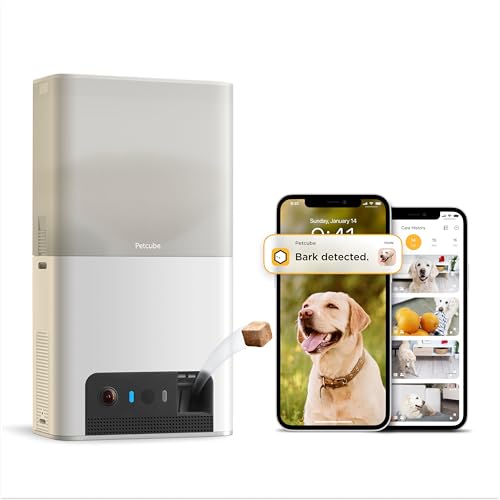
Petcube Bites 2 Lite is the lowest-cost entry into a treat-dispensing pet camera tracked on this site, holding a modest rating from a deep review base. It includes a treat dispenser, HD video and two-way audio, though full features require a subscription. Owners consistently note it as the budget entry point in a category otherwise dominated by Furbo. Its rating and review base trail both Furbo models.
Why You Should Get This
If price is the deciding factor and you don’t mind a subscription for full features, this is the lowest-cost entry point.
Benefits
- Lowest price of any treat-dispensing pet camera tracked on this site.
- Treat dispenser and two-way audio included.
- Established second brand in this category.
Pros and Cons
- Cheapest treat-dispensing camera in this comparison.
- HD video with two-way audio.
- Established, recognized brand.
- Lowest rating of the three picks.
- Full features require a subscription.
- Smaller review base than either Furbo model.
Features
- Treat dispenser.
- HD video, two-way audio.
- Subscription for full features.

Types of Pet Cameras
The pet-camera category tracked on this hub splits fairly cleanly into two types. The first, and the one this hub centers on, is a treat-dispensing camera — Furbo and Petcube being the two established brands — built around a motorized hopper that lets you remotely toss a treat through the app in addition to live video and two-way audio. The second is a standard indoor security camera repurposed for pet-watching, which handles the live view and audio side identically but has no treat mechanism at all. Both types genuinely work for keeping an eye on a pet during the day; the treat-dispensing category simply adds one specific interaction a standard camera doesn't offer.
Treat Dispensing Explained
The treat hopper is the feature that defines this hub. It holds a stock of small, uniform treats, and a button in the app triggers a motorized launch mechanism that tosses one out toward your pet, typically with a sound or light cue that gets your pet's attention first. Owners consistently describe this as genuinely useful for two purposes beyond simple entertainment: rewarding calm behavior remotely during the day, and providing a distraction during a stressful moment like separation anxiety when you first leave the house. Treat size and shape matter more than owners expect going in — most manufacturers specify a fairly narrow range of dimensions the hopper is built for, and a mismatched treat is the most common cause of a jam across every brand in this category.
Two-Way Audio and Live View
Every camera on this hub is a two-way pet camera with a speaker, pairing its treat-tossing mechanism with a standard live video feed and two-way audio, letting you see and talk to your pet through the app the same way you would with any indoor security camera. This is the part of a pet camera's feature set that overlaps most directly with a general-purpose indoor camera, and it's worth remembering that the treat dispenser is the add-on here, not the video and audio functions, which any decent indoor camera already provides at a lower price if that's genuinely all you need.
Pet Cameras With No Subscription: Subscription Considerations
Subscription requirements vary meaningfully both between and within these two brands. Some models sell core treat-tossing and live-view functionality with no monthly fee at all, while others gate remote treat access, extended recording history, or AI-driven alerts behind a paid tier. Because that difference materially changes the real cost of owning a pet camera over a year or more, check the specific listing's subscription terms before comparing sticker prices alone — a cheaper camera with a mandatory subscription can cost more over time than a pricier one with no ongoing fee.
What Consumer Reports says. Consumer Reports tried two ordinary home security cameras as pet cameras, a Wyze and an Arlo, and found both worked well for basic monitoring at a lower price than dedicated pet cameras. Neither offers treat tossing, so the choice comes down to whether you want that feature.
How to Choose the Right Pet Camera
Household and Pet Size
A single camera generally covers one room adequately regardless of how many pets share that space, but a larger home with pets that roam between rooms may need more than one unit, or a camera with a wider field of view, to avoid blind spots during the day.
WiFi Reliability
Every camera on this hub depends on a stable home WiFi connection for live view, treat tossing and notifications — a spotty connection in the room where the camera lives undermines the whole point of remote interaction, so check your WiFi signal strength at the intended mounting spot before buying.
Budget and Ongoing Cost
Weigh the up-front price against any recurring subscription fee, since the true cost of ownership over a year can differ substantially between a no-subscription camera and one that gates its most useful features behind a monthly plan.
Placement and Setup
Every camera on this hub is a plugged-in, stationary device rather than a battery-powered one, since the treat-launching motor draws meaningfully more power than a simple video feed. That means placement is a one-time decision built around outlet access as much as camera angle — most owners position the camera at pet height, on a low shelf or side table in the room a pet spends the most day, with a clear, unobstructed path for the treat toss itself. A camera aimed too high or blocked by furniture can still stream video fine while missing the treat mechanism's actual target, so check the field of view and toss trajectory described in owner reviews for the specific model and room layout you have in mind.
Barking, Meowing and Motion Alerts
Beyond the treat mechanism, most cameras on this hub add pet-specific alert types layered on top of standard motion detection — a barking alert on Furbo models, for instance, notifies you specifically when your dog vocalizes rather than triggering on any movement in frame. These alerts are genuinely useful for catching separation anxiety early in the day rather than only discovering it after the fact, though exactly which alert types are included free versus behind a subscription varies by model, so check the current listing before assuming a given alert type is included at every tier.
How We Rank
Every product ranked on this hub is scored the same way the rest of the site is: aggregated owner star ratings weighted by review volume, recurring themes in negative reviews, and specification differences owners raise unprompted. We never buy, install or physically test these cameras, and every star rating and review count comes from licensed Amazon data. Full method on how we rank.
Going Deeper: What a Pet Camera Can and Can’t Tell You About Separation Anxiety
Barking alerts are one of the reasons owners buy these cameras, and the timing of an alert says a lot. The ASPCA explains that separation anxiety is triggered when dogs become upset at being separated from the people they are attached to, and that a dog with it will usually start barking and showing other distress behaviors within a short time of being left alone, often within minutes. The barking it describes is persistent and does not seem to be triggered by anything except being left alone. An alert that fires shortly after you leave, with nothing else happening in the room, is a more telling signal than one that fires when the doorbell rings.
A live view also helps you rule other explanations in or out. The ASPCA lists behaviors that can look similar: some dogs are simply bored and disruptive without appearing anxious, and some bark or howl in response to unfamiliar sights and sounds, which they do whether their guardians are home or away. For house soiling, it advises seeing your dog’s veterinarian first to rule out medical causes before treating it as a behavior problem. Being able to watch what happens when you are gone is exactly the evidence those distinctions depend on.
For mild cases, the ASPCA describes counterconditioning: building an association between being alone and something the dog loves, such as a food puzzle toy that takes at least 20 to 30 minutes to finish, offered each time you leave and removed when you come home. A treat-tossing camera is a remote version of that reward, useful for reinforcing calm moments during the day, but the ASPCA’s approach is a structured plan rather than an occasional treat, so treat the camera as a tool within that plan rather than the plan itself.
Finally, remote treats add up. Veterinary nutritionists at Tufts University’s Petfoodology service say treats should make up only 10% of a pet’s daily calories. Their worked example: a 10 lb dog or cat needs about 300 calories a day on average, so its treat allowance is about 30 calories, while an average 75 lb dog needs about 1,400 calories, for a treat maximum of about 140. Tossing a treat every time you check in is easy to overdo, so it is worth counting camera treats toward that allowance.
Just Want to Watch Your Pet? A Standard Camera Works Too
This hub covers cameras with a dedicated treat-dispensing mechanism specifically. If you just want to see and talk to your pet with no treat-tossing feature, a standard indoor camera is a simpler, generally cheaper option — see the indoor cameras hub or the best pet camera use-case guide.
Sources & References
- We Tried a Wyze and an Arlo Home Security Camera as Pet Cameras — Consumer Reports
- Separation Anxiety — ASPCA
- Treat Options for Dogs and Cats Without Unbalancing Their Diet — Petfoodology, Cummings School of Veterinary Medicine at Tufts University
- Furbo 360° Dog Camera: Specs and Furbo Nanny — Furbo (Tomofun)
- Petcube Bites 2 Lite: Specifications — Petcube
- Petcube Care Plans — Petcube