
Affiliate Disclosure: Some links on this page are affiliate links. As an Amazon Associate, we earn from qualifying purchases — at no extra cost to you. We do not buy, install, or physically handle the cameras we cover; our rankings come from aggregated owner reviews, ratings and expert consensus. Commissions never change our verdicts. We're reader-supported: commissions fund hosting, research and updates, so if a guide helped, buying through our links keeps it going. How we rank · full disclosure.
Short version: a door/window sensor alerts you the instant an entry point opens; a glass break sensor catches the scenario a contact sensor misses — a window smashed rather than opened. Standalone versions work independently with no subscription; system-connected versions integrate with a broader security app and often a camera setup.
How we work: we do not buy, install or physically handle these devices. Every ranking here comes from aggregated owner reviews, star ratings weighted by review volume, and expert consensus. Method on how we rank; funding on our affiliate disclosure. Ready for models? Go to best door and window sensor.
In Plain English
Door and window sensors are small devices that tell you when a door or window opens. Most come in two pieces: one on the frame and one on the part that moves. When the two pieces separate, the sensor goes off.
There are two styles. A standalone sensor sounds its own alarm right there, with no app, hub or subscription. A connected sensor sends an alert to your phone through a brand’s app, and usually needs that brand’s hub (a small box that links the sensors to your home network).
Think of it like the difference between a smoke alarm that beeps in the hallway and one that also texts you at work.
A glass break sensor covers the gap a contact sensor misses: a window that is smashed rather than opened.
The one thing to do first: cover every ground-floor door and any window that is easy to reach from outside. Those are where forced entry usually happens.
Top 3 Recommended Entry Sensors
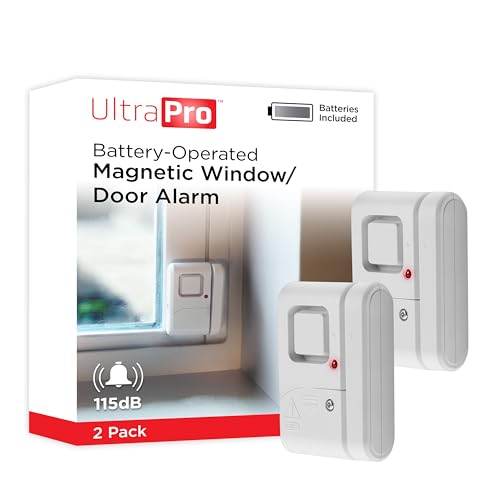
The UltraPro holds by far the deepest review base of any entry sensor tracked on this site, backed by one of the highest ratings we track, as a self-contained wireless chime and alarm with no hub, app or subscription needed. A simple magnetic contact mount makes installation trivial. Owners consistently value having nothing else to buy or configure. It suits buyers who want a standalone alert with an audible siren rather than a silent smart-home notification.
Why You Should Get This
If you want the most review-validated entry sensor available, with nothing else to buy or configure, this is the default.
Benefits
- Deepest review base of any entry sensor tracked on this site.
- No hub, app or subscription needed.
- Simple magnetic contact mount.
Pros and Cons
- Largest, most trustworthy review base.
- Genuinely standalone, nothing else to buy.
- Built-in audible alarm.
- No smartphone notification, local alarm only.
- No integration with a broader smart-home system.
- Battery-powered, needs periodic replacement.
Features
- Standalone wireless chime and alarm.
- No hub, app or subscription.
- Magnetic contact mount.
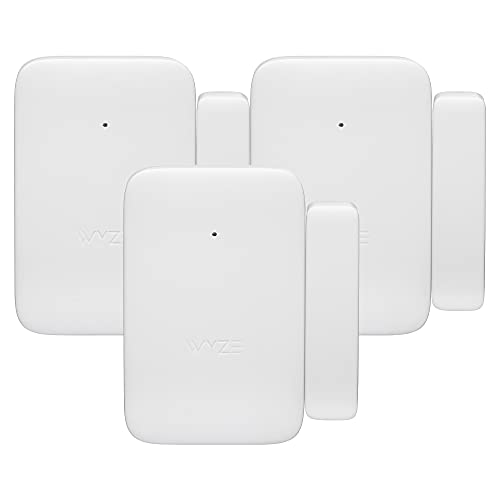
This Wyze entry sensor 3-pack integrates directly into the Wyze Home Security System app, holding a solid rating from a deep review base, for households already running Wyze cameras. It sends phone notifications rather than just sounding a local siren. Owners consistently value adding entry alerts into an app they already use. Three sensors cover multiple doors and windows from one purchase.
Why You Should Get This
If you already run Wyze cameras and want entry alerts inside the same app, this is the natural fit.
Benefits
- Integrates with the Wyze Home Security System app.
- Phone notifications, not just a local siren.
- Three sensors in one purchase.
Pros and Cons
- Fits directly into an existing Wyze setup.
- Smartphone alerts rather than local-only.
- Three-pack covers multiple entry points.
- Smaller review base than the standalone UltraPro.
- Requires the Wyze ecosystem to get full value.
- Subscription may be needed for some advanced features.
Features
- Wyze Home Security System integration.
- Phone notifications.
- Three sensors included.

The eufy E20 offers the longest stated battery life in this comparison at 5 years, holding a solid rating from a smaller review base, integrating with eufy HomeBase systems. Dual-side detection adds flexibility in mounting. Owners consistently value the extended battery life for low-maintenance entry monitoring. It suits households already running eufy security devices, with a smaller review base than the more established UltraPro.
Why You Should Get This
If you’re already in the eufy ecosystem and want the longest battery life on this hub, this is the matched choice.
Benefits
- Longest stated battery life in this comparison, 5 years.
- Integrates with eufy HomeBase systems.
- Dual-side detection.
Pros and Cons
- Exceptional battery life versus rivals.
- Fits an existing eufy HomeBase setup.
- Compact, unobtrusive design.
- Smaller review base than UltraPro or Wyze.
- Best value requires an existing eufy HomeBase.
- Higher price than the standalone UltraPro.
Features
- 5-year battery life.
- Dual-side detection.
- eufy HomeBase integration.
Standalone Alarms vs System-Connected Sensors
A standalone sensor (like the UltraPro alarms here) is entirely self-contained — mount it, and it sounds its own local siren when triggered, with no hub, app or subscription required. It’s the simplest, cheapest way to add entry-point alerting to a home. A system-connected sensor (Wyze, eufy, SimpliSafe) integrates with that brand’s broader app and, often, its cameras. That gives you a phone notification rather than just a local siren, at the cost of needing that ecosystem’s hub or base station.
Where to Place Sensors
Prioritize every ground-floor door and easily-accessible window first — these are overwhelmingly where forced entry actually happens. Glass break sensors are worth the added cost specifically on ground-floor windows, where breaking glass rather than forcing a lock is a more common entry method than upper floors.
Contact Sensors Explained
A contact sensor is two small magnetic pieces, one on the door or window frame and one on the moving part itself. When the two halves separate, the circuit breaks, and the sensor triggers an alert. That is the entire mechanism. It is simple, reliable, and has powered entry alarms for decades. Modern versions add wireless connectivity and app notifications, but the core physical principle hasn't changed. Reviewers describe contact sensors as the most dependable category here, with battery life often stretching a year or more between changes since the sensor only draws real power at the moment of a trigger.
What Consumer Reports says. In its home security system guide, Consumer Reports describes contact sensors as devices that attach to doors and windows and alert you when they open or close, typically costing $15 to $50 each in DIY systems. It also notes that today's systems are wireless and much easier to install than the older wired kind, and that a missed phone notification can be the difference between a burglary and a foiled one.
Glass Break Sensors Explained
A glass break sensor listens for the specific acoustic signature of breaking glass, either the sound frequency or the shock pattern of impact, rather than watching for a door or window to physically open. That makes it the only sensor type on this hub that catches a smashed window rather than an opened one. Reviewers note glass break sensors typically cover an entire room from a single ceiling or wall mount, since they listen for sound rather than needing contact with each individual window. False triggers from unrelated loud noises, like a dropped plate, are the most commonly cited drawback, though modern units use pattern recognition specifically tuned to glass to reduce that.
Wireless Window Alarm Sensors: WiFi, Zigbee and Z-Wave Connectivity
Standalone sensors like the UltraPro need no wireless protocol at all — they sound their own local alarm with nothing to configure. System-connected sensors use one of three common protocols. WiFi connects directly to your router, needing no extra hub, but draws more battery power. Zigbee and Z-Wave are lower-power smart-home protocols that need a compatible hub or base station, trading a bit of setup complexity for meaningfully longer battery life. Reviewers generally recommend Zigbee or Z-Wave for a household already running a compatible hub, and WiFi-direct sensors for anyone who wants to skip the extra hardware entirely.
How to Choose the Right Sensor
Start with the question that actually matters: do you want a standalone local alarm, or an alert inside an app you already use? A renter or a first-time buyer wanting the simplest possible setup should default to a standalone sensor like the UltraPro. A household already running Wyze, eufy or another connected security system should stay inside that ecosystem for the smoothest integration and a single app to check. From there, decide whether glass break coverage is worth adding on ground-floor windows specifically, since that is the one scenario a contact sensor alone cannot catch.
DIY Installation Tips
Nearly every sensor on this hub is designed for a homeowner to install without a technician. Clean the mounting surface first — dust or old adhesive residue is the most common reason a magnetic sensor detaches after a few weeks. Align the two halves of a contact sensor within the gap distance specified in the manual, since too wide a gap prevents the magnet from registering a closed state correctly. Test every sensor immediately after mounting, not days later, so a bad connection or misalignment gets caught before it matters. Battery-powered sensors ship with adhesive backing as standard, and reviewers say a proper surface clean makes that adhesive last through years of use rather than needing a re-stick within the first season.
How We Rank
Every product ranked on this hub is scored the same way the rest of the site is. We weigh aggregated owner star ratings by review volume, recurring themes in negative reviews, and specification differences owners raise unprompted. We never buy, install or physically test these devices, and every star rating and review count comes from licensed Amazon data. Full method on how we rank.
Going Deeper: How Zigbee and Z-Wave Differ From WiFi Sensors
This guide explains that connected sensors use WiFi, Zigbee or Z-Wave, and that the last two trade a hub for longer battery life. The difference comes down to how each network was designed. Zigbee, maintained by the Connectivity Standards Alliance, is described by the Alliance as a “proven, self-healing mesh network” that “eliminates single points of failure with minimal power consumption,” and as “optimized for low power consumption to extend battery life.” The Alliance says it supports both 2.4GHz and sub-GHz bands.
In a mesh network, devices can pass messages along for one another rather than each one needing a direct link to the hub. The Alliance describes Zigbee’s topology as self-organizing and self-healing and scalable to thousands of nodes, which is how a sensor at the far end of a house can still reach its hub.
Z-Wave takes a different route to a similar goal. The Z-Wave Alliance lists its US operating frequencies as 908.42/916MHz — well below the 2.4GHz band that WiFi crowds — and says classic Z-Wave uses a mesh topology, while its newer Z-Wave Long Range variant uses a star layout and claims up to 10-year battery life on a single coin-cell battery through dynamic power control. Z-Wave also supports S2 security options for device communication.
WiFi sensors skip the hub by talking directly to your router, but they pay for it in battery drain, which is why reviewers recommend Zigbee or Z-Wave for households that already own a compatible hub. None of this applies to a standalone alarm like the UltraPro, which needs no network at all: its magnetic contact simply sets off its own siren when the door opens.
Building a Complete Home Security Setup
Entry sensors are one component of a layered home security approach. Pair them with a camera system (see the NVR camera systems hub) for visual confirmation. Add outdoor motion detection (see the motion sensors and driveway alarms hub) for perimeter warning. A smart lock (see the smart locks hub) controls entry itself rather than just alerting to it. A household starting from zero often builds this out in stages. Contact sensors on primary doors come first, then a camera covering the main entry point, then glass break sensors and additional entry-point coverage as budget allows. There is no requirement to buy every layer at once. Reviewers consistently say starting with the highest-risk entry points produces a better result for the money actually spent than trying to cover an entire home on day one.
Sources & References
- How to Pick a Home Security System — Consumer Reports
- What Is a Reed Switch and How Does It Work? — Standex Detect
- Zigbee — Connectivity Standards Alliance
- Z-Wave Long Range vs Z-Wave — Z-Wave Alliance
- FG1625 FlexGuard Glassbreak Detector — Honeywell
- Burglary of Single-Family Houses — ASU Center for Problem-Oriented Policing