
Affiliate Disclosure: Some links on this page are affiliate links. As an Amazon Associate, we earn from qualifying purchases — at no extra cost to you. We do not buy, install, or physically handle the cameras we cover; our rankings come from aggregated owner reviews, ratings and expert consensus. Commissions never change our verdicts. We're reader-supported: commissions fund hosting, research and updates, so if a guide helped, buying through our links keeps it going. How we rank · full disclosure.
Looking for the best security camera for home use rather than a single room, across every entry point? This page is the site-wide starting point for exactly that. It covers a full home: multiple entry points, plus a mix of indoor and outdoor coverage. If you would rather have one recorder and several cameras as a single kit, see the best security camera systems guide. The short version: the Ring Floodlight Cam Wired Plus is the highest-rated all-around outdoor camera in our research. The Ring Battery Doorbell 2K is the easiest way to cover a front door without wiring. And the TP-Link Tapo C100 is the most review-validated budget pick — including as a WiFi camera for home use in a rental or a first apartment — if you are outfitting more than one room. Past those three, the right camera depends heavily on your specific setup. Wired vs battery vs solar, whether WiFi even reaches the mounting spot, and whether a monthly subscription is a dealbreaker all matter.
This page is the site-wide starting point. Every category below has its own dedicated ranking with more products and a deeper comparison table. See best outdoor cameras, best indoor cameras, best video doorbells, and the full category index covering every category.

In Plain English
A home security camera lets you see what is happening at your door, in your yard or inside your house from your phone, and it records clips when something moves. Most homes end up with a small mix: one camera outside where people arrive, a doorbell camera at the front door, and a low-cost indoor camera or two.
Three questions decide which camera suits each spot. First, power: a wired camera never runs flat but needs wiring where it goes, while a battery camera goes up almost anywhere but needs recharging. Second, WiFi: the camera has to reach your router from the exact spot where it is mounted, which is harder outdoors and at the far end of a house. Third, cost over time: some brands save recordings only with a monthly plan, while others record to a memory card for free.
Think of it like furnishing a house. You do not buy the same chair for every room; you pick what suits each space.
The one thing to do before buying: stand at each planned mounting spot and check the WiFi signal on your phone.
Top Rated Picks at a Glance
Best Overall Pick: Ring Floodlight Cam Wired Plus
Across a deep base of owner ratings, the Ring Floodlight Cam Wired Plus holds one of the highest average scores of any outdoor camera we track. The reviews driving that number focus on exactly what a floodlight camera should deliver: a motion-activated light paired with clear 1080p video, on a wired connection that never needs a battery swap.
Consensus Score ███████████░ 9.2 — from one of the deepest, highest-rated review bases in our outdoor research.
The honest tradeoff: it needs an existing wired fixture location or professional wiring. That rules it out for renters and anyone without an accessible junction box. For a no-wiring alternative, see the best wireless cameras ranking instead.
The Ranked Field: Star Rating, Owner Reviews and Price

Best for homeowners who want one wired camera to cover a driveway or entry with light and video together.
- 1080p HD video with motion-activated floodlights.
- Two-way talk and live view on demand.
- Wired power, no battery to recharge.
- Works with the wider Ring ecosystem.
Why buy it: The highest review volume and rating of any wired outdoor camera in our research pool — one of the most-reviewed and highest-rated wired cameras we track.

Best for front-door package alerts and visitor screening without running new wiring.
- 2K video with a wide-angle view of the whole porch.
- Battery powered, install in minutes.
- Two-way talk and motion alerts to your phone.
- Optional Ring Protect for full clip history.
Why buy it: Owners consistently rate it the easiest way to add front-door coverage without an electrician.

Best for a first indoor camera or a budget-conscious multi-camera setup.
- 1080p video with night vision and two-way audio.
- Motion detection with phone alerts.
- Local SD card or cloud storage options.
- Works with Alexa and Google Home.
Why buy it: A deep review base and a strong average rating make it the most review-validated budget indoor camera we track.
Best Budget & Best Value Pick: TP-Link Tapo C100
As an entry-level pick, the Tapo C100 is the best budget security camera in our research pool by review volume — one of the deepest, highest-rated review bases in the budget category. It records 1080p video with night vision and two-way audio, and it works over local microSD storage with no required subscription. It is cheap enough that outfitting three or four rooms costs less than one premium camera. The tradeoff against pricier options is simpler detection (free person detection per TP-Link, but not the finer person/vehicle/package classification of premium cameras), plus a fixed lens with no pan-tilt motion.
Best Premium Pick: Arlo Essential Battery 2K
At the other end of the price range, the Arlo Essential Battery 2K is the consensus premium pick for color night vision and detection accuracy. It offers 2K resolution with person, package, vehicle and animal detection that owners rate as more reliable than budget alternatives. The premium price buys genuinely better image detail and smarter alerts, at the cost of a required Arlo Secure subscription for full recorded history. See premium cameras for the wider high-end field.
Comparison Table: Security Camera Star Ratings and Price
| Product | Best for | Buy |
|---|---|---|
| Ring Floodlight Cam Wired Plus | Best Overall | Price |
| Ring Battery Doorbell 2K | Best Doorbell | Price |
| TP-Link Tapo C100 | Best Value | Price |
The Subscription Question for Home Security Cameras
Not every camera on this page needs a monthly fee. Ring and Arlo gate full clip history behind a paid plan, while Tapo, eufy and Reolink record locally for free. That single choice can matter more over five years than any spec on the box. If a recurring bill is a dealbreaker, start with our best cameras without a subscription roundup instead.
Pros and Cons by Security Camera Type
Wired outdoor (Ring Floodlight Cam): pros — no battery to manage, continuous power, strong deterrent floodlight; cons — needs an existing wired fixture or an electrician, less flexible placement.
Battery doorbell (Ring Battery Doorbell 2K): pros — no wiring required, install in minutes, easy to remove when moving; cons — battery life varies with traffic volume, subscription required for clip history.
Budget indoor (Tapo C100): pros — lowest price in this comparison, no subscription required, large review base; cons — simpler detection than premium cameras (basic person alerts rather than full person/vehicle/package classification), fixed lens, 1080p rather than 2K.
Across every camera on this page, the recurring pro in owner reviews is straightforward setup. The recurring con is a subscription requirement on the cloud-based brands (Ring, Arlo), versus genuinely free local storage on Tapo, eufy and Reolink.
Warranty and Return Policy
Consumer security cameras in this comparison typically carry a one-year limited warranty on the hardware. Amazon’s own 30-day return window does most of the practical work for buyers. In the US, Ring extends hardware coverage for eligible devices for as long as a Ring subscription plan that includes extended warranty stays active, which is a quiet incentive toward the subscription that rarely appears in marketing. Test the WiFi signal and trigger a real recording within the first week. Both the mounting-spot signal strength and whether footage is actually being saved are things you cannot verify before the camera is installed, and both are covered by a standard return window if they don’t work out.
Installation: What to Expect by Power Type
Battery and plug-in cameras (the Battery Doorbell 2K, the Tapo C100) are DIY jobs under thirty minutes — a bracket, a few screws, an app pairing. The wired Ring Floodlight Cam is a bigger commitment. It connects to an existing junction box at mains voltage, and a meaningful share of buyers hire an electrician rather than work at a breaker panel themselves. Full step-by-step guidance, including WiFi signal testing and weatherproofing, is in our how to install a security camera guide.
How We Rank: Owner Consensus Behind Every Star Rating
We do not buy, install or physically handle home security cameras. We are not going to pretend a test house exists. What we do instead is read the evidence that already exists at scale. That means aggregated owner star ratings, weighted by review volume so that a 4.8 from forty buyers does not outrank a 4.4 from forty thousand. It also means the recurring themes in negative reviews, which are far more informative than the positive ones, plus the specification differences owners actually mention unprompted, and expert consensus across the category. Full method on how we rank.
More Home Security Cameras Worth Knowing About
The three top picks above cover the most common starting points. These six span the categories most readers ask about next: indoor, wireless, premium, solar, wired PoE and no-WiFi cellular. Each is pulled from its dedicated category ranking so you can go deeper the moment one fits your situation.

Best for a compact, well-reviewed indoor camera.
- 1080p HD indoor video.
- Two-way talk and motion alerts.
Why buy it: The most-reviewed and one of the highest-rated indoor cameras in our data.

Best for wireless outdoor coverage with a two-year battery claim.
- 1080p HD day and infrared night view.
- Two-year battery life per Amazon listing.
Why buy it: Owners repeatedly cite the long battery interval as the reason they switched from a wired system.

Best for color night vision and premium detection accuracy.
- 2K color night vision.
- Person, package, vehicle and animal detection.
Why buy it: The consensus premium pick for color night vision, ahead of most budget competitors on detection accuracy.
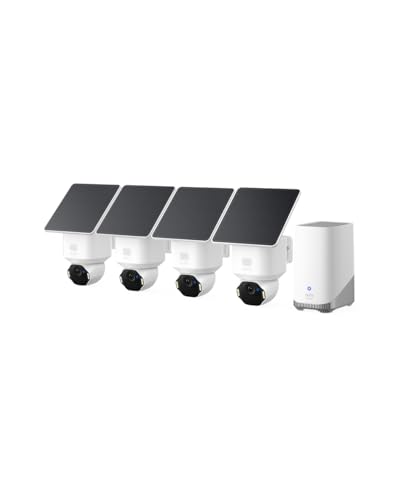
Best for solar-powered coverage with no recharging trips.
- 4K solar security camera, 4-camera kit.
- No battery swaps once positioned in sun.
Why buy it: Owners in sunnier climates report going months without touching the cameras after setup.

Best for a reliable always-on PoE camera for a wired system.
- 12MP resolution PoE dome camera.
- No WiFi dropouts, powered over Ethernet.
Why buy it: The strongest owner rating of any PoE camera in our research pool.
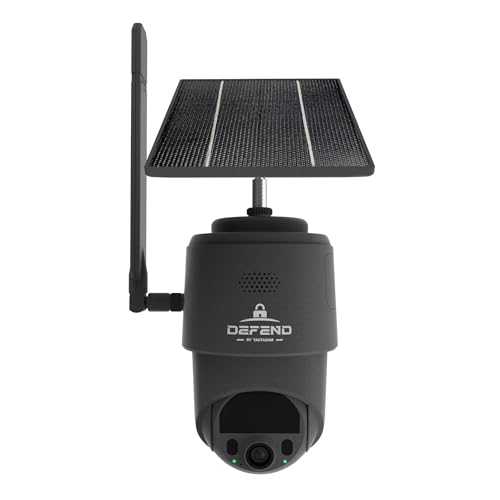
Best for cabins, land or rentals with no home WiFi at all.
- Cellular connection, no WiFi required.
- Solar-powered, built for off-grid use.
Why buy it: The camera owners reach for specifically because there is no router within range.
Browse by Security Camera Category
Every camera above belongs to a full category hub with more options, a dedicated buying guide and a deeper comparison table. Start with the category that matches your setup: outdoor cameras, indoor cameras, video doorbells, wireless & battery cameras, wired PoE cameras, floodlight cameras, solar cameras, PTZ pan-tilt cameras, no-WiFi & cellular cameras, NVR camera systems, budget cameras, premium cameras, brand comparisons, buying guides and use-case guides.
Going Deeper: Why WiFi Reach at the Mounting Spot Matters
The summary at the top of this page names WiFi reach at the mounting spot as one of three deciding factors, and the reasons are physical. Many home cameras connect on the 2.4GHz band; Ring’s specifications for the Battery Doorbell 2K, for example, list single-band 2.4GHz Wi-Fi 4. Intel’s comparison of WiFi bands explains why makers choose it: “2.4 GHz has the longest range and wall-penetration capability of the available bands.” The trade-off, Intel notes, is a ceiling of around 100 Mbps and a crowded band, because most legacy devices still use it.
Walls take their share of whatever signal there is. NIST measured radio signal loss through common construction materials in a study of signal attenuation. In the full report, a 13 mm drywall panel dissipated only about 6% of the transmitted power, while a three-layer (267 mm) brick wall passed only about 40% of the signal in the 0.5 to 2 GHz range, and concrete produced the strongest absorption of any material tested. A camera on the far side of a brick exterior wall, several rooms from the router, may be working with a fraction of the signal your phone shows in the living room.
A weak link costs more than a laggy live view. Reolink’s battery-camera guidance says a poor WiFi connection makes cameras “consume more power in transmitting data,” draining the battery quickly, and recommends installing them near the router. On a plug-in or wired camera, the same weak link shows up as missed or delayed clips rather than a flat battery.
The fixes follow from the physics. Check the signal at the exact mounting height, not just nearby. If it is weak, move the router or add a mesh node on the side of the house facing the camera. Where no reliable wireless path exists, a PoE camera such as the Reolink RLC-1224A takes power and data over a single Ethernet cable, so there is no WiFi link at the camera to lose.
The Verdict: Best Home Security Cameras for Every Budget
If you are outfitting a home from scratch and want one place to start, the Ring Floodlight Cam Wired Plus covers the most common first camera spot: the driveway or main entry. It carries the strongest owner consensus of anything in our outdoor research. Add the Ring Battery Doorbell 2K for the front door itself, and a Tapo C100 or two for indoor coverage, and you have a genuinely well-reviewed three-camera starting system without a large combined outlay. From there, the category hubs above cover every situation that first system does not: no WiFi, no subscription, solar power, or a full wired PoE system for whole-property coverage.
Sources & References
- Floodlight Cam Wired Plus Information — Ring
- Battery Video Doorbell 2K — Ring
- Understanding Ring subscriptions and extended warranty — Ring
- Tapo C100 Home Security Wi-Fi Camera specifications — TP-Link Tapo
- Arlo Essential Security Camera (3rd Gen) Spec Sheet — Arlo
- Do I need to subscribe to a cloud storage plan to record video? — eufy
- RLC-1224A 12MP PoE Camera — Reolink
- Blink Outdoor 4 Camera Tech Specs — Blink
- 2.4 GHz vs. 5 GHz vs. 6 GHz: What’s the Difference? — Intel
- Electromagnetic signal attenuation in construction materials (NISTIR 6055) — National Institute of Standards and Technology
- How to Extend the Battery Life of Reolink Battery-Powered Cameras — Reolink Support