
Affiliate Disclosure: Some links on this page are affiliate links. As an Amazon Associate, we earn from qualifying purchases — at no extra cost to you. We do not buy, install, or physically handle the cameras we cover; our rankings come from aggregated owner reviews, ratings and expert consensus. Commissions never change our verdicts. We're reader-supported: commissions fund hosting, research and updates, so if a guide helped, buying through our links keeps it going. How we rank · full disclosure.
Short version: if there is no router within range of where the camera needs to go, you need a no-WiFi security camera, meaning a cellular camera with its own SIM card, and you should expect a monthly data plan. If there is a router and what you object to is the monthly cloud fee, you need a camera that records to a microSD card or an NVR, and you should expect to pay nothing after purchase. Those are two different products for two different problems, and the listings on Amazon blur them constantly.
How we work: we do not buy, install or physically handle any of these cameras. Our rankings come from aggregated owner reviews, star ratings weighted by review volume, and the recurring complaints that show up across thousands of buyers. The full method is on how we rank, and our funding is set out in the affiliate disclosure. Ready for models? Go to the best security cameras without WiFi rankings for cellular, or the best security cameras without subscription rankings for local storage.
In Plain English
Think of a cellular camera as a cheap phone screwed to a post. It has its own SIM card (the small chip that lets a phone join a mobile network), so it never needs your home WiFi. That makes it the right tool for a cabin, a gate or a jobsite with no router nearby. Like a phone, it needs a data plan, so expect a monthly bill.
A no-subscription camera is the opposite. It uses the WiFi you already have and saves video onto a memory card or a recorder box inside your home, so there is nothing to pay each month.
Why this matters: buying the wrong one is the most common mistake in this category. People buy a cellular camera to escape fees and then get a data bill, or buy a WiFi camera for a paddock that has no signal at all.
The one thing to do first: stand where the camera will go and look at your phone’s signal. If your phone struggles there, a cellular camera will too. If you have working WiFi and simply hate the monthly fee, skip cellular entirely and look for local recording.
Top 3 Recommended No-WiFi & Subscription-Free Cameras

The eufy E30 is the clearest subscription-free value tracked on this hub — a 4K sensor with local microSD recording and no plan required, at an entry-level price and a strong owner rating. It records 24/7 continuously rather than in clips only, with pan and tilt AI subject tracking. On-device AI detection means alerts do not depend on a cloud service being reachable. A deep base of owner ratings backs a rating well above most subscription-first competitors at this price.
Why You Should Get This
If you want 4K, continuous local recording and on-device AI with no cloud bill, this is the clearest subscription-free value on this hub.
Benefits
- 4K resolution with genuinely continuous local recording.
- On-device AI detection, no cloud dependency for alerts.
- No subscription required at any point.
Pros and Cons
- Best subscription-free value tracked on this hub.
- Continuous 24/7 recording, not just event clips.
- Pan-tilt AI tracking included.
- Indoor camera, not weatherproofed for outdoor exposure.
- MicroSD card sold separately.
- Smaller ecosystem than Ring or Nest.
Features
- 4K sensor, local microSD recording.
- 24/7 continuous recording.
- Pan-tilt AI subject tracking.

The eufy C31 2-pack is the cheapest honest way tracked on this hub to cover a front and back approach with local storage on both, at an affordable combined price and a strong owner rating. Its IP66 weather rating allows genuine outdoor mounting, and color night vision works without a giveaway spotlight. 360-degree pan and tilt with auto-tracking covers more ground per camera than a fixed lens. Human, vehicle, pet and cry detection all run on-device with no subscription required.
Why You Should Get This
If you need two weatherproof outdoor angles with no monthly fee on either, this is the cheapest honest way to get both covered.
Benefits
- Two weather-rated cameras with no monthly fee, in one purchase.
- Color night vision without a visible spotlight.
- On-device detection for humans, vehicles, pets and crying.
Pros and Cons
- Cheapest two-camera no-subscription outdoor pair on this hub.
- Genuinely weatherproof, IP66 rated.
- Auto-tracking pan-tilt on both cameras.
- 4.3 rating slightly behind the flagship indoor E30.
- 3MP-class resolution, not 4K.
- Two-camera minimum purchase.
Features
- IP66 weatherproof rating.
- 360° pan and tilt auto-tracking.
- Human, vehicle, pet, cry detection.

The BOIFUN doorbell carries the largest review base on this hub, delivering 2K video across a 166-degree wide field of view with local storage and no subscription required for recording. It runs on battery with no doorbell wiring needed, and an indoor chime ships in the box. Owners consistently cite it as removing the single most-resented recurring fee in home security — the doorbell subscription. It holds a strong owner rating, a good result for a no-name-brand alternative to Ring or Nest.
Why You Should Get This
If the brand-name doorbell subscription fee is the specific dealbreaker, this is the largest-reviewed way to avoid it entirely.
Benefits
- Largest review base of any no-subscription product on this hub.
- Chime included in the box, no separate purchase.
- No wiring required, fully battery powered.
Pros and Cons
- Deepest review base on this hub.
- No subscription required for recording at all.
- Wide 166° field of view.
- Less established brand than Ring or Nest.
- App polish trails major-brand doorbells.
- Battery recharge needed on a busy door.
Features
- 2K video, 166° field of view.
- Local storage, no subscription.
- Battery powered, chime included.
How to Choose: No WiFi or No Subscription?
The direct answer: "no WiFi" is a connectivity problem and "no subscription" is a cost problem. Almost every disappointed buyer in this category solved the wrong one.
The connectivity problem looks like this: a cabin two hours out, a paddock gate, a jobsite trailer, a storage unit, a boat on a mooring. There is no home network to join because there is no home. The only technologies that reach are a cellular radio, or a camera that records locally and waits for you to visit.
The cost problem looks completely different: a normal house with working WiFi, four cameras, and a modest monthly bill that has quietly become a substantial sum over five years. Nothing about connectivity is broken. What you want is hardware that records to its own storage and stops asking for money. That is a solved problem in 2026, and the cameras that solve it are cheaper than the ones that do not.
A third case sits between them: you want both. That is the expensive corner, because cellular cameras almost always carry a data plan. The closest honest answer is a solar cellular camera on the smallest possible plan, with an SD card doing the real recording so the plan only carries alerts.
How a Cellular Camera Works With a SIM Card and LTE
A cellular camera is, functionally, a phone that watches something. Inside is a SIM card and an LTE modem, and it connects to a carrier network exactly the way a handset does. Nothing on your property is involved — no router, no range extender, no cable. That is what makes it the only real option at a location with no infrastructure.
Most units in this category pair that radio with two other things. The first is a solar panel, because a camera with no network also tends to have no outlet. The second is a microSD slot, so footage is written locally whether or not the network is cooperating that day. Owners who report the best experiences almost always treat the card as the primary record and the cellular link as the alerting mechanism, rather than depending on the network for everything.
The thing to internalize is that the LTE radio is the biggest power consumer in the device — far more than the image sensor. A camera watching a busy road wakes constantly and transmits constantly; a camera watching a quiet back gate barely stirs. Two identical units, sited differently, can produce completely different battery reports, and that explains a large share of the contradictory reviews you will read.
Types of No-WiFi Security Cameras
Three types of camera answer to "no WiFi", and they are not substitutes for each other. 4G LTE cellular cameras carry their own SIM and a carrier plan — Reolink’s Go range is a widely sold example — the Go Plus takes a standard data SIM and writes to a microSD card — and Arlo has sold cellular models into the same niche. They are the only type that sends you an alert from a place with no network of any kind.
Card-only cameras have no radio worth speaking of and simply write to a microSD card until you visit. Trail-camera makers and the cheaper generic brands dominate here, and for a shed or a storage unit they are perfectly adequate. Hub-and-NVR systems — Reolink, Lorex and Amcrest all sell them — run on their own closed local network, which is why they keep recording when your internet drops, though they still need power. Ring, Blink and Wyze cameras, and nearly all of eufy’s range, do not belong in this group at all: they require home WiFi, no matter what the listing implies. The notable exception is eufy’s 4G LTE Cam S330, which carries its own SIM and falls back to cellular data.
No Router, No WiFi: LTE Coverage Is the Whole Decision
Everything else is negotiable. Coverage is not. Before buying, check the carrier coverage map for the specific address, then think about the specific corner — trees, a rise, a metal roof and a concrete wall all matter at the margins. If you know a phone drops calls at that spot, a camera will not do better.
Some cameras ship locked to one carrier’s network, which turns marginal coverage into no coverage. Others take a standard SIM you can swap. The second arrangement is worth paying for at a property where you have any doubt, because it converts a dead camera into a ten-dollar fix.
Where coverage genuinely does not exist, the honest answer is that no cellular camera will help, and you fall back to a local-recording camera you check on visits. That is a real, workable setup — it simply gives you evidence rather than notification.
The Cellular Data Plan Cost Everyone Misses
This is the single most common source of one-star reviews in the whole category, and it is not a hardware failure. The listing says no WiFi needed, the buyer reads that as no ongoing cost, and the included trial data runs out in a fortnight.
Plan on a modest monthly fee per camera for a light plan built around motion clips. Live-view streaming is what burns data, and buyers who check the feed several times a day exhaust a light plan quickly. Continuous streaming plans cost considerably more, and the "unlimited" tiers usually throttle past a threshold.
Do the multi-year arithmetic before you shop on price. An entry-level camera on a light plan adds up to a real total cost over three years. A premium camera on the same plan comes out closer than the sticker prices suggest. Framed that way, the gap between the cheap generic unit and the supported brand-name one shrinks considerably, which changes the decision for a property you cannot easily revisit.
Local Storage: The No Subscription Route
If your problem is the monthly fee rather than the router, the technology is simpler and cheaper. Three approaches work.
microSD in the camera. The camera writes to a card in its own body. Cheapest, simplest, and now standard even on entry-level cameras. The limits are card capacity and the fact that stealing the camera steals the footage.
A hub or base station. Several brands pair cameras to a base with onboard storage, so the recording lives inside the house rather than on the camera. Better against theft, and it keeps the cameras themselves simpler.
An NVR system. Wired cameras recording to a dedicated box with a hard drive. Weeks of continuous footage, nothing in the cloud, nothing that a vendor can change its mind about. The cost is installation — running Ethernet through a finished house is real work. Our NVR camera systems hub and wired PoE cameras hub cover that end properly.
Whichever route, buy high-endurance memory cards rated for continuous write from a retailer you trust. Counterfeit and low-grade cards are a common cause of missing-footage complaints across the entire category, and a card that failed six months ago looks exactly like a working camera right up until you need the clip.
Off-Grid Uses: Cabin Camera, Rural Property and Job Site
Land, acreage and hunting property. The original cellular use case, and still the strongest. No power, no network, long gaps between visits, and a real cost to driving out to check.
Construction sites and equipment yards. Theft of tools and materials drives this, and sites move, so anything requiring installed infrastructure is money thrown away.
Cabins, boats and seasonal properties. The value is knowing in February rather than in May — about a break-in, or about a door left open in a storm.
Rentals and apartments where the network is not yours. A cellular camera watching your own parking space or storage locker avoids the landlord’s router entirely. For the indoor side of renting, the use-case guides hub covers apartment-specific setups.
Any household tired of monthly fees. Not cellular — local storage. This is the largest group of readers arriving at this hub, and the answer for them is the subscription-free rankings, not a SIM card.
Solar Power and Battery Reality
Most no-WiFi cameras are solar, because a site with no network usually has no outlet either. Solar works genuinely well in open sun — owners in southern states routinely report going whole seasons untouched. It works much less well in four predictable situations: north-facing mounts, panels under tree canopy, short winter days at northern latitudes, and high-traffic locations where the radio never sleeps.
The practical rules that come out of thousands of owner reports: aim the panel south with nothing overhead, mount high enough that snow and undergrowth cannot shade it, and if the camera faces a public road, expect to supplement with a larger separate panel or a seasonal charge. Panel sizing and winter behavior are covered in more depth in the solar cameras hub.
What to Look For on Any Budget
Across this category, the specifications that correlate with satisfied owners are not the ones on the front of the box.
Color night vision beats higher daytime resolution for most buyers, because the practical job is identifying a vehicle or a person at 2am rather than admiring detail at noon.
A wide or pan-capable view often removes the need for a second camera entirely, which matters more when every camera means another data plan.
Adjustable detection zones and sensitivity are what turn a camera from irritating to useful. The most common early complaint is all-or-nothing motion alerts, and the owners who work through it are almost always the ones whose camera lets them draw a zone.
Brand support is what you are actually buying at the premium end. The picture quality gap between an entry-level and a premium cellular camera is small. The gap in firmware maintenance, app longevity and someone answering the phone is not.
Installation Away From the House
Installation is where a rural property differs most from a suburban one. There is usually no ladder on site, no outlet to test against, and no second chance later in the week, so the whole job has to be right the first time. The sequence that works: activate the SIM and confirm a data connection at home, format the memory card in the camera, charge the battery fully indoors, and only then drive out to mount it.
On site, mount high and angle down, aim the solar panel south with nothing overhead, and stand where an intruder would to check the framing before you tighten anything. Take a phone photo of the mounted position — on a cabin camera you may not see it again for months, and the photo is what tells you whether a branch has grown into the shot. Bring a spare card and a spare bracket screw; a wasted second trip costs more than either.
The Complaints That Recur Everywhere
Four themes dominate the negative reviews across every brand and price point in this hub, and knowing them up front is most of the value of reading the reviews yourself.
The data plan arriving as a surprise. Battery not keeping up in high-traffic or low-sun locations. App quality that lags well behind the hardware, with slow live views and late notifications. And motion detection that needs tuning before it becomes useful. Notably absent: image quality. 2K sensors at these prices are genuinely fine, and almost nobody complains about the picture.
What to Look For on a Budget, and What Installation Involves
Set the budget across three years rather than at the checkout, because in this category the hardware is rarely the expensive part. An entry-level budget buys a generic 2K solar cellular unit with a thin review history and an app nobody maintains. A premium budget buys a Reolink, Arlo or Tactacam with firmware updates and support behind it. On a light plan, those two paths converge much more closely over three years than the listing prices imply — which is a very different conclusion from the one the sticker suggests.
Installation is the easy half. There is no cable to run and no electrician: a bracket, two or three screws into a post or a wall, the SIM activated in the app, and the panel aimed south. Budget for a high-endurance memory card at the same time, and register the camera if the brand allows it. The one job worth doing carefully is aiming, because at a rural gate or a paddock you will not want to come back to adjust it.
Going Deeper: Where a Cellular Camera’s Power and Data Actually Go
Every camera on this hub is doing two separate jobs: recording, and reporting back. Reolink’s description of its Go Plus 4G camera shows how the two are split in practice. It runs on a 3G/4G LTE mobile network, is powered by a battery with optional solar charging, and saves motion recordings locally to a microSD card of up to 128GB. Its own troubleshooting advice is telling: if the camera will not connect, check the signal with your phone in the same spot, then check whether the SIM or data plan has expired. The card is the record; the radio is the messenger.
What keeps that messenger asleep most of the time is usually a passive infrared (PIR) sensor. As Reolink explains, a PIR sensor measures the infrared radiation that warm objects give off, uses a Fresnel lens to focus it onto the sensor, and reacts to a change in that radiation, such as a person walking across its view. It draws less power than other motion sensors, but heat sources like sunlight can set it off. Every trigger wakes the camera and, on a cellular unit, the modem, which is why a camera facing a busy road runs its battery down faster than one watching a quiet gate.
Data plans come in three broad shapes, and the listings on this hub show all of them. Tactacam sells Defend 360 plans by live-view sessions (three a month on Starter, four on Intermediate, five on Pro), with an eSIM that picks a carrier automatically. SEHMUA lists its CB14S on unlimited data at $19.90 a month, on a built-in SIM the customer cannot replace. Reolink’s Go Plus instead takes a standard data-only SIM from carriers such as T-Mobile prepaid or Mint Mobile. Capped sessions, flat unlimited, or bring your own SIM: knowing which one you are buying tells you what live view will cost.
Solar is the last piece. The U.S. Department of Energy notes that to get the highest annual output in the northern hemisphere, panels should point due south and tilt at an angle equal to the local latitude. A camera’s small panel follows the same physics, which is why the advice on this hub is to aim it south with nothing overhead.
More Accessories and Related Cameras

Best for local recording on any no-WiFi or subscription-free camera with a card slot.
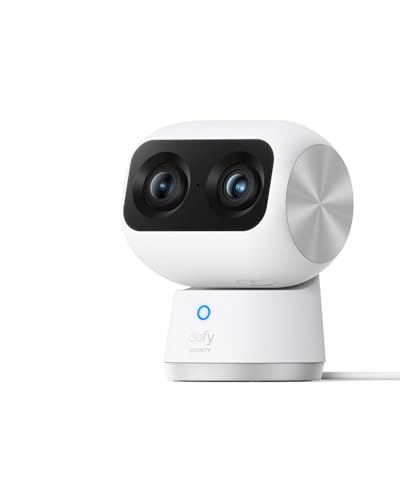
Best for one room needing both wide coverage and zoomed-in detail, no subscription.

Best for mounting a no-WiFi camera anywhere a cellular signal reaches.
Where to Start
If there is no router where the camera has to go, start at best security cameras without WiFi — and check your coverage map before you order anything. If the router is fine and the monthly bill is the problem, go straight to best security cameras without subscription, which is where most readers on this page actually belong. If you are covering a whole property permanently and will run cable, the NVR systems hub is the better destination. And if this is your first camera of any kind, the buying guides hub starts one step further back. The frequently asked questions below cover the no-WiFi versus no-subscription split, coverage, data plan cost and local storage, and the topical map closes the loop across the hub.
Sources & References
- Reolink Go Plus 4G LTE camera — Reolink
- eufy 4G LTE Cam S330 — eufy
- eufy Indoor Cam E30 — eufy
- Can Reolink PoE cameras and PoE NVRs work without internet? — Reolink
- Ring devices and extreme temperatures — Ring
- PIR Motion Sensor: How It Works in Security Cameras — Reolink
- DEFEND 360 Cellular Security Camera — Tactacam
- SEHMUA Cellular Solar Security Camera CB14S — SEHMUA
- Solar Photovoltaic System Design Basics — U.S. Department of Energy