
Affiliate Disclosure: Some links on this page are affiliate links. As an Amazon Associate, we earn from qualifying purchases — at no extra cost to you. We do not buy, install, or physically handle the cameras we cover; our rankings come from aggregated owner reviews, ratings and expert consensus. Commissions never change our verdicts. We're reader-supported: commissions fund hosting, research and updates, so if a guide helped, buying through our links keeps it going. How we rank · full disclosure.
The short version: the Wyze Cam Pan v3 is the best pet camera for most households at an entry-level price, because it pans, tilts and tracks a moving animal instead of watching an empty cushion. If you want the same capability for less, the Tapo C201 pan-tilt is even more affordable and holds a higher star average than the Wyze across a deep review base. If instant live view matters more than movement, the Ring Indoor Cam, at an entry-level price, is the camera owners say loads first time, every time.
A pet camera is a different brief from a security camera, and buying it as though it were the same thing is why so many end up unplugged. Security cameras are optimised to capture an intruder who appears once, briefly, at a known chokepoint. A pet camera is optimised for a subject who is present all day, moves constantly, and is the whole reason you are opening the app. Those two jobs pull the specification in different directions.
This page ranks cameras against the pet brief specifically. For the wider indoor shortlist — nurseries, hallways, entry doors and general home monitoring — the best indoor security cameras roundup covers the same brands against a broader set of jobs, and the indoor cameras hub handles placement and privacy in full.
In Plain English
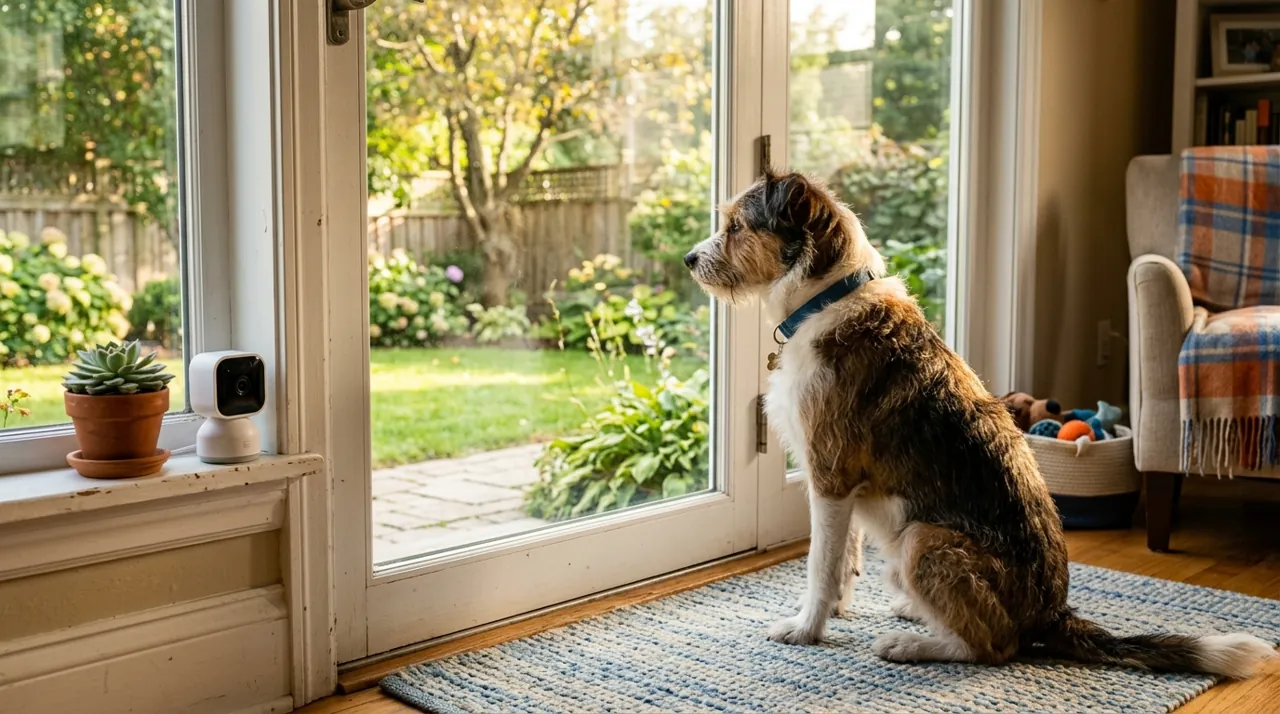
A pet camera is a small indoor camera you check from your phone to see what your dog or cat is doing. The big difference from a security camera is that your pet is there all day and moves around constantly.
That is why a camera that can turn and follow movement (pan and tilt) often beats a sharper fixed one; otherwise you spend the day looking at an empty sofa. Two-way audio lets you talk to your pet, but some dogs find a voice with no person attached upsetting, so try it while you are home first. The one thing to do on day one is set detection zones (the parts of the picture that trigger alerts) around the spots that matter, and turn sensitivity down a notch, so you get useful alerts instead of forty a day.
Top Rated Pet Cameras at a Glance
What Actually Matters in a Pet Camera
The direct answer: live-view load speed, two-way talk quality, frame coverage and motion sensitivity tuned for a small subject. Resolution barely registers, which is the opposite of how these cameras are marketed.
Live-View Load Speed
This is the specification nobody publishes and the one that decides whether the camera gets used. Checking on a pet is a thirty-second impulse between meetings, and a camera that takes fifteen seconds to connect gets opened less each week until it stops being opened at all. Owner reviews are the only source for this, and they are consistent: Ring loads fastest, the Wyze OG line is quick, and the cheapest models are noticeably slower to wake.
Two-Way Talk That Actually Lands
Every camera here has it and they are not equal. Latency and half-duplex behaviour turn a calm instruction into a garbled burst that a dog reads as noise rather than voice. Ring and the mid-range Tapo models come out best in reviews. Whatever you buy, introduce the speaker while you are home; a voice with no person attached unsettles some animals more than the behaviour you were trying to correct.
Field of View, or Pan and Tilt
Pets move. That single fact reorders the whole specification sheet. A 110-degree fixed lens is fine pointed at a crate or a food bowl and useless for an open-plan living room, because the animal spends most of the day outside the frame. A pan-tilt camera turns one mount into whole-room coverage and, on the models here, will follow a moving subject automatically. The trade-off is that it only sees where it is currently pointed, and the motor is audible in a quiet room.
Motion Sensitivity for a Pet-Sized Subject
Detection defaults are tuned for people. A cat crossing a room at pace either fails to trigger anything or triggers everything, depending on the model, and both failure modes end with the notifications muted. The fix is the same either way: set detection zones around the places that matter and step sensitivity down one notch from default. Cameras offering a pet label make this easier, though on most of these models that label is a paid feature.
The Ranked Field: Star Rating, Consensus and Price

Best for following a dog or cat around a whole room instead of losing them off-frame.
- 360-degree pan and 180-degree tilt with motion tracking that follows a moving subject.
- Colour night vision, so a dark room still shows which pet did it.
- Two-way audio for calling a pet off the couch.
- microSD recording with no subscription required.
Why buy it: The tracking motor is the one feature that solves the actual pet problem — animals move, and a fixed lens simply loses them.

Best for whole-room pet coverage at close to impulse pricing.
- 340-degree pan and 70-degree tilt covers an entire room from one mount.
- Motion tracking and person detection with instant app notifications.
- Two-way audio and infrared night vision.
- Cloud or microSD card storage.
Why buy it: A higher star average than the Wyze across a deep review base, and it costs less than a bag of premium dog food.

Best for households where the live view has to load on the first tap, every time.
- 1080p with a 115-degree horizontal field of view.
- The most consistently praised notification reliability in the category.
- Two-way talk with noise cancellation.
- Built-in manual privacy cover over the lens.
Why buy it: Checking on a pet is a spur-of-the-moment thing, and this is the camera owners say loads instantly rather than spinning.

Best for watching a crate, a food bowl or a single doorway a pet uses.
- 1080p fixed lens with infrared night vision to 40 feet.
- Two-way audio with a built-in siren.
- Cloud or microSD card storage.
- Small enough to sit on a shelf unnoticed.
Why buy it: A deep base of owner ratings on a camera cheap enough to buy three of, one per room a pet actually uses.
Comparison Table: Price, Coverage and Rating
| Product | Best for | Buy |
|---|---|---|
| WYZE Cam Pan v3 (360°) | Best Overall | Price |
| Tapo 1080p Pan/Tilt Pet Camera (C201) | Best Value | Price |
| Ring Indoor Cam | Best Premium | Price |
| TP-Link Tapo 1080P Indoor Camera | Best Budget | Price |
How We Rank
We do not buy, install or physically handle these cameras. There is no test house here and inventing one would be worse than admitting it. What we do instead is read the evidence that already exists at scale: aggregated owner star ratings weighted by review volume, so a 4.7 from 900 buyers does not automatically outrank a 4.5 from 42,000; the recurring themes in negative reviews, which tell you far more than the positive ones; and the specification differences owners raise unprompted. Every star rating and review count on this page is drawn from licensed Amazon listing data rather than typed by us, and a product with no verified rating renders no stars at all. Full method on how we rank.
Every Pet Camera Reviewed From Owner Reviews
1. Wyze Cam Pan v3 — Best Overall
The most-reviewed pan-tilt camera in this price bracket, and as a Wyze pet camera it answers the pet problem directly. What owners praise: tracking that genuinely follows a dog across a room, colour night vision that shows which animal was involved rather than a grey blur, an IP65 rating that lets the same model watch a run or a covered patio, and local recording with no monthly fee. What owners complain about: the pan motor is audible despite Wyze’s quieter-motor claims, which some anxious dogs react to; auto-tracking occasionally loses the subject and returns to its home position mid-event; the app is functional rather than polished; and the brand has a publicly reported history of security incidents, covered honestly in our is Wyze worth it guide.
2. Tapo 1080p Pan/Tilt Pet Camera (C201) — Best Value
Marketed explicitly as a pet and baby camera, and it is both the highest-rated and the most-reviewed camera on this page. What owners praise: pan and tilt coverage of a whole room (340 degrees horizontally) with motion tracking at an entry-level price, which makes the fixed-versus-moving decision essentially free; quick setup that non-technical households complete unaided; and microSD recording that costs nothing per month. What owners complain about: 1080p rather than 2K, infrared rather than colour night vision, motion alerts that fire on shadows until zones are narrowed, and an audible motor in a quiet room.
3. Ring Indoor Cam — Best Premium
The highest star average on this page, backed by one of the deepest owner-review bases we track, and the pick when responsiveness beats coverage. What owners praise: a live view that loads on the first tap, notifications that arrive in seconds rather than minutes, two-way talk that sounds natural enough for a pet to respond to, and a manual privacy cover you can verify by looking at it. What owners complain about: Ring requires a subscription to review recorded video, so without one it is a live window rather than a recorder; there is no microSD slot; the lens is fixed, so a wandering pet leaves frame; and 1080p is behind the field.
4. TP-Link Tapo 1080P Indoor Camera — Best Budget
The cheapest way to point a camera at the one place a pet actually gets into trouble, backed by a deep base of owner ratings. What owners praise: the price against the feature set — 1080p, infrared night vision, two-way audio, a siren and microSD recording — and a size small enough that it disappears on a shelf. Reviews from owners watching a dog and parents watching a nursery are overwhelmingly positive. What owners complain about: basic motion detection that cannot separate a pet from a shadow, so alert volume runs high until zones are set; a fixed lens with no pan; and a cloud tier limited enough that the memory card is effectively required.

Where to Put a Pet Camera
Point it at the trouble, not at the room. The instinct is to mount high in a corner for maximum coverage, and for a security camera that is right. For a pet it usually is not. The footage people actually want is close-up: the crate, the bin, the counter, the back door the dog scratches at. A camera at about four to five feet aimed at a specific area produces far more useful video than a ceiling-corner view of a whole room from twelve feet up.
Keep the sun out of the frame. A camera aimed at a window exposes for the bright glass and turns everything in front of it into a silhouette. Since pets tend to settle exactly where the sun falls, this catches a lot of buyers out. Point away from the window and let it light the subject instead.
Mind the cable. Every camera here is mains powered, typically with a lead of about six feet (Ring includes a 6 ft cable), and a puppy or a cat treats a dangling cable as a toy. Run it behind furniture, tape it down, or use a corner where it can drop straight to an outlet. A cheap cable clip beats replacing the camera.
One camera or two. At an entry-level price each, two fixed cameras covering the two places a pet actually goes often beat one pan-tilt camera that has to guess. If the animal has run of an open-plan space, pan-tilt wins. If it alternates between a crate and a back door, two cheap fixed cameras win.
Best Pet Camera for Dogs and Cats: They Need Slightly Different Things
For a dog, two-way talk earns its keep, because a lot of dogs respond to a familiar voice and calling one off the couch actually works. Separation-related behaviour also tends to be audible before it is visible, so a camera with sound detection gives earlier warning than motion alone. Pan-tilt helps if the dog patrols, and a wide fixed lens is enough if it settles in one spot.
For a cat, the priorities shift. Two-way talk is mostly wasted. Night vision matters more, because a large share of cat activity happens after lights out. Motion sensitivity has to come down, since a cat moving at speed across a frame will otherwise generate constant alerts. And because cats end up in places you would not think to point a camera, the argument for pan-tilt, or for a second cheap camera, is stronger than it is for dogs.
What Consumer Reports says. After testing the Wyze Cam v3 and the Arlo Essential Indoor as stand-ins for dedicated pet cameras, Consumer Reports wrote that "you don't necessarily need to buy a pet-specific camera." The trade-offs it reported were no remote treat tossing, which the pet-specific Furbo and Petcube offered, and mostly generic "motion detected" alerts rather than pet-specific ones. Cheaper security cameras covered the basics of watching a pet from afar.
What Owner Reviews Actually Complain About
Across every brand and price point on this page, four complaints recur, and only one is about the hardware.
Alert fatigue. By a wide margin the most common failure. The camera works perfectly, sends fifty notifications a day, gets muted in week two and forgotten by month two. Detection zones fix it and almost nobody sets them up front.
Slow live view. The second most common, and the one people underestimate at purchase. A camera that takes fifteen seconds to connect gets opened less often each week.
The subscription discovery. Buyers who wanted to review a clip and found it was never saved. This is entirely avoidable by reading the storage line before the price line. On this page the Tapo and Wyze models record to a card with no plan; the Ring does not.
microSD card failure. A camera writes constantly and a generic card is not built for it. Buy one rated for surveillance or dashcam use and the complaint disappears.
How to Choose Between These Four
If your pet has the run of an open-plan room: the Wyze Cam Pan v3. The tracking motor is the feature that matches the brief.
If you want that same coverage for the least money: the Tapo C201 pan-tilt, at an entry-level price, and the highest star average here.
If you check in constantly and hate waiting: the Ring Indoor Cam, budgeting the subscription as part of the price.
If you are watching one specific spot: the entry-level Tapo 1080p fixed camera, and buy two.
If the camera also needs to earn its keep as home security while you are out, read the best indoor security cameras roundup next, or start from the indoor cameras hub for placement and privacy guidance.
Pros and Cons: Best Overall, Best Value, Best Premium
Wyze Cam Pan v3 (Best Overall): pros — genuine 360° motorized tracking, no subscription; cons — audible pan motor, 2.4GHz WiFi only.
Tapo C201 (Best Value): pros — cheapest pan-tilt on this page, highest star average; cons — basic app, motion sensitivity needs manual tuning.
Ring Indoor Cam (Best Alerting): pros — fastest, most reliable notifications; cons — no pan-tilt motion, subscription required for history.
eufy's indoor cameras are also worth a look for pet owners specifically wanting a wide fixed field of view with zero subscription and no motorized tracking to fail — see eufy cameras compared side by side.
Warranty and Return Policy
Hardware warranties of around one year are typical across these brands (Wyze, for example, offers one year, or 18 months when bought direct); check each maker’s current terms. Test the tracking feature specifically within the return window — some pan-tilt cameras lose track of a moving pet mid-event and return to a home position, which only becomes obvious once a real pet is actually moving through the frame rather than during a store demo.
Going Deeper: What Separation-Related Behaviour Looks Like on Camera
This page notes that separation-related behaviour tends to be audible before it is visible, and that is one of the most useful things a pet camera can capture. Cornell University’s College of Veterinary Medicine describes the signs of separation anxiety as whining, howling, barking, pacing, house soiling or destroying household items after the owner leaves. It adds that affected dogs often prefer to be in the same room as their owners and start becoming stressed when they see their owner preparing to go out.
Those signs are hard to judge from what you find when you get home, because a chewed door frame or an accident does not tell you when or why it happened. That is where footage helps. Purdue University’s veterinary behavior medicine service notes that separation anxiety is known to be misdiagnosed, and recommends recording a video and keeping a diary to track incidents, contacting a board-certified veterinary behaviorist in severe cases.
A pet camera can supply both halves of that record if it is set up for the job. Aim a fixed camera at the door your dog waits by rather than at a wide view of the room, turn on sound detection if the camera offers it, and keep clips on a microSD card so the day’s events are saved without a subscription. Note the time you left and when the behaviour starts. Cornell suggests gradual practice, such as walking out of the room and coming straight back, then slowly increasing the time out of sight, and footage shows whether each step is working. Share it with your veterinarian rather than treating the camera itself as the fix.
The Verdict on the Best Pet Cameras in 2026
The Wyze Cam Pan v3 is the pet camera we would point most readers toward, because it is the one whose defining feature matches the defining problem. Pets move; a fixed lens loses them; this camera follows. At an entry-level price with a deep base of owner ratings, colour night vision and free local recording, it is a lot of capability aimed at exactly the right job. Weigh the brand’s security record honestly before it goes anywhere sensitive, and keep the firmware current.
If the price is the constraint, the Tapo C201 does the same job for roughly half as much and carries a higher star average on more ratings, which is a genuinely strong case for spending less. And if you already know that what you want is a quick, reliable window rather than a moving one, the Ring Indoor Cam is the fastest-loading camera here — just budget the subscription, because without it nothing is saved. Whichever you pick, spend ten minutes on detection zones before you spend another dollar on hardware.
Related Accessories

Best for local recording on a camera with a card slot.

Best for angling a camera precisely under an eave, soffit or shelf.

Best for a clean, weatherproof cable entry point on an outdoor mount.
Sources & References
- We Tried a Wyze and an Arlo Home Security Camera as Pet Cameras — Consumer Reports
- Wyze Cam Pan v3 — Wyze
- Tapo C201 Pan/Tilt Home Security Wi-Fi Camera — TP-Link
- Tapo C100 Home Security Wi-Fi Camera — TP-Link
- Indoor Cam (2nd Gen) Information — Ring
- Comparing Ring Home Plans — Ring
- Anxious behavior: how to help your dog cope with unsettling situations — Cornell University College of Veterinary Medicine
- Behavior medicine service — Purdue University Small Animal Hospital