
Affiliate Disclosure: Some links on this page are affiliate links. As an Amazon Associate, we earn from qualifying purchases — at no extra cost to you. We do not buy, install, or physically handle the cameras we cover; our rankings come from aggregated owner reviews, ratings and expert consensus. Commissions never change our verdicts. We're reader-supported: commissions fund hosting, research and updates, so if a guide helped, buying through our links keeps it going. How we rank · full disclosure.

Furbo Dog Camera: Treat Tossing, Full HD Wifi Pet Camera
By far the deepest review base of any treat-dispensing pet camera this site tracks, from the brand that popularized the category.
Check Price →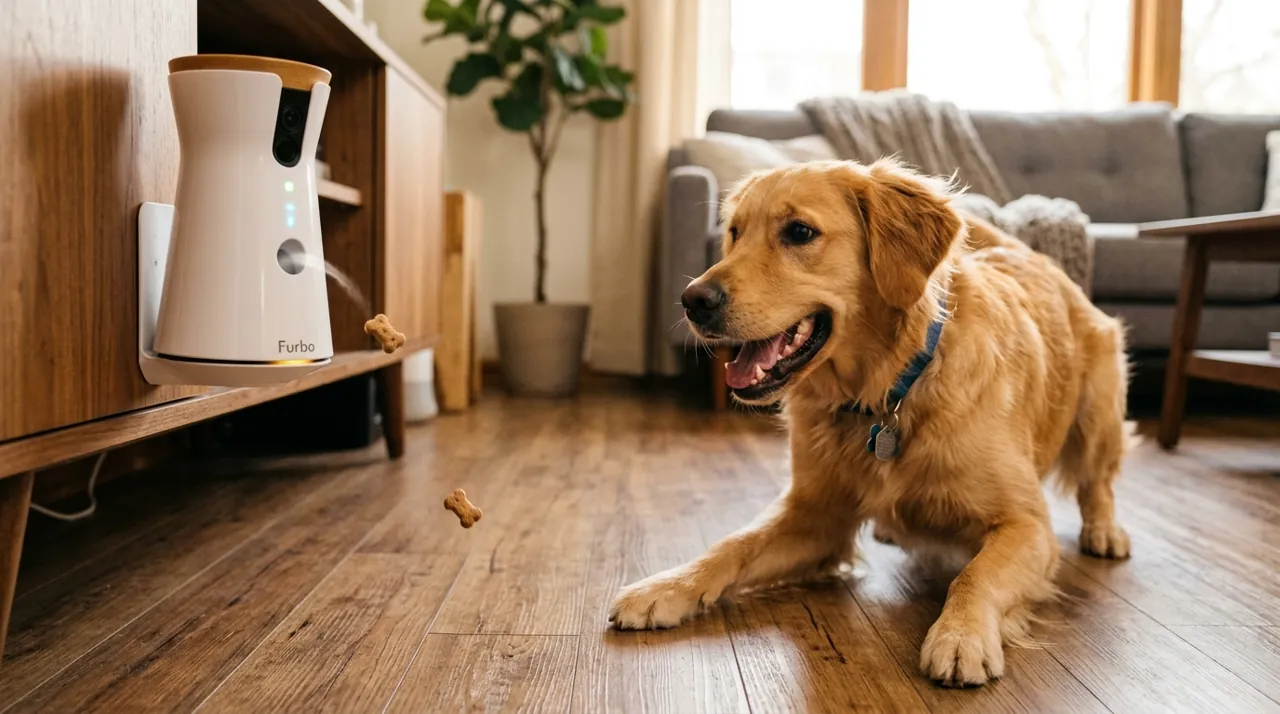
In Plain English
The Furbo is a pet camera that sits on a shelf and lets you check on your dog from your phone. You can watch live video, talk through its speaker, hear your dog through its microphone, and tap a button to toss a treat into the room.
Think of it as a baby monitor with a treat launcher. Its barking alert pings your phone when your dog barks, so you know when to look in.
Why it matters: owners say the barking alerts help them spot a dog struggling while home alone, and a familiar voice or a treat can help settle it.
Two practical points. Use small, round treats of the size Furbo recommends, or the dispenser can jam. And connect it to 2.4GHz WiFi (one of the WiFi bands your router broadcasts); a 5GHz-only network is the most common setup snag.
The one thing to check: which features on your listing need a subscription, since longer video history usually does.
Full Specifications
| Video | Full HD |
| Treat dispenser | Remote treat tossing via app |
| Audio | Two-way |
| Alerts | Barking notifications |
Summary
The original Furbo Dog Camera holds a strong rating. It has by far the deepest evidence base of any treat-dispensing pet camera this site tracks. That owner-review base covers Full HD video, two-way audio, barking alerts and Furbo's signature remote treat-tossing mechanism.
What Owners Praise
The treat-tossing mechanism working reliably is the most consistently praised feature. Barking alert accuracy comes up just as often. Owners say it genuinely helps catch separation-anxiety episodes. The two-way audio gets repeated praise too. It's clear enough for real conversation with a pet. Several owner reviews mention it helping an anxious dog settle down during a workday. The size of the review base itself matters here. A rating built on tens of thousands of verified owner reviews carries more weight than a newer camera's much smaller sample.
What Owners Complain About
Treat jams are the most common complaint. Most trace back to treats that are larger or more irregular than the manufacturer's guidance recommends. Some owner reviews mention subscription costs for extended video history. That's common across this whole category. A smaller number of owners say the app could be more polished next to newer smart-home-first brands. That doesn't seem to affect the reliability of the core treat-toss and audio functions.
Pet Camera Design and Build Quality
The original Furbo has a tall, cylindrical white housing built around the treat hopper. The camera lens and speaker sit above it. Reviewers describe the plastic housing as solid rather than premium. That fits its mid-range price. It isn't a flagship security camera's finish. It's built to sit on a shelf, table or windowsill at roughly a mid-size dog's eye level. It isn't wall-mounted like a typical indoor camera. The treat toss needs a clear, level line of sight into the room. The dispenser loads from the top. Furbo recommends small, round treats sized for the internal chute. The wrong treat shape is the detail that shows up again and again in owner troubleshooting threads.
Setup and WiFi Pairing
Setup follows the same pattern as most WiFi pet cameras. Download the Furbo app. Create an account. Connect the camera to a 2.4GHz home WiFi network during pairing. Owners generally say the process takes well under fifteen minutes for a household already comfortable with smart-home gear. The app walks through each step, including a firmware update on first connection. The most common snag is a 5GHz-only WiFi network. Furbo needs the 2.4GHz band specifically, like most budget-tier connected cameras. Check your router's band settings first if your home network splits each band under a separate name. Once paired, the camera stays connected over WiFi continuously. A stable home connection matters more here than it would for a battery camera that only checks in now and then.
The Treat Tossing Mechanism and Hopper
Treat tossing is the feature the whole Furbo product line is built around. It's also the single most-discussed mechanism in owner reviews. A remote command from the app triggers an internal mechanism. That mechanism launches one treat at a time into the room. It's meant for a quick reward, or for redirecting a dog's attention during a barking episode, not a full meal. Per the manufacturer's guidance, the hopper takes small, round treats sized for the dispensing chute. Oversized, irregular or crumbly treats are the most common cause of a jam in owner troubleshooting threads. That's not a flaw in the mechanism itself. Owners who stick to the recommended treat size describe the tossing function as reliable across daily use. That matters, given how central treat tossing is to the whole camera's appeal. Toss distance and hopper capacity vary by unit and generation. Check the current listing's specification for exact figures rather than a single fixed number here.
App, Live View and Notifications
The Furbo app handles live video streaming, remote treat tossing, and push notifications. Owners generally describe it as functional for the camera's core purpose. It isn't the most polished app in the wider security-camera category, though. Live view lets you check in on your dog from anywhere with an internet connection. The app surfaces motion and barking events as they happen, based on how you've set your notifications. Extended video history and clip storage sit behind Furbo's optional subscription tier on most listings. Check the current listing for exactly what's included free, versus gated behind the Dog Nanny plan. Furbo's plan structure has shifted over time and can vary by specific SKU.
Barking Alerts and Two-Way Audio
Barking alert accuracy is one of the most consistently praised features in owner reviews. Reviewers specifically call it useful for catching separation-anxiety episodes they'd otherwise miss during a workday. The alert sends a push notification when the camera's microphone detects barking. That lets an owner check the live feed, or toss a calming treat remotely, from wherever they are. Two-way audio lets you speak to your dog through the camera's speaker and hear them back through the microphone. Reviewers repeatedly say the audio is clear enough for a dog to recognize an owner's voice from across a room. That detail matters more for an anxious or vocal dog than one that's calm and settled home alone.
Furbo Dog Camera Without Subscription: Subscription and Value
Furbo's core hardware functions work without an ongoing subscription on most listings. That includes live view, remote treat tossing and two-way audio. Check the current listing carefully, though. Furbo's lineup includes both subscription-required and no-monthly-fee configurations that can look similar at a glance. Where a subscription applies, it typically unlocks extended video history, extra alert types and cloud recording on top of the base feature set. Given the exceptionally deep review base behind the original Furbo, most owners seem to find the core treat-tossing and monitoring functions worth the price on their own. They treat any subscription as a separate, optional add-on, not a requirement for basic value.
What Consumer Reports says. Consumer Reports reviewed the Furbo and liked its design, wide viewing angle and simple setup, and found that both cats and dogs responded to the treat toss. On the downside, it said the camera can send a lot of notifications and offers limited control over treat distance and quantity.
Who This Pet Camera Is For
Dog owners who want the most thoroughly evidenced treat-dispensing pet camera available, with reliable night vision, barking alerts and treat tossing. It suits a household that wants to check in on a dog during the workday, toss a reward remotely, and trust a rating built from a genuinely large owner-review base rather than a handful of early adopters.
Who Should Skip It
If avoiding a subscription entirely matters, see the Furbo 360° No-Monthly-Fee variant in the best pet camera with treat dispenser roundup.
Pros and Cons
Pros: deepest review base in the category, reliable treat tossing, accurate barking alerts, clear two-way audio.
Cons: treat jams if incorrect treat size is used, subscription may be needed for extended features.
Going Deeper: What Barking Alerts Reveal, and How to Keep Treats in Proportion
Owners praise the Furbo’s barking alerts for catching separation-anxiety episodes, and the ASPCA’s description of the condition explains why timing matters. The ASPCA explains that separation anxiety is triggered when dogs become upset at being separated from the people they are attached to, and that a dog with it will usually start barking and showing other distress behaviors within a short time of being left alone, often within minutes. The barking it describes is persistent and does not seem to be triggered by anything except being left alone. A cluster of alerts in the first minutes after you leave is a different signal from a single bark when a delivery arrives.
The live view helps separate look-alike problems. The ASPCA notes that some dogs are disruptive because they are bored and do not appear anxious, and that some bark or howl in response to unfamiliar sights and sounds, which they do whether their guardians are home or not. Checking the feed when an alert arrives, and seeing whether something outside set it off, is how the camera turns a notification into useful information.
For mild cases, the ASPCA describes counterconditioning: building an association between being alone and something the dog loves, such as a food puzzle toy that takes at least 20 to 30 minutes to finish, offered each time you leave and removed when you come home. The Furbo’s treat toss is well suited to rewarding calm behavior during the day as part of that approach, but it works best alongside the routine rather than as a stand-in for it.
Keep the tossing in proportion, too. Veterinary nutritionists at Tufts University’s Petfoodology service say treats should make up only 10% of a pet’s daily calories. Their worked example: a 10 lb dog or cat needs about 300 calories a day on average, so its treat allowance is about 30 calories, while an average 75 lb dog needs about 1,400 calories, for a treat maximum of about 140. Because every check-in invites another treat, counting camera treats toward that daily limit is the simplest way to avoid overfeeding a dog that is already getting its regular meals.
Verdict
The most thoroughly evidenced treat-dispensing pet camera available, and the right default for most dog owners. See best pet camera with treat dispenser for the full field.
Alternatives to Consider
- Furbo 360 vs Original Furbo
- Furbo vs Petcube
- Best Pet Camera With Treat Dispenser — the full ranked field
Sources & References
- Furbo Dog Camera Review — Consumer Reports
- Furbo 360° Dog Camera: Specs, Requirements and Furbo Nanny — Furbo (Tomofun)
- Furbo Works with Alexa — Furbo (Tomofun)
- Separation Anxiety — ASPCA
- Treat Options for Dogs and Cats Without Unbalancing Their Diet — Petfoodology, Cummings School of Veterinary Medicine at Tufts University