
Affiliate Disclosure: Some links on this page are affiliate links. As an Amazon Associate, we earn from qualifying purchases — at no extra cost to you. We do not buy, install, or physically handle the cameras we cover; our rankings come from aggregated owner reviews, ratings and expert consensus. Commissions never change our verdicts. We're reader-supported: commissions fund hosting, research and updates, so if a guide helped, buying through our links keeps it going. How we rank · full disclosure.
No monthly fee, stated plainly: every camera on this page records, detects and plays back footage with zero subscription cost — no bill showing up on your card every month, ever. The short version: the eufy 4K Indoor Camera E30 is the best no-monthly-fee camera for most people — 4K, continuous local recording to a microSD card, on-device AI detection, and no plan of any kind, at an entry-level price across a deep base of owner ratings. For outdoors, the eufy C31 two-pack covers two approaches for an affordable combined price with the same no-fee model. For a front door, the BOIFUN 2K doorbell removes the fee that annoys homeowners more than any other. And if you want the version that will still be recording in a decade regardless of what happens to any app, the Reolink 8-channel NVR system with a 2TB drive is the real answer.
Worth being precise about what this page is, because it sits alongside a similar-sounding one. No subscription is a cost question. No WiFi is a connectivity question. Everything here assumes you have a working home network and simply refuse to pay a monthly cloud fee on top of hardware you already bought. If your problem is that there is no router within range — a cabin, a jobsite, a paddock — you want cellular cameras instead, and those usually come with a data plan. That page is best security cameras without WiFi, and the hub explains which of the two problems you actually have.
In Plain English
A subscription camera is like renting a storage unit for your videos. Every month you pay so the company keeps your clips on its computers. A no-subscription camera keeps the videos at home instead, on a memory card inside the camera or on a recorder box with a hard drive (an NVR, or network video recorder). Once you have bought it, there is nothing more to pay.
This matters because fees add up. A few cameras on a monthly plan can cost more over five years than the cameras themselves.
The catch is simple: if a thief takes the camera or the recorder, your footage leaves with it. There is no second copy somewhere else.
The one thing to check before you buy: make sure recording, playback and person detection all work without a paid plan. Some cameras record for free but lock the useful features behind a subscription. Then buy a good-quality memory card made for constant recording, and check now and then that it is still saving footage.
Top Rated Picks at a Glance
Pros and Cons at a Glance: Best Overall, Best Value, Best Budget, Best Premium
Best Overall (eufy 4K Indoor Camera E30): pros — continuous 4K local recording, on-device AI, no plan of any kind; cons — indoor only, card fills fast at 4K.
Best Value (eufy C31 2-Pack): pros — two weather-rated outdoor cameras for one low price, no monthly fee; cons — thinner review base, mounting hardware feels light.
Best Budget (BOIFUN 2K Doorbell): pros — the lowest sticker price here with zero subscription; cons — the lowest star rating on this page, battery life varies with traffic.
Best Premium (eufy 4K Cam S350): pros — dual-lens wide-plus-zoom coverage, still no plan required; cons — costs more than the E30 for what is a refinement, not a different category.
Every pick here shares one non-negotiable trait: recording, playback and detection all work with no paid tier — see the buying guide below for why that distinction matters more than the star rating.
Our #1 Pick: eufy Security 4K Indoor Camera E30
The E30 earns the top spot because it does the thing this whole page is about without asking for anything back. Footage records to a microSD card in the camera, continuously rather than in motion clips only, at 4K. The person, pet and cry detection runs on the device rather than in someone’s data center, which is why it keeps working with no account attached. At an entry-level price, that is a specification that cost several times as much two years ago and generally came with a mandatory plan.
Consensus Score █████████░ 8.6 — from a deep, highly-rated base of owner ratings.
Owners consistently report that the 24/7 recording is the feature that changes how the camera feels. Clip-only cameras record what the motion sensor decided was interesting; continuous recording lets you scrub back to the moment you actually care about, which is usually thirty seconds before anything triggered. Pan-and-tilt with tracking means one camera covers a whole room, and the on-device AI keeps false alerts down without a cloud round trip.
The honest weaknesses: it is an indoor camera, so it solves half the house at most. Owners report that continuous 4K recording eats card capacity fast, which makes a high-endurance card a real requirement rather than an upsell. eufy has also drawn criticism in the past over how much data left the device versus what the marketing implied, and while local recording is genuinely local here, buyers who care about that should read the current privacy terms rather than take a slogan at face value. And a small but persistent thread of reviews reports motorized pan mechanisms getting noisy or sticky after long service.
The Ranked Field: Star Rating, Consensus and Price

Best for indoor rooms where you want 24/7 recording with no cloud bill.
- 4K sensor with local microSD recording, no plan required.
- 24/7 continuous recording rather than clips only.
- Pan and tilt with AI subject tracking.
- On-device AI detection so alerts do not depend on a cloud service.
Why buy it: The clearest subscription-free value on the page — 4K, continuous local recording and on-device AI at an entry-level price, with a deep base of owner ratings behind it.

Best for covering two outdoor angles with local storage on both.
- IP66 weather rating for genuine outdoor mounting.
- Color night vision without a spotlight giving you away.
- 360° pan and tilt with auto-tracking.
- Human, vehicle, pet and cry detection handled on-device.
Why buy it: Two weather-rated cameras with no monthly fee at a genuinely affordable combined price — the cheapest honest way to cover a front and back approach.

Best for front doors where the brand-name doorbell fee is the dealbreaker.
- 2K video with a 166° wide field of view.
- Local storage, no subscription required for recording.
- Battery powered — no doorbell wiring needed.
- Indoor chime included in the box.
Why buy it: It carries the largest review base here, and it removes the single most-resented recurring fee in home security.
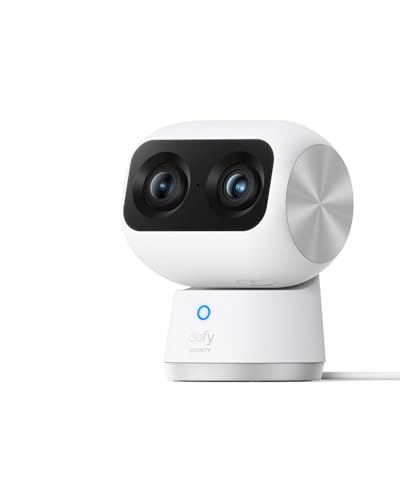
Best for one room where you want both wide coverage and readable detail.
- Dual cameras — a wide 360° view plus a 3× optical zoom lens (up to 8× digital).
- 4K resolution with local storage and no plan.
- AI auto-tracking that follows a subject between lenses.
- Human, pet and cry detection processed on-device.
Why buy it: The dual-lens design solves the wide-versus-detail trade-off that forces most buyers into a second camera.

Best for permanent whole-property coverage with years of recording on hand.
- Eight channels with four 4K PoE cameras included.
- 2TB hard drive built into the NVR — recording is local by design.
- Power and data over one Ethernet run per camera.
- No cloud account required for recording or playback.
Why buy it: The only genuinely permanent answer here: an NVR that keeps recording whether or not any company stays in business.
Comparison Table: Price, Star Rating and Storage
| Product | Best for | Buy |
|---|---|---|
| eufy Security 4K Indoor Camera E30 | Best Overall | Price |
| eufy Security Indoor/Outdoor Camera C31 (2-Pack) | Best Outdoor Pair | Price |
| BOIFUN 2K Wireless Video Doorbell with Chime | Best No-Fee Doorbell | Price |
| eufy Security 4K Indoor Cam S350 (Dual Camera) | Best Premium Indoor | Price |
| REOLINK 8CH 4K PoE System with 2TB HDD (RLK8-800D4) | Best Whole-Home System | Price |
How We Rank
We do not buy, install or physically handle these cameras. There is no test house behind this page and we will not pretend otherwise. Our rankings come from aggregated owner star ratings weighted by review volume, the recurring themes in negative reviews, published specifications cross-checked against what owners say those specifications deliver, and expert consensus across the category. For this page specifically we add one hard filter: a camera only qualifies if its core function — recording and reviewing footage — works with no paid plan at all. Cameras that record locally but hide detection or playback behind a paywall were excluded regardless of rating. The full method is on how we rank.
Every No Subscription Camera Reviewed: Pros and Cons
1. eufy 4K Indoor Camera E30 — Best Overall
Continuous 4K recording to local storage, on-device AI, pan and tilt with tracking, at an entry-level price, which is why we rank it the best indoor home security camera without subscription on this page.What owners praise: that 24/7 recording is included rather than a premium tier, picture detail that makes faces readable rather than merely present, tracking that keeps a moving subject in frame, and alerts that arrive without an account. What owners complain about: storage consumption at 4K, which makes card sizing a real decision; occasional app connection hiccups after firmware updates; and pan-motor noise developing over time on a minority of units. Indoor-only is a limitation, not a fault, but it does mean this is half a solution for most homes.
2. eufy C31 Indoor/Outdoor 2-Pack — Best Outdoor Pair
Two IP66-rated cameras with 360-degree pan, auto-tracking, on-device detection and local recording, for an affordable combined price for the pair, which makes this our pick for the best outdoor security camera without subscription fees on this page.What owners praise: color night vision that does not need a spotlight announcing the camera’s position, weather sealing that has held through real seasons, and the value of covering two approaches for the price of one mid-range camera. What owners complain about: mounting hardware that feels light for the job, WiFi range at the far corners of a property, and a review base that, while solid, is not yet in the same evidence class as the E30. Battery-versus-wired expectations also trip some buyers up, so check the power arrangement against your mount before ordering.
3. BOIFUN 2K Video Doorbell — Best No-Fee Doorbell
The doorbell subscription is the fee homeowners resent most, because it gates the one clip they actually want. This one records locally, runs on battery so no doorbell wiring is required, and includes the indoor chime. A deep base of owner ratings puts the largest evidence base on this page behind it. What owners praise: the absence of a monthly bill, straightforward installation with no electrician, a 166-degree view that captures packages on the step rather than just the visitor’s forehead, and usable HDR night footage. What owners complain about: battery life dropping sharply on a busy street-facing door, a short but real motion-to-notification delay, and app polish well below the brand-name doorbells. It has the lowest average here, and the complaints are consistent enough to take seriously — this is a value pick, not a giant-killer. For the wider field see the video doorbells hub.
4. eufy 4K Indoor Cam S350 — Best Premium Indoor
Two cameras in one housing: a wide 360-degree pan-and-tilt view and a 3× optical zoom lens (up to 8× digital), with AI tracking that hands a subject from one to the other, at a premium price. What owners praise: solving the wide-versus-detail problem that normally forces a second camera into the room, genuinely useful zoom for reading a doorway or a crib from across a space, and the same local-storage, no-plan model as the E30. What owners complain about: the price against the E30 for what is arguably a refinement rather than a category change, the tracking occasionally locking onto the wrong subject in a busy room, and the same 4K storage appetite. It shares the E30’s strong average rating across a similar review base, so the choice between them is about the room, not the risk.
5. REOLINK RLK8-800D4 8CH 4K PoE System — Best Whole-Home System
Four 4K PoE cameras, an eight-channel NVR and a 2TB hard drive in the box, at the top of the price range on this page. This is subscription-free in the strongest sense: the recorder sits in your house, the drive holds roughly a week of continuous footage from all four cameras (Reolink estimates about eight days at the default bitrate, and the NVR accepts drives up to 16TB), and no company’s business decisions can take it away. What owners praise: recording reliability that battery-and-cloud cameras cannot match, image quality at 4K across four channels, and the fact that PoE means one Ethernet run per camera handles both power and data. What owners complain about: installation is real work — running cable through walls and soffits is the reason many buyers hire someone — plus NVR interface design that feels dated, and fan or drive noise if the recorder lives somewhere you spend time. It is the most expensive item here and the only one with a meaningful installation cost. See the best PoE security camera systems and top-rated security camera system rankings for the full comparison at this end of the market.
Buying Guide: What "No Subscription" Should Actually Mean
The direct answer: insist that recording, playback and detection all work with no paid plan, then size your local storage for how far back you would realistically need to look. Everything else is preference.
The Three Tiers of Subscription-Free
Not all no-fee claims are equal, and the distinction decides whether you are happy in a year.
Genuinely free. Recording, playback and AI detection all run locally with no account tier required. Every camera on this page qualifies. This is what you want.
Free but crippled. The camera records to a card, but person detection, activity zones or clip download sit behind the plan. Technically subscription-optional, practically not. This is the tier that generates the angriest reviews, because the limitation only becomes clear after setup.
Free for now. Local features that a firmware update could move behind a paywall later. It has happened across the industry more than once. The defense is buying from vendors whose whole market position is local storage, because reversing that would cost them their reason to exist.
Sizing Local Storage
Continuous 4K recording is hungry. As a rough planning figure, a 128GB card holds about five days of continuous 4K at the highest resolution (eufy’s own figure for its S350), or considerably longer if you record motion events only. An NVR with a 2TB drive holds about a week of continuous footage across four 4K channels — Reolink estimates roughly eight days for the RLK8-800D4 at its default 6,144 kbps per camera, which works out to about 265GB a day. Decide how far back you would ever want to look — for most households the honest answer is a week — and buy to that rather than to the maximum the camera supports.
Buy high-endurance cards rated for continuous write, from a retailer you trust. Counterfeit and low-grade cards are the leading cause of the missing-footage complaints in this category, and a card that failed silently months ago is indistinguishable from a working one until the day it matters.
What You Give Up, Stated Plainly
Off-site backup is the real loss. If someone takes the camera, or the NVR, the footage goes with it. Cloud storage exists partly to solve exactly that. The mitigations are practical rather than clever: mount cameras out of easy reach, put the NVR somewhere not obvious, and consider one camera positioned to watch the room the recorder is in. Some systems also support pushing snapshots to your own network storage or an FTP target, which gets you most of the benefit without the bill.
What Consumer Reports says. In its roundup of cameras without a subscription, Consumer Reports notes that many cameras keep video on a microSD card or built-in memory, with no fee. It also points out that smart features such as object recognition often run on the company's servers rather than the camera, which is one way brands steer buyers toward paid plans, though many cameras still include person detection at no extra cost.
Five-Year Cost: Where the Best Value Actually Is
This is the argument that actually decides the category, so it is worth doing properly. A mainstream cloud plan — Ring Protect, Arlo Secure, Nest Aware or Blink's equivalent — runs a modest monthly fee for a single camera, and more for a multi-camera household plan. Take a modest four-camera home on a mid-tier monthly plan: a real annual cost, and a substantial sum over five years, on top of the hardware.
Against that, the eufy E30 and the C31 pair together cover three positions for a modest combined total, forever. The Reolink NVR system, the most expensive item on this page, covers four positions permanently and still comes in well under the five-year plan cost — and it is recording continuously at 4K, which most cloud plans at that price do not include either.
The case for paying holds in exactly one scenario worth respecting: a single camera, in a household that genuinely values off-site backup, where a small annual fee is not worth thinking about. Everywhere else the arithmetic favors local storage, and it is not close. Our buying guides hub goes deeper on subscription structures brand by brand.
Warranty, Card Failure and Long-Term Support
With no subscription there is no service contract either, so hardware cover is what you have. Reolink lists a two-year limited warranty on the RLK8-800D4, eufy includes its own limited warranty, and both maintain their own support channels, which is a real part of what you are buying relative to an unbranded listing — the BOIFUN doorbell here is the one where the retail return window is the practical remedy rather than a warranty claim.
The failure a warranty will not help with is the memory card. Cards wear out under continuous write, they fail silently, and no camera on the market will make a fuss about it. Treat a high-endurance card as a two-year consumable, budget a small amount to replace it, and check playback every few months so a dead card is a nuisance rather than the reason you have no footage of the one event that mattered. On the NVR system the equivalent consumable is the hard drive, which typically lasts longer but fails the same way.
What Owner Reviews Actually Complain About
Storage filling faster than expected. The single most common surprise, and almost entirely a 4K continuous-recording effect. Owners who switch to event recording or size the card properly stop reporting it.
Card failures that go unnoticed. Second most common, and the most consequential. Nothing tells you a card has died until you go looking for a clip. Check playback occasionally rather than assuming.
App polish below the brand names. Consistent across the value end of this page, especially the doorbell. The cameras work; the software around them is where the money was not spent.
Feature changes after firmware updates. A minority complaint but a loud one, and the reason to prefer vendors whose identity is built on local storage.
Installation effort on the NVR system. Not a defect, but consistently understated in listings. Running four Ethernet drops through a finished house is a weekend or a contractor.
How to Choose Between These Five: Best Budget to Whole-Home
One important indoor room, best picture: the eufy E30.
Two outdoor approaches on a budget: the C31 two-pack.
Front door, and the fee is the whole reason you are here: the BOIFUN doorbell, accepting its app limitations.
One room where you need wide coverage and readable detail together: the S350.
Whole property, permanent, and you will run cable: the Reolink NVR system, every time.
If you are still mapping out coverage rather than picking a model, start at the best indoor security cameras and best outdoor security cameras rankings, or the use-case guides hub if your situation is specific — an apartment, a rental or a single problem entrance. Trying to spend as little as possible overall? The budget cameras hub covers what an entry-level budget genuinely buys.
No Subscription vs No WiFi: Where a Cellular Camera Fits
These two phrases get used interchangeably in listings and they mean opposite things, which is the most expensive confusion in this corner of the market. Every camera on this page needs working home WiFi. What they remove is the monthly cloud fee, not the router.
If the location has no router at all — a paddock gate, a boat, a jobsite trailer — you need a cellular camera with a SIM card and an LTE radio instead, and those very rarely come without a cost. A camera like the Tactacam Defend 360 uses an integrated eSIM with automatic carrier selection across major US networks, so you are not locked to one provider, but a data plan is still required regardless of which carrier ends up serving the connection. A cellular data plan runs a recurring monthly fee per camera — Tactacam’s plans start at $5 a month, and SEHMUA lists $19.90 a month for its CB14S, as of September 2026 — so an off-grid camera is usually the opposite of subscription-free, and that data plan cost is the number one complaint on those listings. It is still the right buy for a cabin camera at the end of a track or a gate on a rural property, where a solar cellular camera is the only thing that works at all. The nearest thing to both is a cellular unit set to record everything locally to microSD, with the plan carrying only alerts. If that is your situation, read the best security cameras without WiFi instead of buying from this page.
Going Deeper: Why Local Storage Fills Up, and How Cards and Drives Wear Out
How long local storage lasts comes down to bitrate: how much data each second of video takes up. Reolink states that the cameras in its RLK8-800D4 kit default to 6,144 kbps, and that with all four recording, the pre-installed 2TB drive holds about eight days of footage. Run the arithmetic and 6,144 kilobits a second is roughly 66GB per camera per day, which is why “2TB” means about a week rather than months.
Compression is the biggest lever you control. When the International Telecommunication Union agreed first-stage approval of HEVC, also called H.265, in 2013, it said the new standard would need only half the bit rate of its predecessor, H.264. Reolink lists both formats on the RLK8-800D4, so checking that H.265 is switched on is the cheapest way to stretch a drive or a card further before buying more capacity.
Memory cards are the part most likely to fail quietly, because continuous recording rewrites them all day. Cards built for this job are rated for it: SanDisk’s High Endurance microSD data sheet says the card is designed to record for up to 40,000 hours (for the 512GB size, in Full HD) and is rated Class 10, U3 and V30 for Full HD or 4K recording. Those speed markings come from the SD Association, which says every speed class assures a minimum sequential card access performance under conditions defined by the standard, which is why a card with a video speed rating is the safer choice for a camera that never stops writing.
The same logic applies to the hard drive inside an NVR. Western Digital says its WD Purple surveillance drives are designed for 24x7 recording, with a workload rating of up to 180TB a year, up to three times that of its desktop drives. That is the practical reason this page, and every NVR guide on this site, tells you to use a surveillance-rated drive rather than whatever desktop drive is on sale.
The Verdict
The eufy 4K Indoor Camera E30 is the subscription-free camera we would put in front of most readers. With one of the strongest evidence bases on this page, it pairs a high owner rating with the specification that matters most here: continuous local recording at 4K, with detection running on the camera rather than on a server you rent. An entry-level hardware cost, once, and then nothing.
If the coverage problem is bigger than one room, buy the C31 pair alongside it and you have a three-camera, no-fee household for a modest total outlay. And if you want the version that is still working in ten years with no app, no account and no company in the loop, the Reolink NVR system is the honest answer — it costs more upfront and asks you to run cable, and it is the only setup here that nobody can switch off.
Related Accessories

Best for local recording on a camera with a card slot.

Best for angling a camera precisely under an eave, soffit or shelf.

Best for a clean, weatherproof cable entry point on an outdoor mount.
Sources & References
- 15 Best Home Security Cameras Without a Subscription — Consumer Reports
- eufy Indoor Cam E30 — eufy (Anker Innovations)
- eufy Indoor Cam S350 — eufy (Anker Innovations)
- eufy Indoor Security Cameras (local storage, no subscription) — eufy (Anker Innovations)
- RLK8-800D4 4K PoE Security Camera System — Reolink
- DEFEND 360 Cellular Security Camera — Tactacam
- SEHMUA Cellular Solar Security Camera CB14S — SEHMUA
- New video codec to ease pressure on global networks — International Telecommunication Union
- SanDisk High Endurance microSD Card Data Sheet — SanDisk (Western Digital)
- Speed Class Standards for Video Recording — SD Association
- WD Purple Surveillance Hard Drive — Western Digital