
Affiliate Disclosure: Some links on this page are affiliate links. As an Amazon Associate, we earn from qualifying purchases — at no extra cost to you. We do not buy, install, or physically handle the cameras we cover; our rankings come from aggregated owner reviews, ratings and expert consensus. Commissions never change our verdicts. We're reader-supported: commissions fund hosting, research and updates, so if a guide helped, buying through our links keeps it going. How we rank · full disclosure.
Short version: the UltraPro alarm is the best door and window sensor overall — the deepest review base of any entry sensor on this site, standalone with no subscription. The Wyze Entry Sensor is the pick for households running Wyze cameras. The eufy Entry Sensor E20 offers the longest battery life within the eufy ecosystem. The sections below walk through how to choose between a standalone alarm and a system-connected sensor, where to place them, and what installation and battery upkeep actually looks like, so the ranking above makes sense in context rather than as a bare list.
Want a sensor that catches broken glass rather than just an opened entry point? See best glass break sensor.
In Plain English
An entry sensor tells you when a door or window opens. It has two small parts. One sticks to the frame, the other to the door or window itself. When they pull apart, the sensor reacts.
The big choice is how you want to be told. A standalone alarm like the UltraPro sounds a loud siren or chime right there, with no app, WiFi or subscription. A connected sensor from Wyze or eufy sends a message to your phone instead, so you know even when you are out. It usually needs that brand’s hub.
Think of it like a bell on a shop door versus a text from the shop. The bell tells whoever is standing there. The text tells you wherever you are.
The one thing to do when installing: line the two halves up closely and check the gap against the manual before you press the adhesive down. A gap that is too wide is the most common cause of false or missed alerts.
How to Choose a Door and Window Sensor
Every entry sensor in this category solves the same basic problem - detecting when a door or window opens - but the way it tells you differs a lot. The first decision is standalone versus system-connected, covered in detail below. Beyond that, look at review depth and rating consistency for the specific model, mounting method (adhesive versus screw), and whether the sensor needs a hub, base station, or existing app ecosystem to function. A sensor that is technically well-reviewed but requires a hub you don't already own adds real cost and setup time that a simple standalone alarm avoids entirely.
Standalone Alarms vs Smart-Home Sensors
A standalone alarm like the UltraPro sounds its own local siren the instant the magnetic contact breaks - no app, no WiFi, no subscription, and nothing else to configure. That makes it the simplest option to install and the cheapest to buy, and it works even during an internet or power outage since it runs on its own battery. A system-connected sensor from Wyze or eufy instead sends a notification to your phone through that brand's app, which means you find out a door opened even if you're not home to hear a siren, and the event can log alongside footage from any cameras in the same ecosystem. Neither approach is universally better - it depends on whether you want an on-the-spot deterrent or a remote record of what happened and when.
Top Rated Picks at a Glance
The Ranked Field: Star Rating, Consensus and Price
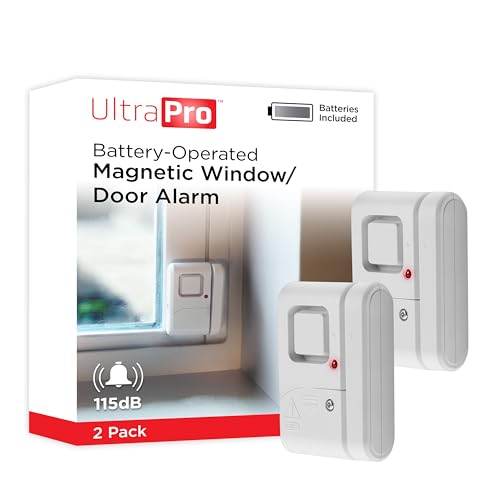
Best for the deepest-reviewed standalone door/window alarm, no hub or subscription required.
- Standalone wireless chime and alarm.
- No hub, app or subscription needed.
- Simple magnetic contact mount.
- Over 25,400 verified owner ratings.
Why buy it: By far the deepest review base of any entry sensor we track, and a self-contained device with nothing else to buy or configure.
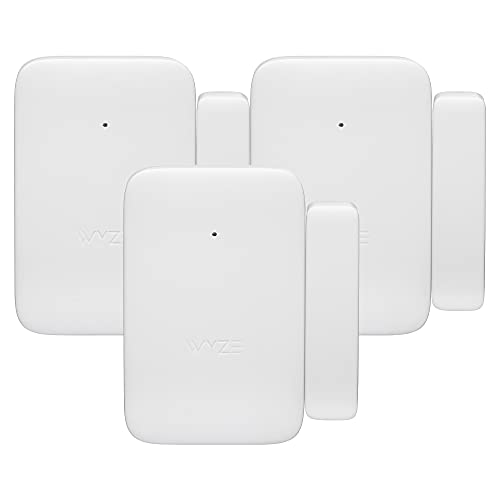
Best for integrating entry alerts into a Wyze camera and security setup.
- Integrates with the Wyze Home Security System app.
- Phone notifications, not just a local siren.
- Three sensors in one purchase.
- Over 850 verified owner ratings.
Why buy it: The natural pick for a household already running Wyze cameras, adding entry alerts into the same app.

Best for a long 5-year battery life within the eufy HomeBase ecosystem.
- 5-year battery life.
- Dual-side detection.
- Integrates with eufy HomeBase systems.
- Nearly 140 verified owner ratings.
Why buy it: The longest stated battery life on this page, and the matched choice for households already running eufy security devices.
Comparison Table
| Product | Best for | Buy |
|---|---|---|
| UltraPro Personal Security Window and Door Alarm (2-Pack) | Best Overall | Price |
| Wyze Home Security System Entry Sensor (3-Pack) | Best for Wyze Ecosystem | Price |
| eufy Security Entry Sensor E20 | Best for eufy Ecosystem | Price |
Where to Place Entry Sensors
Most burglars enter through a door or window, and the ASU Center for Problem-Oriented Policing notes that side or back entries are the most common access point, so cover ground-floor doors and easily reached windows first: the front door, back door, and any sliding glass door before anything else. After that, prioritize ground-floor windows that are hidden from street view - side and rear windows behind fences or landscaping are a common entry point precisely because they're out of sight. A garage's man-door and any gate leading to a fenced side yard are also worth covering if your household includes one. Upper-floor windows are lower priority unless there's an easy climb point such as a porch roof, deck, or exterior stair right beneath them.
Installation and Battery Life
Nearly every sensor in this category mounts with a simple two-piece magnetic contact - one half on the frame, one on the moving door or window - held in place with adhesive tape or small screws, and most owners finish an install in a couple of minutes per opening with no special tools. Measure the gap between the two halves against the sensor's stated trigger distance before committing to adhesive placement, since a mismatch is the most common setup mistake in owner reviews. Battery life varies by model: eufy rates the E20 at up to 5 years and Wyze rates its entry sensor at up to 18 months, while Jasco does not publish a runtime for the UltraPro's LR44 cells. Each gives some low-battery warning - a front LED indicator on the UltraPro, the brand's app for the Wyze and eufy sensors - so check units periodically rather than waiting to be caught with a dead sensor.
Multi-Sensor Kits and Expandability
Most households need more than one entry sensor, which is why several of the picks above ship as multi-packs rather than single units - the Wyze and eufy sensors are both sold in sets, and even the UltraPro standalone alarm is commonly bought two or three at a time to cover multiple doors. Before buying a single unit, check whether the current listing offers a multi-pack at a lower per-sensor price, since that's almost always the better value once you've decided to cover more than one opening. System-connected sensors also matter here: a Wyze or eufy sensor added later will simply appear alongside your existing devices in the same app, while a standalone alarm has no such expansion path - each additional unit is entirely independent of the ones you already own.
Avoiding False Alerts
A poorly mounted sensor is the most common source of false or missed alerts in owner reviews across this category - not a defective unit. If the two magnetic halves sit too far apart, or a door doesn't close flush against its frame, the sensor can either fail to trigger on a genuine opening or chirp intermittently from vibration alone. Re-checking alignment after the first week of use, and keeping both halves free of paint, dust, or weatherstripping buildup, resolves the large majority of the false-alert complaints reported for sensors in this comparison. If a specific unit consistently misfires after a clean, aligned install, that is a fair reason to return it rather than a sign every sensor in the category behaves the same way.
How We Rank
We do not buy or physically install these devices. Every star rating and review count comes from licensed Amazon data. Full method on how we rank.
Cost and Ongoing Fees
The UltraPro needs no subscription at all, and the Wyze and eufy sensors are sold as one-time hardware purchases - though check whether any extra feature you want sits behind that brand's optional plan. Where cost differs is the upfront price and, for system-connected sensors, whether you already own the hub or base station they pair with. A standalone alarm has the lowest total cost since there's nothing to buy beyond the sensor itself. A system-connected sensor costs more upfront if you're starting an ecosystem from scratch, since the required hub is part of that cost - the value case improves considerably if you already own a compatible camera or hub the sensor can join for free.
Going Deeper: How a Magnet Tells a Sensor the Door Is Shut
Most entry sensors are built around a component called a reed switch, which is why the two-piece design has barely changed in decades. Standex Detect, a reed switch manufacturer, describes the part as “two ferromagnetic blades that are hermetically sealed in a glass envelope.” In a sensor, the switch sits in the main body, opposite the plain magnet mounted on the moving door or window.
The magnet does the work. Standex explains that a nearby magnetic field “magnetizes the ferromagnetic reed blades,” and the attractive force pulls the reeds together to close the circuit; “when the magnetic field is removed, the blades separate and the circuit opens.” Open the door, the magnet moves away, the switch changes state, and the sensor sounds its alarm or sends its alert. Depending on how it is built, a reed switch can be normally open or normally closed.
That explains the long battery lives on this page. According to Standex, no power is consumed while a reed switch’s contacts are open, and with no wearing parts it can switch reliably for billions of operations. The sensor’s electronics only need real power when the switch changes state and the device has to sound a siren or send a message — which is how eufy can rate the E20 at up to five years.
It also explains the gap. The switch only holds its closed state while the magnet is close enough to pull the blades together, so the two halves must sit near each other when the door is shut. Mount them too far apart, or on a door that doesn’t close flush, and the sensor can read “open” at rest or chirp with vibration — the false and missed alerts that owner reviews most often trace to installation rather than a faulty unit.
The Verdict
The UltraPro alarm is the right default for most buyers wanting simple, reliable entry alerts with no ongoing cost. Choose the Wyze Entry Sensor or eufy Entry Sensor E20 specifically if you're already running that brand's camera ecosystem.
Sources & References
- UltraPro Battery-Operated Magnetic Window Alarm 2 Pack — Jasco
- Wyze Sense Entry Sensor v2 — Wyze
- eufy Entry Sensor E20 — eufy
- Burglary of Single-Family Houses — ASU Center for Problem-Oriented Policing
- Through the Eyes of a Burglar: Study Provides Insights on Habits and Motivations — UNC Charlotte
- What Is a Reed Switch and How Does It Work? — Standex Detect