
Affiliate Disclosure: Some links on this page are affiliate links. As an Amazon Associate, we earn from qualifying purchases — at no extra cost to you. We do not buy, install, or physically handle the cameras we cover; our rankings come from aggregated owner reviews, ratings and expert consensus. Commissions never change our verdicts. We're reader-supported: commissions fund hosting, research and updates, so if a guide helped, buying through our links keeps it going. How we rank · full disclosure.
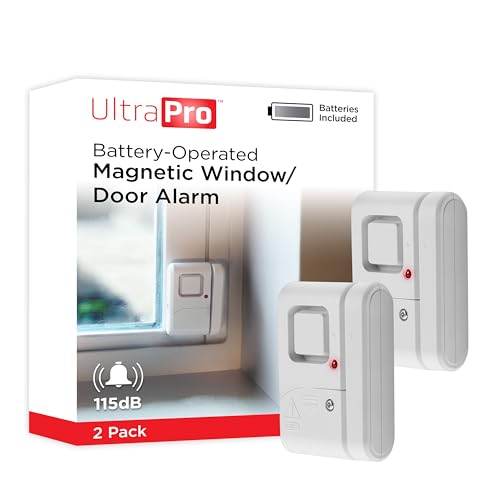
UltraPro Personal Security Window and Door Alarm (2-Pack)
The deepest-reviewed standalone entry alarm this site tracks — no hub, app or subscription.
Check Price →In Plain English
The UltraPro is a tiny two-piece alarm for a door or window. You stick one half on the frame and the other half on the door. When the door opens and the halves separate, it makes a sound.
A switch on the side picks the sound. Chime mode gives a soft tone, handy for knowing when a child opens the back door. Alarm mode is a loud siren meant to startle. There is no app, WiFi or monthly fee, and it keeps working in a power or internet outage because it runs on its own small batteries.
Think of it like the bell above an old shop door: simple, a little old-fashioned, and it always rings.
The trade-off is that it cannot tell your phone anything. If you are not home to hear it, you will not know it went off.
The one thing to do: clean the surface before sticking it on, line the two halves up, and test it by opening and closing the door a few times.
Full Specifications
| Entry method | Magnetic contact, adhesive mount |
| Connectivity | None — standalone local siren/chime |
| Modes | Off, chime and alarm (side switch) |
| Alarm volume | 120dB |
| Power | LR44 button-cell batteries (included), LED low-battery indicator |
| Units included | 2 |
Summary
The UltraPro Personal Security Window and Door Alarm holds a strong rating across the deepest review base of any entry sensor this site tracks. It’s a fully standalone device with no app, hub or subscription, just a magnetic contact alarm that mounts with adhesive backing.
What owners praise
Simplicity and reliability dominate the positive reviews — a device that does exactly one job with nothing to configure beyond mounting it. The dual chime/alarm mode selection is repeatedly cited as useful for different rooms and purposes within the same home.
What owners complain about
A minority of reviews mention the adhesive losing grip over extended outdoor or high-humidity exposure, which is worth noting if mounting on an exterior-facing door. Battery replacement (standard, not rechargeable) is an ongoing minor cost some reviewers mention.
Design and Build
The UltraPro alarm ships as a two-piece magnetic contact sensor. Each half is a compact rectangular unit. Both mount flush against a door or window frame with adhesive backing. There's no visible wiring. There's no separate control panel to place elsewhere in the room. The whole device lives right at the point of entry. Owners consistently describe the plastic housing as light but not flimsy. That fits a device meant to be mounted once and largely forgotten. The compact footprint is a real advantage over bulkier alarm sensors. It sits discreetly in a window corner or along a door jamb, with no visual distraction.
Installation and Placement
The mounting method is entirely adhesive, so installation is close to instant. Align the two contact halves so they sit directly opposite each other when the door or window is closed. Press each half firmly against a clean, dry surface. That's it — the unit is active. No drilling, no wiring, and no app pairing step. That's a real difference from a smart sensor's setup process. Reviewers do flag one detail that matters: surface prep. Wipe the mounting spot free of dust or old adhesive residue first. That noticeably improves how well the backing holds over time. It matters most on a frequently-used door, where closing vibration can work a poorly-seated adhesive loose.
Chime Mode vs Alarm Mode
The dual-mode design is genuinely useful, and reviewers call it out often. Chime mode gives a soft tone whenever the contact breaks. Owners use it less as security and more as awareness. It flags a toddler opening a side door, or a delivery driver at the entry, without a doorbell camera pointed at every access point. Alarm mode flips that to a genuinely loud siren meant to startle and draw attention. Most owners reserve alarm mode for doors and windows that shouldn't open at all during certain hours, like an overnight setting on a ground-floor window. Toggling between the two per unit, instead of one behavior across the whole household, is a detail owners specifically like.
False Alerts and Sensitivity
The UltraPro relies on a simple magnetic contact break, not a motion or vibration sensor. That keeps false alerts comparatively rare in owner feedback. The alarm only triggers when the two halves physically separate beyond the working range. It won't fire from nearby movement, pets, or a minor draft the way a motion-based alarm can. Alignment is the one thing that does matter. If the two halves aren't mounted close enough, or squarely opposite each other, a door or window that doesn't fully close can sit in a broken-contact state even at rest. That produces a nuisance trigger unrelated to any real security event. Testing the unit by opening and closing the door or window a few times after mounting avoids this in most cases.
Battery Life and Upkeep
The UltraPro runs on replaceable LR44 button-cell batteries (included), not a rechargeable pack. Owner reports on runtime vary with how often the covered door or window gets used. A rarely-opened window sensor lasts considerably longer than one on a high-traffic back door. Beyond a small front LED low-battery indicator, there's no app to push a low-battery notification the way a connected sensor would. Building a habit of testing each unit every few months with a quick open-close check is worth doing. Don't assume years of maintenance-free operation. This lack of remote status reporting is the main tradeoff for going fully standalone. Weigh it against the complete absence of any subscription or hub cost.
Standalone Alarm vs a Connected Sensor
The UltraPro's core appeal is what it doesn't require. No hub, no app, no WiFi, no subscription, and no dependency on a home network being up. That makes it dramatically simpler to deploy across a whole house in one afternoon than a system-connected sensor. It keeps working identically during an internet or power outage, since it isn't drawing on either. The cost of that simplicity is the absence of remote notifications. A connected sensor like the eufy Entry Sensor E20 can push an alert straight to a phone the moment it triggers. The UltraPro's local siren alone can't do that. Buyers choosing between the two are really choosing between a phone alert from anywhere, or the fastest, cheapest, most maintenance-free way to add loud local alerts to every door and window in a home. See eufy Entry Sensor E20 review for the connected alternative. Neither approach is wrong. It comes down to whether remote status matters more to you than upfront cost and setup speed.
Who It's For
Buyers who want a reliable, no-subscription entry alarm for a door or window with the deepest owner-review evidence in the category.
Who Should Skip It
If you want phone notifications rather than a local siren, a system-connected sensor is the better fit — see a ranked list of door and window sensors for Wyze and eufy options.
Pros and Cons
Pros: deepest review base in the category, no app or subscription, simple adhesive mount, dual chime/alarm modes.
Cons: adhesive may weaken with prolonged exterior exposure, standard battery replacement needed over time.
Going Deeper: How Small Batteries and a 120dB Siren Share the Work
The UltraPro runs on LR44 button cells, and Energizer’s A76 datasheet shows how modest that supply is: an LR44 alkaline cell is rated at 1.5 volts and a typical 150 mAh, with a note that capacity varies according to the applied load, temperature and cutoff voltage. That small budget is why the alarm’s design matters.
A magnetic contact alarm spends most of its life doing almost nothing electrically. The reed switches used in this style of sensor, according to Standex Detect, are two ferromagnetic blades sealed in glass that a nearby magnet pulls together; “when the magnetic field is removed, the blades separate and the circuit opens.” Standex notes that no power is consumed while a reed switch’s contacts are open. The alarm only draws significant current when the contact breaks and it has to sound — which is why owners report longer battery life on rarely opened windows than on busy back doors.
When it does sound, it is meant to be noticed. The UltraPro is rated at 120dB. The National Institute on Deafness and Other Communication Disorders, in its guide to noise-induced hearing loss, puts sirens at 110–129 dBA and normal conversation at 60–70 dBA, and notes that long or repeated exposure to sounds at or above 85 dBA can cause hearing loss. A 120dB alarm is squarely in siren territory: startling to an intruder, and best kept away from your ear when you test it.
The small cells also explain the maintenance advice in this review. With no app to report battery status, the front LED low-battery indicator and a quick open-and-close test every few months are the only ways to confirm the alarm is still ready.
Verdict
The best-evidenced standalone door and window alarm on this site, and the right default for most buyers wanting simple, reliable entry alerts. See door and window sensors ranked by owner reviews for the full field.
Alternatives to Consider
- eufy Entry Sensor E20 review
- Wsdcam Glass Break Sensor review
- Best Door and Window Sensor — the full ranked field
Sources & References
- UltraPro Battery-Operated Magnetic Window Alarm 2 Pack — Jasco
- eufy Entry Sensor E20 — eufy
- Through the Eyes of a Burglar: Study Provides Insights on Habits and Motivations — UNC Charlotte
- Energizer A76 (LR44) Miniature Alkaline Product Datasheet — Energizer
- What Is a Reed Switch and How Does It Work? — Standex Detect
- Noise-Induced Hearing Loss — National Institute on Deafness and Other Communication Disorders (NIH)