
Affiliate Disclosure: Some links on this page are affiliate links. As an Amazon Associate, we earn from qualifying purchases — at no extra cost to you. We do not buy, install, or physically handle the cameras we cover; our rankings come from aggregated owner reviews, ratings and expert consensus. Commissions never change our verdicts. We're reader-supported: commissions fund hosting, research and updates, so if a guide helped, buying through our links keeps it going. How we rank · full disclosure.
The short version: for the best smart home security cameras, pick the ecosystem first and the camera second. If your house runs on Alexa, the Ring Indoor Cam, at an entry-level price, is the most review-validated smart camera in the United States, backed by one of the deepest, highest-rated review bases we track. If it runs on Google Home, the Nest Cam Indoor, at a premium price, is the only camera here with person, animal and vehicle alerts included free. If it runs on iPhones and an Apple TV, the Aqara E1 or the cheaper G100 unlock HomeKit Secure Video, which is the one storage model in this category that can genuinely cost you nothing extra per month.
This page is organized by platform rather than by brand, because that is the decision that actually constrains the shortlist. If you have not settled on where the camera is going yet, our indoor cameras hub covers placement and the local-versus-cloud storage question in full, and our Nest value breakdown digs into whether the Google premium holds up against cheaper hardware.

In Plain English
A smart home camera is one that works with the assistant you already use: Amazon Alexa, Google Home or Apple Home. If the camera matches, you can pull it up on your smart display by voice, and it can switch on a lamp when it sees motion. If it does not match, it lives in its own separate app, with its own login and alerts.
That is why this page says to choose the ecosystem first. It is like buying a charger: the best charger in the world is useless if it does not fit your phone.
The other big difference is how you pay to keep recordings. Ring saves no video without a plan. Nest includes smart alerts and a few hours of event previews free. Apple’s HomeKit Secure Video stores clips in iCloud as part of the iCloud+ plan many iPhone owners already pay for, and the footage does not count against that storage.
The one thing to check: a “Works with Apple Home” badge is not the same as HomeKit Secure Video support. Look for that exact phrase.
Top Rated Picks at a Glance
Why the Ecosystem Decision Comes First
The direct answer: a smart home camera that fights your phone and your speakers will get uninstalled within a month, regardless of how good its sensor is. Almost every furious review in this category traces back to a mismatch rather than a defect.
The practical consequences are specific. A camera outside your ecosystem cannot be pulled up by voice on the smart display you already own. It cannot participate in a routine that turns on a lamp when motion is detected. It needs its own app, its own login and its own notification settings, which means a second place to check when something happens. And on a family phone plan, it means talking every household member through a second setup.
The counter-argument matters too. If you have no ecosystem commitment at all — no Echo, no Nest Hub, no Apple TV — then this whole section is noise, and you should buy on storage cost and owner rating alone. In that case the Aqara G100, at an entry-level price, is the value answer here, and the cameras on our indoor cameras hub are worth reading first.
Apple HomeKit: HomeKit Secure Video and Why It Is Genuinely Different
HomeKit is the smallest of the three camera ecosystems and the most interesting, because Apple did not simply build a pairing standard. It built a recording pipeline, and the economics of that pipeline are unlike anything else in the category.
Here is how it works. A compatible camera streams to a home hub you already own — a HomePod or an Apple TV (Apple’s home hub guide lists only HomePod and Apple TV). That hub, inside your house, does the analysis that decides whether the movement was a person, an animal or a vehicle. Clips are then encrypted end to end and stored in iCloud, protected by end-to-end encryption keys that Apple itself cannot access, so Apple cannot open them. Critically, the camera allowance comes with your existing iCloud+ plan rather than a separate camera subscription, and Apple says the footage does not count against your iCloud storage. Per Apple, the 50GB plan supports one camera, 200GB supports up to five, and 2TB or above supports an unlimited number.
What this means in money. If you already pay for iCloud+ for photos and backups, adding a HomeKit Secure Video camera costs nothing per month. Adding a sixth one on the 2TB plan still costs nothing per month. Compare that with a per-camera cloud plan at a modest fee each and the gap over five years runs into hundreds of dollars. This is the strongest financial argument in favor of any ecosystem, and it is routinely under-explained.
The honest caveats. You need that home hub online, and a power cut or an unplugged Apple TV means the recording pipeline stops even though the camera is fine. HomeKit Secure Video support is much rarer than the "Works with Apple Home" badge suggests — a great many cameras pair with HomeKit for live view only, which is not the same thing. And the two Aqara cameras here sit at a respectable rating, but clearly below the Ring and Nest scores, with owner complaints concentrated on app polish and occasional reconnection nags rather than on hardware.
The picks. The Aqara 2K Indoor Security Camera E1, at a mid-range price, is the fuller product: a 2K sensor on a pan-and-tilt head that covers a whole room from one mount, with a microSD slot if you would rather skip iCloud entirely. The Aqara 2K Indoor/Outdoor Camera G100, at an entry-level price, is the smarter buy for a second or third position, and unusually for the price it is sold as an indoor/outdoor model — check Aqara’s current weather rating before mounting it fully exposed.
Amazon Alexa: The Ring Indoor Cam and the Subscription Trade
Alexa is the largest smart home platform in American houses, and Ring is Amazon-owned, which shows in the integration. Say the word and the feed appears on an Echo Show. Motion on the camera can trigger an Alexa routine that switches on a lamp. Announcements play through every speaker in the house. Nothing on this page matches it for how little friction there is between the camera and the rest of the home.
Consensus Score ██████████░░ 9.4 — from one of the deepest, highest-rated review bases we track.
Read the positive reviews in volume and one theme dominates, and it is not image quality: the alert arrives, quickly, every time. That sounds unremarkable until you read the reviews of cheaper cameras, where late or missing notifications are the most common complaint in the entire category. The built-in manual privacy cover that physically blocks the lens is the other feature owners single out, because it is the only privacy control you can confirm by looking at it.
The trade you are making is the subscription. Without a Ring Protect plan the camera saves no video at all. You get a live view and a motion alert, and the moment passes unrecorded. At a modest monthly fee that adds up to a real sum across five years, several times what the camera costs, and there is no microSD slot to escape into. At 1080p it is also the lowest-resolution camera on this page, out-specced by two cameras that cost less. If the recurring bill is a hard no, buy an Aqara or use the local-storage picks on our indoor cameras hub instead.
Worth noting for mixed households: Alexa is the most tolerant of the three platforms. Both Aqara cameras here work with Alexa as well as HomeKit, so an iPhone owner with Echo speakers can genuinely have both.
Google Home: The Nest Cam and On-Device Intelligence
The Google Nest Cam Indoor (Wired, 3rd Gen) is the most expensive camera on this page, at a premium price, and the reason to pay it is where the thinking happens. Person, animal and vehicle alerts are included with no subscription, per Google’s own plan comparison. That has two consequences owners notice immediately: the alerts are markedly more accurate than the motion-blob detection on cheap hardware, and the camera keeps up to six hours of free event video previews without any plan.
The Google Home integration is the second reason. Casting the feed to a Nest Hub, a Chromecast or a Google TV works by voice, the camera slots into Home automations, and the app is one of the better ones in the category. It is the second-highest rated camera here.
The honest weaknesses. The review base is thin against Ring's much deeper one, so the longevity evidence simply is not there yet in the way it is for the older models. It is wired-only, which rules out flexible placement. There is no HomeKit support at all. And the free six-hour preview window is short: anything you want to review after a day away needs a Google Home Premium plan (which replaced Nest Aware in October 2025), which pushes the real five-year cost well above the sticker price. Whether the premium is justified is exactly the question we work through in the Nest subscription math.
The Ranked Field: Star Rating, Consensus and Price

Best for Alexa households that want alerts, routines and Echo Show viewing to just work.
- Deepest Alexa integration of any camera in this comparison.
- Pull the live feed up on an Echo Show by voice.
- 1080p with a 115-degree horizontal view and two-way talk.
- One of the deepest, highest-rated review bases we track.
Why buy it: The most review-validated smart home camera on this page, and the Alexa side of the integration is the part owners almost never complain about.

Best for Google Home and Nest Hub households that want detection they can actually trust.
- Person, animal and vehicle alerts with no subscription.
- Up to six hours of free event video previews.
- Casts to a Nest Hub, Chromecast or Google TV by voice.
- Wired power for uninterrupted operation.
Why buy it: The only camera here whose person, animal and vehicle alerts are included without any plan, so the smart alerts survive even if you never pay.

Best for iPhone households that already pay for iCloud+ and want recordings inside it.
- Full HomeKit Secure Video support, not just HomeKit pairing.
- 2K sensor with 360-degree pan and tilt coverage.
- Recordings land in iCloud, encrypted end to end.
- Local microSD storage as a subscription-free alternative.
Why buy it: If you already pay for iCloud+, this camera stores its footage there at no extra monthly cost — the one genuinely different storage model in the whole category.
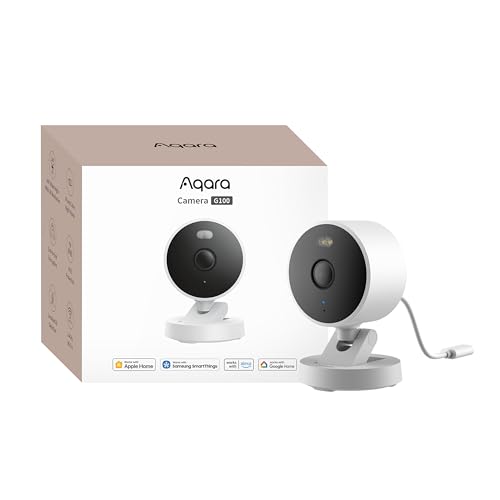
Best for adding a second or third HomeKit Secure Video camera without a second subscription.
- HomeKit Secure Video at roughly forty dollars.
- Sold as an indoor/outdoor model.
- 2K resolution with infrared night vision.
- Also works with Alexa and Google Assistant.
Why buy it: The cheapest route into HomeKit Secure Video we can find, and it is sold as an indoor/outdoor model, which almost nothing at this price is.
Comparison Table: Ecosystem, Rating and Price
| Product | Best for | Buy |
|---|---|---|
| Ring Indoor Cam | Best Overall | Price |
| Google Nest Cam Indoor (Wired, 3rd Gen) | Best for Google Home | Price |
| Aqara 2K Indoor Security Camera E1 | Best for Apple HomeKit | Price |
| Aqara 2K Indoor/Outdoor Security Camera G100 | Best Value | Price |
How We Rank
We do not buy, install or physically handle smart home cameras. There is no test house and we are not going to invent one. What we do instead is read the evidence that already exists at enormous scale: aggregated owner star ratings, weighted by review volume so that a 4.8 from 80 buyers does not outrank a 4.4 from 28,000; the recurring themes in negative reviews, which are far more informative than the positive ones; the documented behavior of each platform's storage and detection architecture; and expert consensus across the category. A model with a thin review history can still place, but it has to earn it on specification and it gets flagged as unproven. Every star rating and review count on this page is pulled from licensed Amazon data rather than typed by us, and a product with no verified rating shows no stars at all. Full method on how we rank.
Every Smart Home Camera Reviewed From Owner Reviews
1. Ring Indoor Cam — Best Overall for Alexa
What owners praise: notification speed and reliability above everything else, Echo Show live view that works on the first attempt, the physical privacy cover, and setup a non-technical family member completes without help. Many reviews describe units still running years after purchase, which is a longevity signal no spec sheet provides. What owners complain about: the subscription, loudly and repeatedly — no plan means no saved video, full stop. 1080p looks dated beside the 2K cameras below it. There is no local storage escape hatch, and the integration outside Alexa is deliberately thin.
2. Google Nest Cam Indoor (Wired, 3rd Gen) — Best for Google Home
What owners praise: alert accuracy that is a clear step above everything else here, the free six hours of event video previews, effortless casting to a Nest Hub or TV, and build quality that feels like the price. What owners complain about: the cost relative to cameras at half the money, a review base under a thousand ratings, wired-only placement, a free history window short enough that Google Home Premium starts to feel compulsory, and total absence of HomeKit support.
3. Aqara 2K Indoor Security Camera E1 — Best for Apple HomeKit
What owners praise: full HomeKit Secure Video support rather than live-view-only pairing, 2K pan-and-tilt coverage of a whole room from a single mount, recordings that land in iCloud at no extra monthly cost for existing iCloud+ subscribers, and a microSD slot for anyone who would rather keep everything local. What owners complain about: an average rating that reflects real friction — app polish below Ring and Nest, occasional reconnection prompts after a router restart, and a pan motor audible in a quiet room. The dependence on an Apple home hub being online is a structural caveat rather than a fault.
4. Aqara 2K Indoor/Outdoor Security Camera G100 — Best Value
What owners praise: HomeKit Secure Video at an entry-level price, which is the cheapest entry into that pipeline we can find; an indoor/outdoor designation that is genuinely rare at the price; 2K resolution; and compatibility with Alexa and Google Assistant as well. What owners complain about: the same rating pattern as its sibling, with setup quirks and app friction the recurring themes. Night vision is infrared rather than color, and mounting hardware is basic enough that some owners replace it.
Buying Guide: What Actually Matters in a Smart Home Camera
The direct answer: ecosystem, then storage cost over five years, then field of view. Resolution is the specification buyers over-weight most and the one that changes the outcome least indoors.
Work Out the Five-Year Cost, Not the Sticker Price
An entry-level camera on a modest monthly plan adds up to a real sum across five years. A mid-range camera storing into an iCloud+ plan you already pay for costs just the hardware. A premium camera with free smart alerts costs just the hardware if the six-hour preview window is enough for you. The cheapest camera on the shelf is regularly the most expensive camera in the house, and this single calculation should drive the decision more than any feature comparison.
Check for HomeKit Secure Video Specifically
"Works with Apple Home" and "supports HomeKit Secure Video" are different claims, and only the second one gives you encrypted iCloud recording. Both Aqara cameras here support the real thing. A great many cameras marketed at iPhone owners do not.
Local Storage as an Insurance Policy
A microSD slot keeps recording when the internet drops and keeps footage inside your house. It is also the only feature that protects you if a manufacturer changes its plan structure after you buy, which has happened repeatedly across this category. Where a camera offers both, use both.
Voice, Displays and Routines
If you own a smart display, the ability to say "show me the living room" is used far more often than the recording features. If you own smart lights, a motion-triggered lamp is a better deterrent than any camera alone. These integrations only exist inside a single ecosystem, which is the whole reason platform choice leads this page.
Mixed Households: iPhones and Echo Speakers Under One Roof
This is the most common real situation and it is not a disaster. The practical approach is to pick the platform that owns the recordings and treat the other one as a viewing surface. The Aqara cameras make that easy: HomeKit Secure Video handles storage and detection in iCloud, while Alexa provides voice and Echo Show live view. What you cannot sensibly do is split cameras across two recording platforms, because you then have two apps, two alert streams and two subscriptions to reason about during the one moment you actually need footage.
If the house is genuinely split down the middle and nobody will compromise, buy on storage economics instead and accept thinner integration. That usually lands on a local-recording camera and a shared password.
How to Choose Between These Four
If your house runs on Alexa and you will pay for a plan: the Ring Indoor Cam. Best ratings, best alerting, least friction.
If your house runs on Google Home and alert accuracy is the priority: the Nest Cam Indoor, accepting the thin review base and the short free history.
If your house runs on iPhones and you already pay for iCloud+: the Aqara E1, because the recurring cost is genuinely zero and the encryption model is the strongest available.
If you want a second or third HomeKit camera, or one that can move outdoors: the Aqara G100, at an entry-level price.
Pros and Cons by Ecosystem
Alexa (Ring Indoor Cam): pros — best alerting, largest review base; cons — subscription required for any recorded history.
Google Home (Nest Cam Indoor): pros — person, animal and vehicle alerts work free; cons — thinner review base, short free history window.
Apple HomeKit (Aqara E1/G100): pros — encrypted iCloud storage with no extra camera-brand fee if you already pay for iCloud+; cons — smaller ecosystem, fewer accessory options.
Ecosystem-neutral buyers who don't want to commit to a single platform should also consider Wyze or eufy, both of which work reasonably with Alexa and Google Assistant without being built specifically for either — see the Wyze cameras owners recommend and our eufy camera picks.
Warranty and Return Policy
Standard one-year warranties apply across every brand here. Test the ecosystem integration specifically within the return window — a camera that technically "works with" a second platform sometimes loses key features (activity zones, smart alerts) outside its native app, which only becomes obvious after setup.
Going Deeper: How HomeKit Secure Video Keeps Footage Private
This page describes HomeKit Secure Video as a recording pipeline rather than a pairing badge, and Apple’s own security documentation explains how it works. According to Apple’s HomeKit camera security guide, “HomeKit decrypts the audio and video streams on the home hub and analyzes the video frames locally for any significant event.” The decision about whether a clip shows a person, animal or vehicle is made on a device in your house, not on a remote server.
When the hub decides an event matters, Apple says it “encrypts the video clip using AES-256-GCM with a randomly generated AES-256 key.” What protects that key is the important part: Apple states that the clip’s metadata, including the encryption key, is uploaded to CloudKit using iCloud end-to-end encryption, while the encrypted poster frame, audio and video go to iCloud servers.
Playback reverses the process on your own hardware. Apple explains that when you view clips in the Home app, the data is downloaded from iCloud and the keys to decrypt the streams are unwrapped locally using iCloud end-to-end decryption. Because the keys stay protected end to end, the encrypted footage stored on Apple’s servers can’t be read without your devices — the basis for the statement above that Apple itself cannot open it.
The same design explains the caveats on this page. Video clips go directly to an Apple device acting as the home hub for analysis and encryption, so if that hub is unplugged or offline, the recording pipeline stops even though the camera itself is fine. It also explains why true HomeKit Secure Video support is rarer than basic HomeKit pairing: the camera has to hand its stream to the hub for this processing, not just appear in the Home app.
The Verdict on the Best Smart Home Security Cameras 2026
There is no single best smart home camera, and any page that names one without asking what phone you carry is selling you something. What the evidence does support is this: the Ring Indoor Cam is the most thoroughly validated camera in the category, backed by one of the deepest, highest-rated review bases we track, and for an Alexa household it is the right default provided you treat the modest monthly plan as part of the purchase price rather than a surprise.
The more interesting recommendation is the Apple one. HomeKit Secure Video is the only architecture here where adding cameras (up to your iCloud+ tier’s camera limit) does not add a monthly bill, and where the provider structurally cannot watch your footage. The Aqara E1, at a mid-range price, or the G100, at an entry-level price, buy into that pipeline for less than a year of most competitors’ subscriptions. Those average ratings are honest about the app friction you are accepting in exchange, and for a lot of iPhone households that is a trade worth making.
Related Accessories

Best for local recording on a camera with a card slot.

Best for angling a camera precisely under an eave, soffit or shelf.

Best for a clean, weatherproof cable entry point on an outdoor mount.
Sources & References
- Use HomeKit Secure Video with iCloud — Apple
- Set up HomePod, HomePod mini or Apple TV as a home hub — Apple
- Indoor Cam (2nd Gen) Specifications — Ring
- Comparing Ring Plans — Ring
- How Nest cameras record and save video history — Google Nest Help
- Google Home Premium features by device — Google Nest Help
- Introducing Google Home Premium — Google
- Camera G100 — Aqara
- HomeKit Camera Security — Apple Platform Security