
Affiliate Disclosure: Some links on this page are affiliate links. As an Amazon Associate, we earn from qualifying purchases — at no extra cost to you. We do not buy, install, or physically handle the cameras we cover; our rankings come from aggregated owner reviews, ratings and expert consensus. Commissions never change our verdicts. We're reader-supported: commissions fund hosting, research and updates, so if a guide helped, buying through our links keeps it going. How we rank · full disclosure.
The short version: the best security camera for an RV has one requirement a home camera doesn't. It can't depend on a WiFi network you control. You're frequently somewhere you don't own the network. For campgrounds with decent WiFi, a standard weather-resistant battery camera like the Ring Outdoor Cam works fine. For boondocking or unreliable campground WiFi, a cellular camera like the Tactacam Defend 360 is the more dependable answer, at the cost of a required data plan (Tactacam lists plans starting at $5 a month as of September 2026).

In Plain English
A home camera assumes one thing an RV cannot promise: a WiFi network you control. At home, your router is always there. On the road, you might have good campground WiFi, patchy WiFi or none at all.
So the first question is not which camera is best. It is where you usually stay. At full-hookup campgrounds with reliable WiFi, a normal weather-resistant battery camera works fine. If you boondock (camp with no hookups) or the WiFi is unreliable, a cellular camera is the dependable choice. It connects over the mobile phone network, as your phone does, but it needs its own data plan.
Campground WiFi has a catch. Many networks show a login page (a captive portal) where you tap to accept terms. A camera has no screen to tap, so it can look connected while never reaching the internet. It is like being handed a hotel key card that does not open your door.
The one thing to do: after arriving somewhere new, open the camera app and confirm it is actually working.
Top Picks at a Glance
The Ranked Field

Best for weather-resistant coverage that mounts anywhere on an RV exterior.
- Weather-resistant, battery or solar powered.
- Flexible freestanding, wall or ceiling mount.
- Color night vision.
- One of the deepest review bases we track.
Why buy it: Mounting flexibility matters more for an RV than a fixed home, and this camera works without any wiring at all.
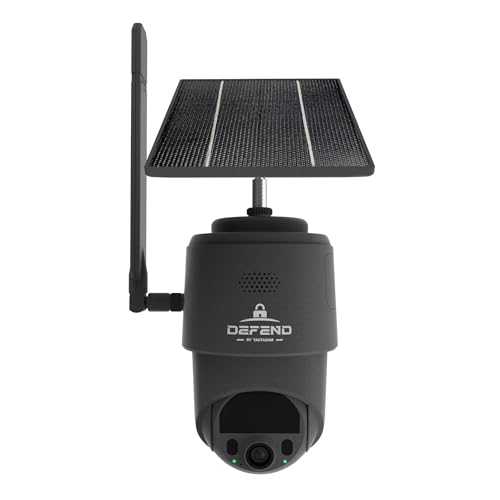
Best for RV parks and boondocking sites with no reliable WiFi.
- LTE cellular, no WiFi required at all.
- Solar-assisted battery power.
- 360° manual pan-tilt-zoom.
- Works anywhere with cell coverage.
Why buy it: A home WiFi network genuinely does not exist most places an RV parks, which is exactly the gap a cellular camera fills.

Best for a cheap interior camera watching the RV door or main living area.
- 2.5K with color night vision.
- Indoor-or-outdoor rated.
- Local recording, no subscription required.
- A deep base of owner ratings.
Why buy it: Cheap enough to run two or three around a rig without a meaningful cost, and it needs no monthly fee while you are off-grid.
Comparison Table
| Product | Best for | Buy |
|---|---|---|
| Ring Outdoor Cam (Stick Up Cam) | Best Overall | Price |
| Tactacam Defend 360 | Best for No Campground WiFi | Price |
| WYZE Cam v4 | Best Budget | Price |
How We Rank
We do not buy, install or physically handle these cameras. This ranking is built from aggregated owner star ratings weighted by review volume and manufacturer specifications relevant to mobile/RV use. Full method on how we rank.
Which RV Security Camera Should You Buy?
You mostly stay at campgrounds with WiFi: the Ring Outdoor Cam, for flexible weather-resistant mounting with no cellular data plan required.
You boondock or frequent sites with unreliable WiFi: the Tactacam Defend 360, since it doesn't depend on any network you don't control.
Watching the interior or the door specifically: the Wyze Cam v4, cheap enough to place two or three around the rig.
Pros and Cons for RV-Specific Use
Ring Outdoor Cam (campground WiFi): Pros — flexible mounting, weather-resistant, no cellular plan needed. Cons — depends entirely on campground WiFi quality, which varies enormously site to site.
Tactacam Defend 360 (no WiFi needed): Pros — works anywhere with cell coverage, solar-assisted. Cons — a data plan is mandatory, and pan-tilt-zoom is manual rather than automatic.
Wyze Cam v4 (interior/budget): Pros — cheap enough to run several around the rig, color night vision. Cons — needs WiFi like the Ring option, no cellular fallback.
eufy's solar cameras are also worth a look for RV use. They eliminate the recharge-cycle maintenance that battery cameras add to an already busy travel schedule. See eufy SoloCam S340 review.
Warranty and Mounting Vibration Notes for Mobile Use
Standard manufacturer warranties generally assume normal stationary household use. None of these brands specifically certify their mounts for the vibration of highway driving. A secure, vibration-resistant mount beyond the standard bracket is a sensible add-on if the camera stays in place while the RV is moving. Warranty coverage is unlikely to address mount failure from road vibration specifically.
Buying Guide: Battery Camera vs Cellular Camera by RV Travel Pattern
The direct answer: classify your typical stops before shopping. Full-hookup campgrounds with reliable WiFi, mixed sites with unpredictable WiFi, or genuine boondocking with no infrastructure at all — each category points to a structurally different camera, not just a different price point.
Full-hookup, WiFi-reliable campgrounds: a standard battery or plug-in camera works exactly as it would at a fixed home. You avoid a cellular data plan entirely.
Mixed reliability: a camera with genuinely free local storage, like Blink's Sync Module 2 with a USB drive (local storage needs no subscription, according to Blink), keeps clips on a drive you hold rather than only in the cloud. It still relies on a working local WiFi network between the cameras and the module, so check how it behaves when the campground connection drops.
True boondocking or dispersed camping: for an RV security camera with no WiFi, only a cellular camera works reliably. The data plan is simply part of the cost of coverage in that scenario — there's no way around it.
Mounting also deserves a second thought for a vehicle that moves. A bracket rated for stationary wall-mounting isn't necessarily rated for highway vibration. Budget for a more secure mount if the camera stays attached while driving.
Power on the Road: House Battery, Solar and RV Electrical Realities
A camera for an RV has to handle two different power states. One is shore power at a full-hookup site. The other is running purely off the RV's own battery bank while boondocking or driving. A battery-powered camera still drains its own internal battery either way, so shore power doesn't extend camera runtime unless the camera is separately wired in. Wiring a camera directly into the RV's 12V house battery is possible through a fused, properly gauged circuit. It removes the camera's own recharge cycle entirely. But it's an electrical task worth handing to an RV technician rather than improvising — a poorly fused tap can drain the house battery faster than solar can replace it. A solar-assisted camera is the simpler middle ground. It recharges independently of the RV's electrical system, as long as it gets a genuinely sunny mounting spot. This applies whether you're running a motorhome or towing a travel trailer; the camera doesn't care which, only the power source does.
Captive Portal WiFi: A Real Campground Compatibility Issue
Many campground WiFi networks use a captive portal. That's a browser page requiring you to accept terms or enter a site code before the connection actually works. It's designed around a phone or laptop with a screen. A WiFi security camera has neither, so it often can't get past that login step at all. The camera reports as connected but never actually gets internet access. This is one of the more common reasons an RV camera goes silently offline at a new site, even with the right WiFi password entered. Checking the camera's app after arriving at a new site, not just assuming remote monitoring is working, catches this early. Some campgrounds offer a separate device network for cameras and smart TVs that skips the portal — worth asking about at check-in. A cellular camera avoids the whole problem, since it never touches campground WiFi at all.
Storing the Camera During the Off-Season
Batteries left installed through months of RV storage degrade faster. They can occasionally leak inside the housing too. Removing the battery, or the whole camera, before winterizing is a sensible habit for anyone parking the rig for the off-season. A hardwired or solar camera left in place is generally fine through storage, as long as the RV's electrical system is properly winterized. Check the camera's stated temperature range against your actual storage climate first — a camera rated for a mild winter isn't necessarily rated for an unheated storage yard further north. Reinstalling the camera each spring takes a few minutes. Confirm it reconnects to the app and remote monitoring works again before you rely on it, rather than assuming it just picks back up on its own.
Going Deeper: Why Captive Portals Strand Cameras, and How Cellular Cameras Avoid Them
The internet’s standards body has written about the captive portal problem directly. The IETF’s RFC 8952, Captive Portal Architecture, published in November 2020, notes that common methods of alerting the user in earlier implementations “involve modifying HTTP or DNS traffic” — in effect, intercepting the first web request to show a login page.
That trick assumes a person with a browser. RFC 8952 states that captive portal solutions that work by affecting DNS or HTTP “generally only function as intended with browsers, breaking other applications using those protocols.” A security camera is one of those other applications: its requests to its maker’s servers get redirected to a page it cannot display, so it can report a WiFi connection while no video goes anywhere. The newer architecture lets devices without screens at least detect that they are captive, but the RFC says it does not describe a mechanism for such devices to negotiate unrestricted access, and that it focuses on devices with user interfaces.
A cellular camera sidesteps the whole exchange by never joining campground WiFi. Tactacam says the Defend 360 uses LTE with automatic network selection by eSIM across most major networks, independent of your phone carrier, and includes a rechargeable battery and solar panel. The cost is the data plan, which Tactacam lists from $5 a month, with the number of live-view sessions set by plan tier.
Two practical lessons follow. If you rely on campground WiFi, ask at check-in about a device network that skips the portal, and verify the camera app after every move. If you often camp where connectivity is uncertain, budget for a cellular plan as part of the camera rather than as an optional extra.
Verdict: The Right Camera for a Motorhome or Travel Trailer
Match the camera to your actual travel pattern rather than defaulting to whatever's popular for a fixed home. If connectivity is ever in doubt at your typical stops, the cellular option is worth the data plan. See no-WiFi and cellular cameras for the wider category, and wireless and battery cameras for standard WiFi options.
Related Accessories

Best for local recording on a camera with a card slot.

Best for angling a camera precisely under an eave, soffit or shelf.

Best for a clean, weatherproof cable entry point on an outdoor mount.
Sources & References
- Ring Outdoor Cam (formerly Stick Up Cam) Battery — Ring
- DEFEND 360 Cellular Camera — Tactacam
- Wyze Cam v4 — Wyze
- Sync Module 2 Local Storage Operation — Blink
- RFC 8952: Captive Portal Architecture — Internet Engineering Task Force (IETF)