
Affiliate Disclosure: Some links on this page are affiliate links. As an Amazon Associate, we earn from qualifying purchases — at no extra cost to you. We do not buy, install, or physically handle the cameras we cover; our rankings come from aggregated owner reviews, ratings and expert consensus. Commissions never change our verdicts. We're reader-supported: commissions fund hosting, research and updates, so if a guide helped, buying through our links keeps it going. How we rank · full disclosure.
The short version: for the best 4K security camera coverage across a whole property, the REOLINK 8CH 4K/8MP system, at a mid-range system price, is the most defensible buy — four true 4K cameras, an 8-channel recorder, a 2TB drive, continuous local recording and no subscription ever. If you want one excellent camera rather than four adequate ones, the Ubiquiti G5 Turret Ultra, at a mid-range price, is the highest-rated camera on this page — though note it is a 2K (4MP) camera, not a 4K one. And if you simply want to see whether 4K is worth it before committing, the Tapo C260, at an entry-level price, puts a 4K pan-tilt camera indoors for the price of a mid-range 2K one.
Before spending premium money, be clear about what 4K buys and what it does not. It buys reach — the ability to crop into a face at the end of a driveway. It does not buy better footage in the dark, and it does not buy fewer false alerts. Our premium cameras hub covers where the money genuinely goes at the top of the market, and best PoE security camera systems covers the cabling and switch decisions that every serious 4K install runs into.
In Plain English
4K is a picture made of about four times as many dots (pixels) as standard 1080p HD. More dots means you can zoom into recorded footage later and still see detail, like a face at the end of the driveway or a plate at the gate.
Think of it like a big, detailed photo you can crop. The more detail you start with, the more you can enlarge one corner and still make sense of it.
But 4K has limits. Close up, say across a living room, ordinary HD already shows a face clearly, so 4K adds little. In the dark, a camera using infrared records in black and white, so extra pixels just give you a sharper gray shape. And 4K video fills hard drives much faster.
Why it matters: people often pay for 4K when better lighting or smarter alerts would help more.
The one thing to decide: how far away is the thing you want to identify? Far away, 4K earns its price. Close or dark, spend the money elsewhere.
Top Rated Picks at a Glance
When 4K Genuinely Helps, and When It Does Not
The direct answer: 4K is a zoom feature. Its value scales with how far the subject is from the lens, and it is close to worthless at conversational distance.
Where the Extra Pixels Pay
A driveway sixty feet long. A gate at the end of a paddock. A wide frontage where one camera has to cover a hedge line, a path and a parking space. In all of these the subject occupies a small fraction of the frame, and 4K is what lets you crop into that fraction and still have a face or a plate. It also lets one camera do the job of two, because a wide 4K frame can be digitally zoomed into two regions of interest rather than needing two lenses.
Where It Is Wasted
Indoors at eight to fifteen feet, 1080p already resolves a recognizable face and 2K provides comfortable margin. What 4K adds inside a house is storage consumption, upload bandwidth and, in a fair number of owner reviews, a slower app. The Tapo C260 on this page is the exception worth making, not because indoor 4K is necessary but because at an entry-level price it costs no more than the 2K alternatives.
The Trade Nobody Mentions
Four times the pixels means far more data to store. A 4K camera recording continuously at REOLINK's default 6Mbps main stream writes roughly 65GB per day. Four of them fill a 2TB drive in about eight days, which is the figure REOLINK publishes for its own four-camera 4K kit. That is why serious 4K kits ship with 2TB and 4TB drives while 1080p kits ship with 1TB, and it is why 4K and local NVR recording tend to arrive together — almost no consumer cloud plan is priced for continuous 4K.
AI Detection: The Feature That Matters More Than Resolution
Every camera on this page classifies what it sees rather than just noticing motion. Person, vehicle and animal are the standard categories, and the difference in daily life is dramatic: a system that alerts on cars and cats sends dozens of notifications a day until the owner mutes it, at which point the entire investment is dormant.
Two distinctions are worth understanding. On-camera versus cloud detection. Detection running on the camera itself keeps working with no subscription, no upload and no privacy exposure. The REOLINK cameras, the Tapo and the Ubiquiti (via its UniFi Protect console) all do their classification locally, which is a large part of why none of them require a plan. Cloud detection, common on cheaper consumer cameras, stops the moment the subscription lapses.
Detection accuracy versus detection marketing. Owner reviews are unusually consistent here: person detection is reliable on all four of these, vehicle detection is good, and animal detection is the weakest category across every brand. Package detection, where offered, is the least reliable of all. Buy on person and vehicle accuracy and treat the rest as a bonus.
The reason this matters more than resolution is behavioral. A 4K camera whose alerts you have muted is a 4K camera you will not check. Accurate detection is what keeps a system in daily use, and daily use is what makes it useful on the one day it counts.
Our #1 Pick, Best Overall System: REOLINK 8CH 4K/8MP with 2TB HDD
This is the least glamorous recommendation on the page and the one that delivers the most 4K per dollar. Four 8MP cameras, an eight-channel NVR with four spare slots, a 2TB drive, and PoE cabling so that every camera has dedicated bandwidth rather than fighting for airtime on a home router. Continuous recording at 4K is only practical on a wired system, and this is the cheapest credible version of one.
Consensus Score ████████░░░░ 8.6 — from a large, well-established base of verified owner ratings.
What owners consistently report is that the resolution advantage is real and specific: they can crop into footage after the fact and read something they could not read on their previous 1080p system. Person and vehicle detection is accurate enough to leave notifications on. And the total absence of a subscription means the five-year cost is the purchase price, which is roughly a third of what eight cloud cameras would cost over the same period.
The honest weaknesses. Installation is a genuine project — four Ethernet runs through walls or eaves is an afternoon at best and a contractor at worst, and the box price is not the project price. The 2TB drive fills faster than most buyers expect at 4K: REOLINK quotes about eight days of continuous recording across all four cameras at default settings, so plan on roughly a week unless you switch quieter cameras to motion-only recording. The NVR interface is dated next to a polished phone app. And its review base, while respectable, is thinner than the 5MP systems that have been on sale longer, which is the trade for newer sensors.
The Ranked Field: Star Rating, Consensus and Price

Best for a whole house covered in true 4K with continuous local recording.
- Four 8MP/4K PoE cameras with an 8-channel NVR.
- 2TB drive for continuous 24/7 recording.
- Person and vehicle AI detection to cut false alerts.
- No subscription for as long as you own it.
Why buy it: The cheapest route to genuine 4K on every camera at once, recorded locally, with the bandwidth headroom that 4K actually requires.

Best for one very good camera in the position that matters most.
- Compact PoE turret with commercial build quality.
- People, vehicle and animal detection through UniFi Protect.
- Highest owner rating of any camera on this page.
- No per-camera license or subscription fee.
Why buy it: The best-rated camera in this comparison, and the one that scales into a serious system rather than a closed app.

Best for genuine 4K indoors for the price of a mid-range 2K camera.
- 4K sensor on a 360-degree pan and tilt head.
- On-device person and pet detection with AI motion tracking.
- Subscription-free local storage on microSD.
- One of the highest-rated cameras on this page.
Why buy it: Sixty dollars for a 4K pan-tilt camera with local recording is the largest resolution-per-dollar gap anywhere in this category.
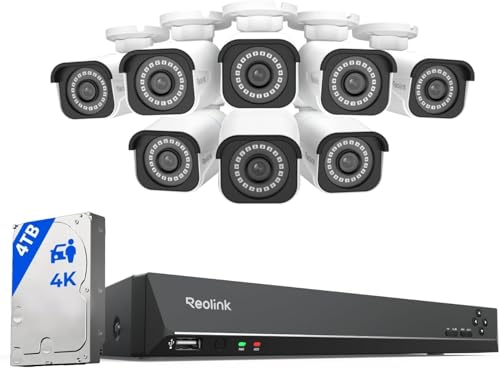
Best for acreage, a long frontage or a building that needs eight or more cameras.
- Eight 4K/8MP PoE bullet cameras and a 16-channel NVR.
- 4TB drive for a longer retention window.
- Person and vehicle detection on every channel.
- Room to expand to sixteen cameras on one recorder.
Why buy it: Eight 4K cameras and a 4TB drive is the point at which a property is genuinely covered rather than sampled.
Comparison Table: Price, Channels and Rating
| Product | Best for | Buy |
|---|---|---|
| REOLINK 8CH 4K/8MP System with 2TB HDD | Best Overall System | Price |
| Ubiquiti G5 Turret Ultra | Best Prosumer Single Camera | Price |
| Tapo 4K Indoor Pan/Tilt Wired C260 | Best Value 4K | Price |
| REOLINK 16CH 4K Security Bullet Camera System with 4TB HDD | Best for Large Property | Price |
How We Rank
We do not buy, install or physically handle 4K security cameras. There is no test house and we are not going to invent one. What we do instead is read the evidence that already exists at enormous scale: aggregated owner star ratings, weighted by review volume so that a 4.8 from 80 buyers does not outrank a 4.4 from 28,000; the recurring themes in negative reviews, which are far more informative than the positive ones; the specification differences owners actually mention unprompted; and expert consensus across the category. A model with a thin review history can still place, but it has to earn it on specification and it gets flagged as unproven. Every star rating and review count on this page is pulled from licensed Amazon data rather than typed by us, and a product with no verified rating shows no stars at all. Full method on how we rank.
Every 4K Camera Reviewed From Owner Reviews
1. REOLINK 8CH 4K/8MP System — Best Overall System
The complete answer for a house that wants 4K everywhere rather than in one spot. What owners praise: genuine 8MP detail with usable digital zoom after the fact, continuous local recording with no subscription, accurate person and vehicle detection, PoE reliability that removes WiFi from the equation, and four spare channels for later. What owners complain about: the cabling job, which is the real cost of the system; a 2TB drive that fills in about a week of continuous recording at default quality; a dated recorder interface; and remote access setup that defeats some non-technical buyers on the first attempt.
2. Ubiquiti G5 Turret Ultra — Best Prosumer Single Camera
The highest-rated camera on this page, and the one built to commercial rather than consumer standards. Note that it is a 2K camera (4MP, 2688 x 1512, per Ubiquiti's tech specs) rather than 4K; it is here as the premium single-camera alternative. What owners praise: image quality and low-light performance well beyond the price, a compact turret body that avoids the internal glare domes suffer from, people, vehicle and animal detection managed through UniFi Protect, centralized management across many cameras and sites, and no license fee per device. What owners complain about: a review base that is still thin; the requirement for a UniFi Protect host to record to, which is a substantial extra cost unless you already run one; and a setup that assumes real networking knowledge. This is a component in a system, not a standalone product.
3. Tapo 4K Indoor Pan/Tilt C260 — Best Value 4K
The cheapest genuine 4K camera we can find, and one of the highest-rated cameras on this page. What owners praise: 4K on a 360-degree pan and tilt head for around sixty dollars, on-device person and pet detection, AI motion tracking that follows a subject across a room, subscription-free microSD recording, and image quality that visibly outclasses the 2K cameras at the same price. What owners complain about: a review base that is still building; a pan motor audible in a quiet room; motion tracking that sometimes loses a subject and returns to the home position mid-event; and indoor-only use, which limits it to one part of a whole-property plan.
4. REOLINK 16CH 4K Bullet Camera System — Best for Large Property
The step up for acreage, a long frontage or a building that genuinely needs eight cameras. What owners praise: eight 4K bullet cameras covering a property properly rather than sampling it, a 4TB drive (REOLINK quotes about six days of continuous recording across all eight cameras at default settings), sixteen channels of expansion headroom, and per-channel person and vehicle detection. What owners complain about: the price, which is a serious commitment at the top of the range; an installation that is realistically a two-day job across a large property; bullet housings that are more visible and more exposed to weather than turrets; and 4TB filling quickly with eight continuous 4K streams, which pushes some owners to motion-based recording on the quieter channels.
Buying Guide: Specifying a 4K System
The direct answer: decide between one great camera and four good ones first. That single choice determines everything else, and buyers who skip it usually end up with four cameras in the wrong places.
One Camera or a System
If there is one position that matters far more than the others — a front door, a gate, a workshop — a single excellent camera like the Ubiquiti will outperform four cheaper ones spread thin. If the property has several approaches and you want continuous coverage of all of them, a system is the only sensible route, because four separate cloud cameras will cost more over five years than the whole REOLINK kit.
Drive Size Versus Retention
Work backward from how late you might need footage. Two weeks is the practical minimum. A month is safer if you travel. Four 4K cameras recording continuously fill 2TB in about eight days at REOLINK's default bitrate; 4TB roughly doubles that for the same four cameras, and motion-only recording on quieter cameras extends it further. Buy the drive you need at purchase, since swapping later means downtime and reconfiguration.
Lens Angle and Mounting Height
4K tempts buyers into wider lenses, on the theory that resolution compensates for coverage. It partly does, but a very wide lens still spreads pixels across a bigger scene and pushes the subject further into the distance. Eight to ten feet high, angled down, with the subject approaching the lens rather than crossing it, remains the configuration that produces identifiable footage regardless of sensor.
Night Performance Is a Separate Purchase
This is the most common disappointment. A 4K sensor in the dark, on infrared, produces a highly detailed monochrome image, and monochrome removes the color detail that descriptions depend on. A 4K ultra HD security camera with color night vision only gets its color when there is light to work with, so solve lighting separately — a floodlight, a spotlight camera, or ordinary exterior lighting on a sensor. The premium cameras hub goes further into which premium features hold up under real conditions.
How to Choose Between These Four
If you want 4K on every approach with no monthly fee: the REOLINK 8CH 4K/8MP system, at a mid-range system price, with the cabling budgeted honestly.
If one position matters more than all the others: the Ubiquiti G5 Turret Ultra, provided you have or will build a UniFi Protect host.
If you want to see what 4K actually gives you before committing: the Tapo C260, at an entry-level price, indoors.
If the property is large enough that four cameras only sample it: the REOLINK 16CH kit with eight cameras and a 4TB drive.
Pros and Cons: Best Overall, Best Value, Best Single Camera
REOLINK 8CH 4K System (Best Overall): pros — complete kit, no subscription; cons — PoE cable installation is real work.
Tapo C260 (Best Value): pros — cheapest genuine 4K entry point; cons — indoor only.
Ubiquiti G5 Turret Ultra (Best Single Camera): pros — highest rating in this comparison; cons — needs a UniFi Protect host.
For buyers on a tighter budget who don't need 4K specifically, Ring and Wyze both offer well-rated 2K options at a fraction of the price — see Ring cameras worth considering and leading Wyze cameras.
Warranty and Installation Notes
Standard one-year warranties apply across these systems. PoE installation is the real project on the multi-camera kits — budget cable-running time or a professional install separately from the hardware cost, covered in wired PoE cameras.
Going Deeper: Pixel Density: How to Turn 4K Into Faces and Feet
The most useful way to think about resolution comes from the IEC 62676-4 video surveillance standard. As Axis Communications explains in its white paper on the 2025 edition, the model is based on how many pixels are needed across a human face, assuming an average face is 16 cm wide, and converts that into pixels per metre at the subject. Its categories run from 20 px/m to overview a scene, through 125 px/m to perceive and 250 px/m to characterize an individual, up to 500 px/m to validate and 1,500 px/m to scrutinize. The pixel density you actually get depends on distance: someone further from the camera is covered by fewer pixels.
Pixel density is simply the horizontal pixel count divided by the width of the scene at the subject’s distance, which makes the comparison on this page concrete. The REOLINK cameras are 3840 × 2160 (8MP), so they reach 250 px/m across a scene about 15 metres (50 ft) wide, or 500 px/m across about 7.7 metres. A 1080p camera, at 1920 pixels, reaches 250 px/m across only about 7.7 metres. The Ubiquiti G5 Turret Ultra’s 2688 × 1512 sensor sits between them at about 10.75 metres. That is the arithmetic behind “4K is a zoom feature”: it keeps a face characterizable across a wider or deeper scene.
Axis is careful to call the model a simplification: light direction, optics quality and image compression all change the real result. That is the same reason this page treats night performance as a separate purchase, because a grayscale infrared image at 250 px/m still lacks the color detail a description depends on.
Storage is the other half of the trade. Reolink lists a 6,144 kbps default bitrate for its 4K kit cameras and about eight days of recording on 2TB with four cameras. The International Telecommunication Union said H.265 would need only half the bit rate of H.264 for comparable video, which is why encoding matters: TP-Link lists H.264 as the Tapo C260’s video compression, recording to a microSD card of up to 512GB, so it does not get that halving. For a single indoor camera that is a small cost; across a multi-camera 4K system, H.265 is what keeps the drive from filling twice as fast.
The Verdict on the Best 4K Security Camera 2026
The REOLINK 8CH 4K/8MP system is the pick for most people who have decided they want 4K, because it is the only configuration here that puts genuine 4K on every approach, records it continuously to a drive you own, and never asks for a subscription. With a review base that is solid rather than enormous, the recurring praise — being able to crop into footage and actually read something — is exactly the benefit 4K is supposed to deliver.
Two honest qualifications. The highest-rated camera on this page is the Ubiquiti G5 Turret Ultra, and if your requirement is one outstanding camera rather than four competent ones, it is the better-built piece of hardware — at 2K rather than 4K resolution. And before spending premium money at all, check that resolution is really your constraint: if the footage you are unhappy with was shot in the dark, a floodlight will fix more than a sensor upgrade will. Where the subject is far away and the light is adequate, 4K earns its price. Where it is close or dark, it mostly earns you a bigger hard drive.
Related Accessories

Best for local recording on a camera with a card slot.

Best for angling a camera precisely under an eave, soffit or shelf.

Best for a clean, weatherproof cable entry point on an outdoor mount.
Sources & References
- RLK8-800B4 4K PoE Security Camera System Specifications — Reolink
- RLK16-800B8 4K PoE Security Camera System Specifications — Reolink
- UniFi G5 Turret Ultra Tech Specs — Ubiquiti
- Tapo C260 4K Pan/Tilt Security Camera — TP-Link Tapo
- ONVIF Profile S — ONVIF
- Pixel Density Based on IEC 62676-4:2025 (white paper) — Axis Communications
- Reolink RLK8-800D4 8MP 4K Security Camera System with PoE NVR — Reolink
- New video coding standard HEVC (H.265) approved — International Telecommunication Union