
Affiliate Disclosure: Some links on this page are affiliate links. As an Amazon Associate, we earn from qualifying purchases — at no extra cost to you. We do not buy, install, or physically handle the cameras we cover; our rankings come from aggregated owner reviews, ratings and expert consensus. Commissions never change our verdicts. We're reader-supported: commissions fund hosting, research and updates, so if a guide helped, buying through our links keeps it going. How we rank · full disclosure.
Short version: a DIY home security system is a kit you install yourself, with no installer visit and usually no long contract. For a true alarm with sensors, the SimpliSafe 8-piece kit is our top pick on this list. If you would rather watch the property with cameras and pay no monthly fee, the eufy four-camera kit or the wired Reolink NVR kit fit best, and Blink is the cheapest way to start.
Deciding whether you need monitoring at all? Read our Ring camera rankings, is Ring worth it and best Blink cameras alongside this page.
In Plain English
A home security system is a set of devices that watch your home and tell you when something is wrong. A DIY system means you set it up yourself, usually in an afternoon, by sticking sensors on doors and windows or mounting cameras, then connecting them to an app on your phone.
There are two big styles. An alarm kit uses sensors that notice a door opening or movement inside and can sound a siren. A camera kit shows you video, so you can see what set off the alert. Some people want both.
Monitoring is the extra layer. It means a company watches for alarms and calls for help. It is optional in most DIY kits, and you pay for it separately. Think of it like a smoke alarm: the device works on its own, and monitoring is like having someone phone the fire department for you.
The one thing to decide first is whether you need a person watching, or whether phone alerts are enough.
Top Picks at a Glance
The Ranked Field

Best for a true alarm system, with sensors on the doors and inside, that you install yourself.
- 8-piece wireless kit for multiple entry points.
- Self-install, no technician visit.
- Optional 24/7 professional monitoring.
- Listed as no contract.
Why buy it: The closest thing on this list to a traditional alarm, with the option to add professional monitoring later instead of committing on day one.
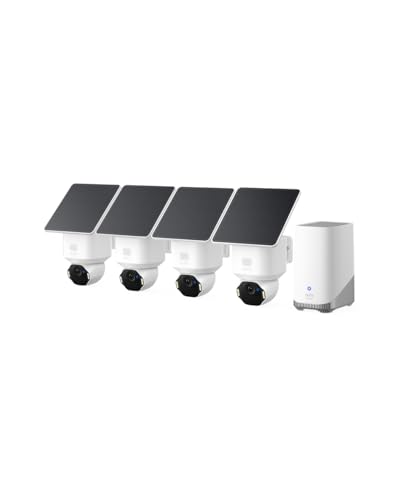
Best for covering the whole property with cameras and no monthly fee.
- Four 4K solar-powered cameras in one kit.
- No wiring to the house.
- eufy positions its local-storage line as no monthly fee.
- Optional premium features may need a plan.
Why buy it: Four cameras in one purchase and a brand built around local storage, which is the most direct way to avoid a monthly bill.

Best for an inexpensive way to cover several outdoor positions on battery power.
- Three wireless cameras, 1080p.
- Listed with two-year battery life.
- Sync Module Core included.
- Local storage needs a Sync Module 2 and a USB drive.
Why buy it: A low-cost, multi-camera starting point from Amazon’s own brand, with a route to free local storage if you add the right module.

Best for starting with the front door and expanding later.
- Head-to-toe HD view.
- Listed with two-year battery life.
- Sync Module Core included.
- Simple setup.
Why buy it: A small, inexpensive entry point that lets you build a system one piece at a time.

Best for a permanent, local-recording system with cables run back to a recorder.
- Eight-channel 4K recorder.
- 2TB hard drive included on the listing.
- Wired power and data, no batteries.
- Recording stays on your own hardware.
Why buy it: The most robust kit here for a homeowner willing to run cable, with no batteries to charge and no cloud plan to buy.

Best for buyers who want the ADT name and an option to grow into its monitoring.
- 2K HDR video doorbell.
- Self-install.
- Listed as plan required.
- A path into ADT’s wider ecosystem.
Why buy it: Not the cheapest way in, but a sensible starting point if you already know you may want a national brand’s monitoring later.

Best for a cheap indoor or covered-outdoor camera with local microSD recording.
- 2.5K resolution.
- Listed as no subscription required.
- microSD recording, card sold separately.
- Pairs with Wyze’s sensor and monitoring line.
Why buy it: One of the lowest-cost ways to add a camera without adding a bill.
Comparison Table
| Product | Best for | Buy |
|---|---|---|
| SimpliSafe 8 Piece Wireless Home Security System | Best Full Alarm Kit | Price |
| eufy SoloCam E42 4K Solar Camera, 4-Cam Kit | Best No-Fee Camera Kit | Price |
| Blink Outdoor 4 Wireless Camera, 3-Camera System | Best Value Camera Kit | Price |
| Blink Video Doorbell with Sync Module Core | Best Doorbell Starter | Price |
| Reolink RLK8-800D4 8-Channel 4K PoE NVR Kit | Best Wired Local Kit | Price |
| ADT Blu Video Doorbell Home Security System | Best Ecosystem Entry | Price |
| Wyze Cam v4 (2.5K) | Best Budget Add-On Camera | Price |
How We Rank
We do not buy, install or physically test these kits. Rankings come from published specifications, listing details and aggregated owner reviews. Where a product has a verified star rating in our licensed Amazon data it appears on its card; several of these listings currently have none, and we show nothing rather than a guess. Full method on how we rank.
Alarm Kit or Camera Kit?
This is the first real decision. An alarm kit, like the SimpliSafe, is built around a base station and sensors: contact sensors on doors and windows, motion detectors inside, a keypad and a siren. It tells you something happened, and it can alert a monitoring center. A camera kit, like the eufy, Blink or Reolink kits, shows you what happened, but on its own it does not know a door opened unless the camera sees it. Many homes end up with both: sensors for the entry points and a doorbell or two cameras for the visual record.
If you are on a tight budget, start with the piece that matches your worry. Worried about break-ins while you sleep or travel? Sensors and a siren. Worried about deliveries, a car in the drive or an unknown visitor? A doorbell and an outdoor camera.
Where Ring Alarm Fits
Ring sells a DIY alarm kit of its own, built around a base station, keypad and sensors. We do not link a listing for it here because we have not tracked one for this page, so we cannot point you to a specific purchase. What Ring says on its Ring Pro plan page is useful for planning: 24/7 professional monitoring is part of Ring Pro, together with alarm cellular backup, and Ring Edge local video storage is limited to Ring Alarm Pro owners. That means the monitoring is a subscription add-on rather than something built into the kit. Ring also notes that additional permit fees may apply locally for professional monitoring. If you are already in the Ring app, its alarm kit is worth pricing against SimpliSafe.
Blink: The Cheap Start With a Free-Storage Route
Blink kits are inexpensive and expandable. Blink’s support pages explain the storage picture: a subscription gives cloud storage, but you can also save clips locally without a subscription using a Sync Module 2 with a USB drive, or a Sync Module XR with a microSD card. The Sync Module Core that ships in the kits on this page does not support local storage, so if free local recording matters, budget for the module. Without any storage, Blink says you still get live view, motion alerts and two-way audio.
eufy: Local Storage and No Monthly Fee
eufy describes its LocalSecure line as a DIY security system with no monthly fee, built around local storage, with a HomeBase hub offering expandable storage of up to 16 TB. The company adds a caveat: if you choose cloud features such as cloud storage or push notifications with thumbnail previews, some content is sent to the cloud, and optional or premium features may require a subscription. eufy also mentions a separate optional protection plan. For a buyer who wants cameras, sensors and no bill, eufy’s approach is the most direct on this list.
Wyze: Sensors, Monitoring and the Lowest Prices
Wyze sells a home monitoring system with a Sense Hub, motion sensor, keypad, entry sensor, climate sensor and leak sensor, and says up to 100 sensors can be installed. The sensors are described as peel-and-stick with no tools needed. Its 24/7 professional monitoring is provided by a third party, Noonlight, and its page lists a US price of $9.99 a month or $99.99 a year as of September 2026. Paying yearly costs $99.99 against $119.88 for twelve monthly payments, a saving of $19.89 a year, and over five years the yearly route works out to $499.95. The page does not set out the contract term, so read the cancellation policy first.
Do You Need Professional Monitoring?
Monitoring is the part that turns a home alarm from a noisemaker into a service that calls for help when nobody responds. It costs money every month, so it pays to be honest about who will respond without it. If you are usually home, or a neighbor or family member can respond to phone alerts, self-monitoring is often enough. If you travel a lot, live alone, or want someone to call the fire department when there is smoke and you are away, monitoring earns its cost. You can also buy the kit now and add monitoring later, which is one of the real advantages of DIY.
What to Look For
Sensor coverage. Count the entry points on the ground floor and add one motion detector for the main hallway. A kit that comes with fewer sensors than you need is cheaper only until you buy more.
Power and backup. Look for battery backup and, if you can, cellular backup, so the system works during a power or internet outage.
Storage. Decide between cloud plans and local storage before you buy, since it decides your monthly cost.
Expandability. Check that you can add sensors, cameras and a doorbell later without replacing the base.
Ecosystem. If you already use Alexa, Google or Apple Home, check compatibility on the listing.
Which DIY System Is Right for You?
You want a real alarm, installed yourself: the SimpliSafe 8-piece kit.
You want cameras around the property and no monthly fee: the eufy four-camera kit.
You want the cheapest start: the Blink doorbell or three-camera kit, and add a Sync Module 2 and USB drive if you want free storage.
You want a permanent wired system: the Reolink NVR kit, if you are happy to run cable.
You want ADT’s name and possible monitoring later: the ADT Blu system, aware that a plan is required for it.
Going Deeper: What the FTC Says to Check Before You Sign
Buying a boxed DIY kit online avoids most of the pressure that surrounds home security sales, but the rules that protect you are worth knowing if you ever add monitoring. The Federal Trade Commission’s guide to avoiding home security scams explains that its Cooling-Off Rule gives you three business days to cancel a deal you signed in your home or anywhere that is not the seller’s permanent place of business, and that you do not have to give a reason.
The same guide lists the warning signs: pressure to act now, offers of free equipment that are tied to a long monitoring contract, scare tactics about burglaries in your neighborhood and phony upgrades from someone claiming to represent your current company. Its advice before signing is to get everything in writing, including the installation price, the monthly, quarterly or annual monitoring fee and the cancellation policy.
The critical questions the FTC recommends asking are about monitoring costs, billing frequency, what happens during power outages, who pays for repairs and whether there is an early termination penalty. Those are the same questions worth asking a DIY vendor about any monitoring add-on, even one sold online. If the answer is not on the page, read the cancellation policy that the checkout links to.
The practical takeaway for a DIY buyer is a simple order of operations. Buy the hardware first, live with the alerts for a month, and only then decide whether to add monitoring. Companies that make you choose a plan before you have seen the kit are asking you to commit before you can judge. If you do add monitoring, compare the annual cost of every option, not just the monthly figure, and note the term. And if a salesperson turns up unannounced offering to replace your existing system, remember the FTC lists that as a common scam.
The Verdict
The SimpliSafe 8-piece kit is the right default for someone who wants a real DIY alarm they can expand and choose to monitor later. For camera-first households, eufy and Reolink offer the strongest no-monthly-fee routes, and Blink is the cheapest place to begin. Whichever you choose, start small, live with it for a month and add pieces as you learn what your home needs.
Sources & References
- How To Avoid Scams When You Shop for a Home Security System — Federal Trade Commission
- Wyze Home Monitoring — Wyze
- Ring Pro — Ring
- Blink Storage Options — Blink Support
- eufy LocalSecure System — eufy
- Using IP Cameras Safely — Federal Trade Commission