
Affiliate Disclosure: Some links on this page are affiliate links. As an Amazon Associate, we earn from qualifying purchases — at no extra cost to you. We do not buy, install, or physically handle the cameras we cover; our rankings come from aggregated owner reviews, ratings and expert consensus. Commissions never change our verdicts. We're reader-supported: commissions fund hosting, research and updates, so if a guide helped, buying through our links keeps it going. How we rank · full disclosure.
Short version: the best video baby monitor depends on the feature you want. For watching two rooms at once, the GoodBaby split-screen monitor is the best-reviewed two-camera option. For the largest, easiest-to-see screen on a single camera, the HelloBaby 6" monitor leads. And if remotely repositioning the camera matters to you, the VTech pan-tilt-zoom model is built around that feature, though the HelloBaby 6" camera also pans and tilts remotely per HelloBaby's specifications.
Looking for the overall top-rated pick regardless of feature set? See a ranked list of baby monitors, which ranks the whole category rather than video features alone.

In Plain English
A video baby monitor is a small camera in the nursery that shows a live picture on a handheld screen you carry around the house. All three on this page connect straight to their own screen, not through your internet, so there is no app or monthly fee.
They differ in one main way each. The GoodBaby comes with two cameras and splits its screen in half, so you can watch two rooms at once, like a TV showing two channels side by side. The HelloBaby has the biggest screen, 6 inches, for seeing detail at a glance. The VTech lets you turn and zoom the camera from the handheld screen, so you can follow a baby who has wriggled into a corner without going into the room.
Night vision, so you can see in a dark room, is close to universal on these monitors, and most add a talk button so you can soothe the baby with your voice.
The one thing to do: choose by your situation, two rooms, a big screen or a movable camera, then place the camera well away from the crib.
Top Rated Picks at a Glance
The Ranked Field: Star Rating, Consensus and Price
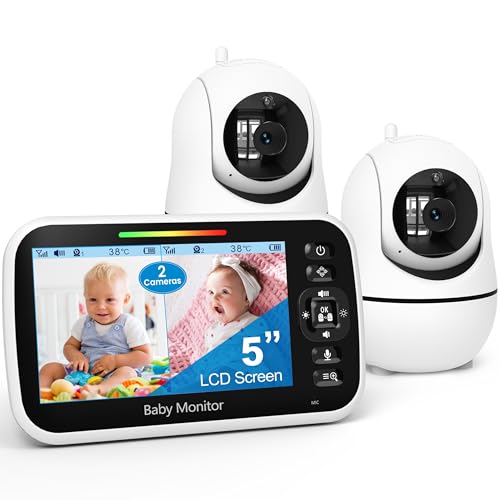
Best for seeing two rooms at once on a single split-screen display.
- 5" split-screen display.
- Two cameras included.
- No WiFi required.
- Over 14,000 verified owner ratings.
Why buy it: A well-reviewed way to watch two rooms from one screen, at a price well below buying two separate single-camera monitors.

Best for the largest single-camera screen in this field, for easy at-a-glance viewing.
- 6" video screen — the largest here.
- Long battery life with a power-saving mode.
- No WiFi, no app required.
- Over 16,700 verified owner ratings.
Why buy it: The largest screen on this page at a strong owner rating, with battery life that comfortably outlasts most video monitors.

Best for remotely adjusting the camera angle from the parent unit without walking to the room.
- 5" screen with remote pan-tilt-zoom control.
- No WiFi required.
- Night vision and two-way talk.
- Over 2,200 verified owner ratings.
Why buy it: Remote pan-tilt-zoom control from the parent unit, useful as a child moves around a crib or room.
Comparison Table
| Product | Best for | Buy |
|---|---|---|
| GoodBaby 5" Split Screen Baby Monitor, 2 Cameras | Best 2-Camera Split-Screen | Price |
| HelloBaby 6" No WiFi Video Baby Monitor | Best Large Screen | Price |
| VTech Baby Monitor No WiFi, Remote Pan-Tilt-Zoom | Best Pan-Tilt-Zoom | Price |
How We Rank
We do not buy or physically install these monitors. Every star rating and review count comes from licensed Amazon data. Full method on how we rank. This page is product information, not medical or safety advice.
Types of Video Baby Monitors
Split-screen, multi-camera monitors like the GoodBaby 5" model let you watch two rooms on a single screen at once, useful for twins, a nursery plus a play area, or any household with more than one space to keep an eye on — the tradeoff is a smaller view of each individual room compared with a single-camera monitor's full-screen feed.
Large-screen single-camera monitors like the HelloBaby 6" prioritize seeing one room in as much detail as possible, at the cost of a bigger parent unit that's less convenient to carry from room to room throughout the day.
Pan-tilt-zoom (PTZ) monitors like the VTech model add the ability to remotely adjust the camera's viewing angle from the parent unit, useful when a child moves to a different part of a crib or room and a fixed camera angle no longer shows them clearly.
Night Vision and Two-Way Talk
Night vision is close to a universal feature across this category, letting the camera show a usable image in a dark room without needing a nightlight left on. Two-way talk lets a parent speak through the parent unit and have it play through the camera's speaker in the nursery, useful for a soothing voice without walking into the room. Check the current listing for each model's exact night-vision range and two-way-talk clarity, since both features are common across the category but the actual implementation quality can vary meaningfully between manufacturers and price points.
WiFi vs No-WiFi Video Monitors
All three monitors on this page are no-WiFi models: the camera talks directly to the parent unit over its own private radio signal, with no home network or internet connection involved at any point. A WiFi baby monitor instead streams through an app and the cloud, which adds the ability to check in from anywhere with a phone signal, but it also means the video feed technically passes through the manufacturer's servers along the way. Neither category is categorically better — no-WiFi keeps the feed entirely local and removes any internet-based attack surface, while WiFi models trade that for remote-viewing convenience when a parent is away from the house.
What to Look For
Range. Check each model's rated range, measured under open, obstruction-free conditions — walls, floors and household electronics typically reduce real-world range below the rated figure, so buy with your actual home's layout and construction in mind rather than the headline number alone.
Battery life on the parent unit. A monitor you have to recharge every few hours is a real daily annoyance; look for a rated battery life that comfortably covers a full day or night without a charge.
Screen size vs portability. A larger screen shows more detail at a glance, but the parent unit itself is generally bigger and less pocketable as a result — decide which tradeoff fits how you actually plan to carry it around the house.
Extra sensors. Some monitors add a room-temperature display, useful for checking the nursery's temperature without a separate thermometer, without adding real cost or complexity.
Local recording, if you want it. Not every no-WiFi monitor records — some are strictly live-view only. If keeping a recorded history matters to you, confirm the specific model supports local recording, typically to a microSD card, before ordering rather than assuming it's included by default.
Privacy and Security
Because none of the three monitors on this page connect to the internet or your home WiFi, there's no remote-access attack surface the way there can be with an internet-connected camera — the signal is a private, direct link between camera and parent unit only, with nothing passing through a manufacturer's cloud servers. This is one of the main reasons some parents specifically choose a no-WiFi monitor for a nursery, alongside the simple fact that there's no subscription fee or app account to manage.
A Note on Safe Sleep
A video monitor is a convenience tool for checking in visually — it isn't a medical device and it doesn't replace safe-sleep practices recommended by pediatric health authorities, such as placing an infant on their back in an otherwise empty crib. None of the monitors on this page are marketed or reviewed here as a breathing or vital-signs monitor; they show, and in some cases record, video and audio, nothing more than that. Talk to your own pediatrician about safe-sleep guidance specific to your child rather than relying on any camera feature as a substitute for that advice.
Going Deeper: Placing the Camera for a Good View and a Safe Cord
A video monitor is only as useful as its camera position, and the most obvious spot for the best picture is also the riskiest one. In an April 2026 letter to the ASTM subcommittee responsible for the voluntary baby monitor standard, U.S. Consumer Product Safety Commission staff reported 83 incidents involving baby monitors between January 2018 and July 2025, including ten strangulation deaths. Staff said those deaths involved monitors installed on ceilings or high walls above cribs or play yards, where the monitor fell into the crib or a length of cord secured to the wall came loose within the child’s reach. The letter notes it reflects staff views and was not reviewed by the Commission itself.
That is where the camera features on this page earn their keep. HelloBaby lists its 6-inch HB6560 with 355° pan and 120° tilt, and the VTech PTZ model is built around remote pan-tilt-zoom. A camera that can be turned and zoomed from the parent unit can sit on a shelf or wall well away from the crib and still frame the sleeping baby, instead of being mounted directly overhead for a fixed top-down shot.
Signal placement matters too. VTech’s quick start guide for its no-WiFi video monitor lists a 2.4GHz transmit frequency (2405-2475 MHz) across 32 channels, and advises placing the monitor at least 3 feet from other electronics such as wireless routers to avoid interference. The same guide warns that children have strangled in cords, tells owners to keep the cord more than 3 feet from the crib, and says never to put the camera inside the crib. HelloBaby says its 6-inch model uses 2.4GHz FHSS, a frequency-hopping link that switches channels to limit interference.
Put together: pick the camera spot first, at least 3 feet from every side of the crib and clear of the router, route and secure the cord so no length can reach the crib, and then use pan, tilt and zoom to get the view rather than moving the camera closer.
Which One Should You Buy?
Watching two rooms at once — twins, or a nursery plus a play area: the GoodBaby 5" Split Screen Baby Monitor.
A single room where the largest, easiest-to-see screen matters most day to day: the HelloBaby 6" monitor.
A child who moves around the crib or room and needs a repositionable camera view: the VTech PTZ model.
The Verdict
The GoodBaby split-screen monitor is the right choice if you need two-camera coverage. For a single room, the HelloBaby 6" monitor’s large screen is the strongest all-round pick, and the VTech PTZ model is worth the modest premium if remote repositioning genuinely matters to your setup. All three keep the video feed local rather than routing it through the internet or a manufacturer's cloud servers, which is worth knowing whether or not it ends up changing your final decision.
Related Accessories

Best for local recording on a camera with a card slot.

Best for angling a camera precisely under an eave, soffit or shelf.
Sources & References
- HelloBaby 6" Video Baby Monitor with 1 Camera HB6560 — HelloBaby
- Ways To Reduce Baby's Risk — NICHD Safe to Sleep campaign (NIH)
- Using IP Cameras Safely — Federal Trade Commission
- Staff Letter to ASTM F15.68 on Baby Monitor Cord Strangulation (April 2026) — U.S. Consumer Product Safety Commission
- VM819 / VM819-2 Video Baby Monitor Quick Start Guide — VTech