
Affiliate Disclosure: Some links on this page are affiliate links. As an Amazon Associate, we earn from qualifying purchases — at no extra cost to you. We do not buy, install, or physically handle the cameras we cover; our rankings come from aggregated owner reviews, ratings and expert consensus. Commissions never change our verdicts. We're reader-supported: commissions fund hosting, research and updates, so if a guide helped, buying through our links keeps it going. How we rank · full disclosure.
The short version: the best security camera for a vacation home or any other second property has to survive long unattended stretches. That changes the priority order from a primary residence. Connectivity you can't guarantee, like WiFi that might be shut off between visits, points toward a cellular option like the Tactacam Defend 360. Long battery life or solar power matters more here than anywhere else, since you can't easily swing by to recharge a dead camera.
In Plain English
A camera at a second home has a harder life than one at your main house. Nobody walks past it every day, so if it stops working, you may not find out for weeks or months.
That changes what matters. First, will the internet stay on while you are away? If you switch it off between visits to save money, only a cellular camera will work, because it uses the mobile network instead of home WiFi. Second, how often can you visit? A battery that needs charging every few months is fine for a place you see weekly, and a real problem for one you see twice a year. Solar power helps if the camera gets steady sun.
Think of it like leaving a houseplant with no one to water it. You choose the plant that survives neglect, not the prettiest one.
The one thing to do: before you leave each time, check the whole chain works — power, connection and an actual recording when you walk past. And give a caretaker their own login rather than yours, so you can remove it later.
Top Cellular Camera and Solar Power Picks at a Glance
The Ranked Field
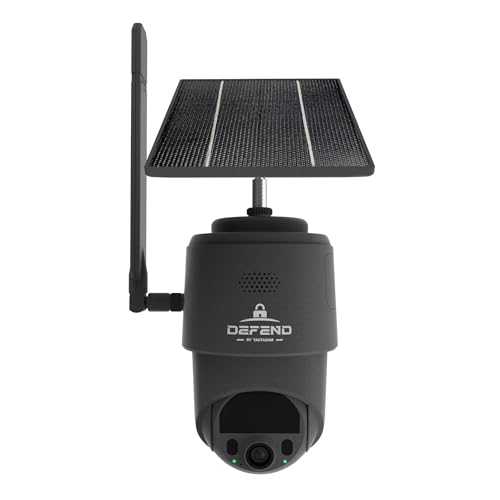
Best for a vacation home where WiFi is disconnected or unreliable between visits.
- LTE cellular, no home network required.
- Solar-assisted battery power.
- 360° manual pan-tilt-zoom.
- Works independent of any router or internet plan at the property.
Why buy it: A vacation home often has no active internet between visits, which is exactly the scenario a cellular camera exists for.

Best for long unattended stretches with WiFi left running at the property.
- Up to 2 years quoted battery life.
- IP65 weather resistant.
- Local backup storage available with no subscription.
- A deep base of owner ratings.
Why buy it: The longest quoted battery life in this category matters most at a property you only visit occasionally to service equipment.

Best for a sunny vacation property where you want to eliminate battery visits entirely.
- Built-in solar panel.
- No subscription required, onboard storage.
- 360° pan-tilt coverage.
- A deep base of owner ratings.
Why buy it: A genuinely sunny position means the camera can run indefinitely without a maintenance visit just to swap or recharge a battery.
Comparison Table: Battery Life, WiFi and Data Plan Trade-offs
| Product | Best for | Buy |
|---|---|---|
| Tactacam Defend 360 | Best for No Home WiFi | Price |
| Blink Outdoor 4 | Best Low-Maintenance Battery | Price |
| eufy Security SoloCam S340 | Best Solar Option | Price |
How We Rank
We do not buy, install or physically handle these cameras. This ranking is built from aggregated owner star ratings weighted by review volume and specifications relevant to unattended, low-maintenance placement. Full method on how we rank.
Which One Should You Buy?
WiFi at the property is unreliable or disconnected between visits: the Tactacam Defend 360, for connectivity independent of any router.
WiFi stays on year-round: the Blink Outdoor 4, for the longest quoted battery life if you can't visit often to recharge.
A genuinely sunny position: the eufy SoloCam S340, to eliminate battery maintenance visits almost entirely.
Pros and Cons for an Unattended Property
Tactacam Defend 360 (cellular): Pros — works with zero home network, connects across most major carriers automatically. Cons — a data plan is mandatory, and pan-tilt-zoom is manual rather than automatic.
Blink Outdoor 4 (long battery): Pros — quoted 2-year battery life, free local backup storage once paired with a Sync Module 2 (USB drive) or Sync Module XR (microSD). Cons — still depends on the property's WiFi staying on, and real-world battery life drops with motion-event volume.
eufy SoloCam S340 (solar): Pros — no subscription, panel can eliminate recharge visits entirely in real sun. Cons — needs consistent direct sun to deliver on that promise, and still needs the property's WiFi to be active for remote viewing.
Ring and Wyze cameras are reasonable options too, if the property has reliable year-round WiFi and you're comfortable with more frequent recharge visits. See the Ring cameras owners recommend and the best Wyze cameras for most homes for those alternatives.
Warranty and Remote Recharge Realities While You're Away
Hardware warranties across these brands are typically one year, but confirm each brand’s current terms. The practical risk at a vacation home is different from a primary residence, though: a dead camera or a failed connection can go unnoticed for weeks between visits. Test the full chain — power, connectivity, and an actual triggered recording — before you leave each time, not just at initial installation. Consider a camera positioned to also confirm the others are still online.
Buying Guide: Visit Frequency and Monitored Alarm System Trade-offs for a Second Property
The direct answer: answer the connectivity question before the camera question. It decides which entire product category you're shopping in. If you can and will keep internet active at the property year-round, a standard battery camera works exactly like it would at a primary home. If internet gets shut off between visits, a real cost-saving move many owners make, a cellular camera is not optional. It's the only category that functions at all.
Visit frequency matters more here than anywhere else in this comparison. A property you visit weekly can tolerate a battery camera's recharge cycle. A property you visit twice a year cannot. By the time you notice a dead battery, you may have gone months with no coverage. Match the power source to how often you're realistically able to service it, not to what would be convenient at your primary residence.
Star rating matters less here than reliability under neglect. A camera that's merely good but proven to keep working unattended for months beats a slightly higher-rated one with a shorter real-world duty cycle. This is one of the few situations on this site where "boring and durable" should outrank "best reviewed."
Property Manager and Caretaker Access
Many vacation homes rely on a local caretaker, cleaner or property manager between owner visits. Most camera apps support multiple user logins with separate credentials for this reason. Sharing your own personal login is the less secure option, and it's harder to revoke cleanly later. A separate login can be removed in seconds once an arrangement ends. Build that removal into your offboarding routine, the same way you'd change a physical lock's code when a relationship with a service provider ends. Forgetting to revoke old access is a common and avoidable gap at a property nobody's watching closely day to day.
Insurance and Vacant-Property Risk
An unattended or seasonally-occupied home is statistically a higher insurance risk than a primary residence someone comes home to every day. Some insurers offer a discount for security devices, and the Insurance Information Institute notes the larger discounts are generally tied to alarms that report to a monitoring station. Confirm directly with your own insurer rather than assuming a discount applies. Ask specifically whether a camera-only setup qualifies, or whether a fully monitored alarm system is required to unlock any rate reduction. Separately, keep a record of the camera's install date and any footage retained after a break-in or storm event — insurers may ask for it during a claim, and a vacation home owner isn't always on-site to gather it after the fact.
Testing Cadence for a Low-Visit Property, and When to Loop In a Neighbor
A camera at a home you visit weekly gets noticed quickly if it stops working. A camera at a home you visit twice a year does not. Test the full chain on every visit: power, connectivity, and an actual triggered recording, not just a quick glance at the live view. Between visits, check the app periodically if you have any reason to suspect an issue, like a storm passing through the area or a neighbor mentioning something unusual. A trusted neighbor who knows the camera is there can also be a genuinely useful second set of eyes on a property that otherwise sits unattended between your own visits. A camera that silently fails between two visits months apart can leave a property with zero coverage for an uncomfortably long stretch. That gap, not the camera's star rating, is the single biggest real-world risk specific to a low-visit-frequency vacation home.
Going Deeper: Keeping Remote Access Secure on an Unwatched Property
A vacation-home camera is managed almost entirely through an app and an online account, so the account matters as much as the hardware. The FTC’s guidance on how to secure your home security cameras warns that “if your video isn’t secure, a hacker might be able to watch your video, too,” and recommends a strong password that isn’t reused from another account, avoiding default usernames and passwords, and turning on two-factor authentication where it is offered.
Two-factor authentication works because it asks for more than one kind of proof. CISA’s More than a Password guidance describes the factors as something you know, such as a PIN or password; something you have, such as an authentication app or a confirmation text on your phone; and something you are, such as a fingerprint or face scan. CISA says users who enable MFA are “significantly less likely to get hacked.” A stolen password on its own is then not enough to open your cameras.
Sharing access is where many second-home setups go wrong. The FTC suggests looking for cameras that offer “different levels of permissions” for shared users, which lines up with the advice above to give a caretaker or property manager a separate login rather than your own. When the arrangement ends, deleting that one user closes the door without changing your password everywhere.
Finally, keep the software current. The FTC advises checking the manufacturer’s site for updates or signing up to receive them automatically, keeping the viewing app updated too, and using WPA3 or WPA2 encryption on the property’s WiFi. At a home you rarely visit, automatic updates are the closest thing to routine maintenance you can do from a distance.
Verdict
Design around your actual visit frequency and whether you'll keep internet active at the property, not around what's popular for a primary home. See no-WiFi and cellular cameras and solar cameras for the wider low-maintenance categories.
Related Accessories

Best for local recording on a camera with a card slot.

Best for angling a camera precisely under an eave, soffit or shelf.

Best for a clean, weatherproof cable entry point on an outdoor mount.
Sources & References
- DEFEND 360 Cellular Security Camera — Tactacam
- Outdoor 4 Camera Tech Specs — Blink
- Outdoor 4 Camera FAQ — Blink
- Blink Storage Options — Blink
- eufy SoloCam S340 — eufy
- 12 Ways to Lower Your Homeowners Insurance Costs — Insurance Information Institute
- How To Secure Your Home Security Cameras — Federal Trade Commission
- More than a Password — Cybersecurity and Infrastructure Security Agency (CISA)