
Affiliate Disclosure: Some links on this page are affiliate links. As an Amazon Associate, we earn from qualifying purchases — at no extra cost to you. We do not buy, install, or physically handle the cameras we cover; our rankings come from aggregated owner reviews, ratings and expert consensus. Commissions never change our verdicts. We're reader-supported: commissions fund hosting, research and updates, so if a guide helped, buying through our links keeps it going. How we rank · full disclosure.
The short version: this is the clearest "subscription or not" comparison on this site. Ring’s Indoor Cam holds the higher rating and a review base an order of magnitude larger, backed by the category’s most reliably praised notification pipeline. eufy’s 4K Indoor Cam S350 costs more up front but needs no subscription at all for full recording, and out-resolves Ring’s 1080p by a wide margin on paper.

In Plain English
This comparison comes down to one question: are you willing to pay a monthly fee for a home camera?
Ring’s Indoor Cam is cheap to buy and very well reviewed. Its alerts reach your phone quickly and its app is easy to use. But it saves no recordings unless you pay for a Ring plan. Without one, you can watch live and get alerts, but you can’t go back and replay what happened.
eufy’s Indoor Cam S350 costs more at the store, but it records to a memory card at home, with no monthly fee required. It also has two lenses, one wide and one zoomed, and it can turn to look around the whole room and follow a moving person or pet. Its picture is sharper too: 4K compared with Ring’s standard HD.
It’s a bit like choosing between a streaming subscription and buying a film outright. Ring is cheaper up front with an ongoing bill, while eufy costs more once and then nothing after. Over several years, the eufy usually works out cheaper.
Top Picks: eufy, Ring and an Alternative
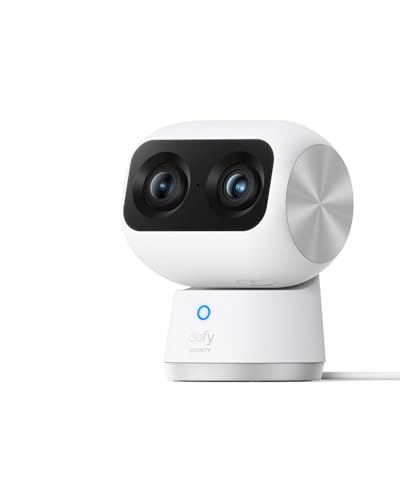
Dual cameras — a 4K wide-angle lens plus a 2K telephoto lens for up to 8x hybrid zoom — on a pan-and-tilt head that covers a full 360°, with local storage and no required plan, at a mid-range price and a solid owner rating. AI auto-tracking follows a subject around the room. Human and pet detection are built in.
Why You Should Get This
If you want 4K detail and zero required subscription for one room, this is the sharper, subscription-free pick.
Benefits
- 4K resolution with local storage, no plan required.
- Dual-lens wide plus zoom coverage.
- Built-in human and pet detection.
Pros and Cons
- Sharper resolution than the Ring Indoor Cam.
- Genuinely no-subscription local recording.
- Dual-lens auto-tracking.
- Higher price than Ring Indoor Cam.
- Smaller ecosystem and review base than Ring.
- Indoor use only.
Features
- 4K wide + 2K telephoto, 8x hybrid zoom.
- AI auto-tracking.
- Human and pet detection.

The largest review base and the fastest, most reliable notifications tracked on this site, with one of the highest ratings we track. 1080p HD video with two-way talk and a physical privacy cover. Plug-in power means nothing to recharge.
Why You Should Get This
If notification speed and the deepest review base matter more than 4K resolution, this is the pick.
Benefits
- Largest review base of any indoor camera tracked here.
- Fastest, most reliable notification pipeline.
- Physical privacy cover.
Pros and Cons
- Massive, trustworthy review base.
- Widely regarded as the most polished app.
- Lower price than the eufy S350.
- Recorded clip history needs a Ring subscription.
- 1080p rather than eufy’s 4K.
- Local storage only via Ring Edge on a Ring Alarm Pro, which still needs a plan.
Features
- 1080p HD, two-way talk.
- Physical privacy cover.
- Plug-in power.

A third indoor option worth comparing: 2.5K resolution with color night vision at an entry-level price, recording to a local microSD card with no subscription required at all. Rated for indoor or outdoor use, unusual at this price point.
Why You Should Get This
If you want a middle ground on price and no-subscription recording between eufy and Ring, this is the alternative.
Benefits
- Sharper than Ring, cheaper than eufy.
- Genuine no-subscription local recording.
- Indoor/outdoor rated.
Pros and Cons
- Best resolution-to-price ratio of the three.
- No subscription required for core recording.
- Built-in spotlight and siren.
- Smaller ecosystem than Ring or eufy.
- MicroSD card sold separately.
- Cam Plus needed for smart detection.
Features
- 2.5K, color night vision.
- Local microSD recording.
- Indoor/outdoor rated.
Representative Products Compared
Where the Real Differences Are
Subscription model. This is the whole comparison. Ring requires a paid plan for any recorded video history — even its only local-storage route, Ring Edge on a Ring Alarm Pro base station, needs an active Ring subscription. eufy records locally with zero required fee.
Resolution. eufy’s 4K Indoor Cam S350 significantly out-resolves Ring’s 1080p Indoor Cam. Ring has 2K options elsewhere in its lineup (Indoor Cam Plus), but the specific flagship indoor cameras compared here favor eufy clearly.
Notification reliability and app polish. Ring’s clearest advantage, backed by the deepest review base in this entire category.
Total cost of ownership. eufy costs more at checkout; Ring costs more over five years once the subscription is factored in for most households. See the honest Ring value breakdown for the exact math.
Video Quality and Field of View
The eufy Security 4K Indoor Cam S350 pairs a 4K wide-angle lens with a 2K telephoto lens (3x optical, up to 8x hybrid zoom) on a pan-and-tilt head, so it covers a whole room through 360 degrees from one mount and can auto-track a moving subject. The Ring Indoor Cam has a single fixed lens with a 115-degree horizontal field of view — plenty for a doorway, a hallway or a corner of a living room, but it never moves and never sees anything outside that frame. On raw resolution the eufy's 4K sensor significantly out-resolves Ring's 1080p on paper; whether that gap is visible in practice depends on screen size and how far the subject is from the lens.
Night Vision
Both brands build night vision into their indoor lineups. Ring lists color night vision for the Indoor Cam (2nd Gen), while eufy lists two infrared LEDs and f/1.6 lenses for the S350; modes can change with model revisions, so check the current listing for the precise spec on each. In general, a spotlight-based color mode produces more identifiable footage (clothing color, hair color) than plain infrared, at the cost of visibly lighting the room, which matters if a sleeping person might be in frame.
Connectivity and App
Both cameras connect over home WiFi and are managed through their own brand app — the eufy Security app for the S350, the Ring app for the Indoor Cam. Ring's app is the more mature of the two by sheer review volume and is widely regarded as the most polished notification pipeline in this whole category, which is a big part of why it holds the deeper review base. eufy's app is built around local-first operation: less reliance on the cloud to keep core features working, which lines up with its no-subscription recording model.
Storage and Subscription
This is the single biggest structural difference between the two. The eufy S350 records to local storage with detection processed on-device, so there's no required monthly fee to keep any recorded history. The Ring Indoor Cam offers free live view, motion alerts and two-way talk, but recorded clip history needs a Ring subscription — and Ring’s only local-storage option, Ring Edge on a Ring Alarm Pro base station, also requires an active plan. If the subscription is the main thing holding you back from Ring, eufy is the more direct like-for-like alternative than switching to a different Ring model.
Installation and Setup
Both are simple plug-in indoor cameras rather than a wiring project — set on a shelf, a mount or a tabletop, connect to WiFi through the app, and you're recording within a few minutes. Neither requires a professional install. The main practical difference is positioning: the Ring's fixed lens needs a more deliberate mounting spot to capture the right area, while the eufy's pan-and-zoom coverage is more forgiving of an imperfect mounting angle since it can reorient itself around the room. Both plug into a standard outlet, so there's no battery to manage or recharge on either camera, unlike the battery-powered options in each brand's outdoor lineup.
Price Tier and Total Cost
Check the current listing for both, since prices shift, but the ongoing cost is the more durable comparison. The eufy S350 costs more up front. The Ring Indoor Cam costs less at checkout but adds a recurring subscription for any recorded history, and over several years that recurring cost is what tends to close, or reverse, the up-front price gap — see Ring pricing and value for the fuller math.
Who Should Buy Which
Choose the eufy Security 4K Indoor Cam S350 if you want the sharper picture, dual-lens room coverage, and you've decided a subscription isn't something you want to pay indefinitely for a single indoor camera. Choose the Ring Indoor Cam if notification speed and app polish matter more than resolution, if you're already inside the Ring or Alexa ecosystem, or if the lower up-front price matters more than the long-run subscription math — it also carries by far the larger, more battle-tested review base of the two. Either way, match the camera to the room rather than the brand: a nursery or a home office where footage detail matters leans eufy, while a busy entry hall where a fast phone alert is the whole point leans Ring.
Winner by Use Case
You will never pay a subscription: eufy, without much debate.
You want the fastest, most reliable notifications and don’t mind paying for them: Ring.
You want the sharpest resolution on a single indoor camera: eufy’s 4K option.
You want the largest, most statistically reliable review base: Ring, by a wide margin.
Read More
See eufy pricing and value, Ring’s value guide, top-rated eufy cameras and top-rated Ring cameras for the full picture on each brand.
Going Deeper: Local Storage on eufy vs Ring Edge
“Local storage” appears on both brands’ websites, but it means very different things in practice, and the difference is the whole reason this comparison splits the way it does.
On the eufy side, local storage is the default. eufy’s Indoor Cam S350 page describes local storage with no monthly fee, microSD support with a 128GB card rated for up to 120 hours of continuous recording, 24/7 recording capability, and compatibility with the HomeBase S380 and HomeBase 3 for extra storage. The camera, not a cloud service, is doing the recording. eufy’s privacy commitment adds that locally stored video is secured with AES encryption and that eufy doesn’t have access to video stored on your device.
Ring’s local option works very differently. Its support page on Ring Edge and Ring Alarm Pro explains that Ring Edge stores video on a microSD card inside a Ring Alarm Pro base station, not in the camera. Three conditions come attached. You need the Alarm Pro itself, the cameras must be connected to the same eero network as the base station, and Ring says you must have an eligible Ring subscription at the location. Ring also says Ring Edge supports 1080p recording and isn’t compatible with 2K or 4K devices. Video on the card can be encrypted so the card is unreadable if stolen, though Ring notes that turning this on stops you viewing locally stored videos on another device.
So for the two cameras on this page, the practical difference looks like this. The Ring Indoor Cam (2nd Gen), a 1080p camera, can technically record locally, but only through additional hardware and with a subscription still running. The eufy S350 records to a card in the camera from day one with no plan at all.
That’s why the subscription question decides this matchup more than any spec. If you want recordings that never depend on a monthly bill, eufy’s design delivers that out of the box, while Ring’s local option is an add-on to a paid system rather than a way around it.
Verdict
If the subscription question is settled in your mind, this comparison is easy: choose eufy if you’ve decided no, choose Ring if you’ve decided you’re fine paying. If you haven’t decided, run the five-year cost math in the Ring subscription math before choosing either.
Sources & References
- Indoor Cam S350: 4K Dual-Cam, 360° Indoor Coverage — eufy
- Exploring the Dual Camera Lens of the Indoor Cam S350 — eufy Support
- Indoor Cam (2nd Gen) Information — Ring
- Store and process videos locally with Ring Edge and Ring Alarm Pro — Ring
- Understanding Ring subscriptions — Ring
- Ring unveils first-ever 4K security cameras — Amazon
- Wyze Cam v4 — Wyze
- Your Privacy is Our Priority — eufy